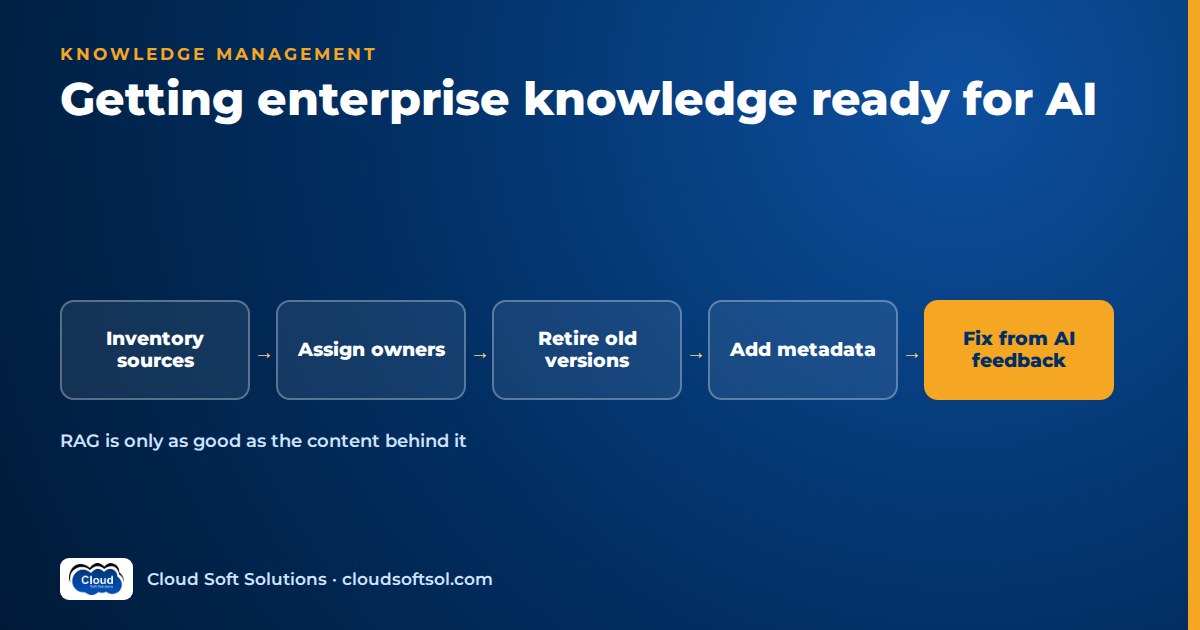
Enterprise knowledge management for AI is the work of making sure the documents an AI assistant retrieves are owned, current, non-contradictory and written so a retriever can find the right passage. Most RAG assistants that give wrong answers are retrieving faithfully from bad content: two versions of the same policy, a page nobody has reviewed in years, or a process that only exists in one person's head. Better models do not fix that; ownership, review cycles, authoritative sources and feedback loops do. This guide covers the people and process side of knowledge base readiness for RAG, for IT teams, knowledge managers and Forward Deployed Engineers.
The engineering side (connectors, sync, deletes, permission sync) is covered in data pipelines for RAG, and turning PDFs and scans into clean text is covered in document parsing for RAG. This article assumes that plumbing exists and asks a different question: is the content worth retrieving?
Why RAG fails on bad content
If retrieved passages are wrong, the answer is wrong, and it will be cited, fluent and confident. The usual content failures are:
- Duplicates. The same travel policy sits in the HR portal, a team SharePoint site, an email attachment someone saved to a shared drive and a Confluence page that "summarises" it. Near-identical chunks crowd out other context, and some copies have drifted.
- Conflicting versions. "Leave policy v3 final" and "Leave policy v4 draft (approved)" both exist. Neither says which is in force. The model may blend them into an answer that matches neither.
- Stale policies. A document from before a reorganisation still names a department that no longer exists, or an approval limit that was changed.
- Tribal knowledge. The real process ("raise it in the ops channel and ping the on-call lead, the form is ignored") was never written down. The assistant confidently describes the official form, which is technically accurate and practically useless.
- Orphaned documents. Nobody owns them, so nobody can confirm whether they are still true, and nobody fixes them when the assistant cites them wrongly.
None of these are model problems; a stronger model just writes a more persuasive answer from the same bad sources. This is why hallucination-like behaviour persists in grounded systems: the model faithfully repeats something that should never have been retrievable.
Start with a knowledge inventory
Before you index anything, build an inventory. A simple register is enough; per source it records what it is, who owns it, how sensitive and how fresh it is.
| Field | What to record | Why it matters for AI |
|---|---|---|
| Source | System and location: SharePoint site, Confluence space, policy portal, shared drive, ticket knowledge base | Decides connectors and what gets indexed at all |
| Content type | Policy, procedure, FAQ, reference, meeting notes, archive | Policies and procedures are high value; meeting notes and archives are usually excluded |
| Business owner | A named role or person who can say "this is correct" | No owner, no indexing (or index with a warning and a deadline) |
| Sensitivity | Public, internal, confidential, restricted | Drives who can retrieve it and whether it belongs in the assistant |
| Freshness | Last meaningful review date, not last modified | Stale sources need review before they go live |
| Audience and scope | Which employees, regions or business units it applies to | Prevents one country's rule being given to another |
| Overlap | Other sources covering the same topic | Flags duplicates and conflicts early |
Expect the inventory to be uncomfortable. It usually reveals sites with no active owner, a "policies" folder that is really an archive, and several teams maintaining their own copy of a common document. Far better to discover that here than through a wrong answer.
Scope the first release narrowly: clean the sources behind the questions found in use-case discovery and leave the rest for later waves.
Content ownership and review cycles
Every retrievable document needs an owner accountable for its accuracy: a role ("Head of Payroll Operations") with a named person behind it, so ownership survives job changes.
Owners need a review cycle matched to how fast the content changes:
- Volatile content (rates, contacts, holiday calendars, current offers): reviewed on a short cycle or whenever the underlying fact changes.
- Policies and procedures: reviewed on a fixed cycle and on every change in law, organisation or system.
- Reference and how-to content: reviewed when the system it describes changes, with a longer default cycle.
A review is a recorded confirmation that the content is still accurate, applicable and authoritative. Record the review date and reviewer as metadata, because that is what the assistant and the pipeline can act on. Overdue content is flagged in answers or excluded, depending on risk.
The hard part is making owners care. Show them which of their documents the assistant cites most and which were flagged wrong; "your page caused complaints this week" works better than a reminder email.
Authoritative sources and deprecating old versions
For every topic the assistant answers, one source must be designated authoritative. If HR publishes the leave policy on the policy portal, the portal is authoritative and copies elsewhere are not indexed, or are indexed with lower priority and a link to the original.
Deprecation needs a process, not just a delete button:
- Mark it. Set a status such as current, superseded or archived, and on superseded documents record which document replaces them.
- Exclude it by default. Superseded and archived content should not be retrievable for normal questions. Keep it for explicit historical questions if needed.
- Redirect people. Put a banner or first line on the old page pointing to the new one, so human readers and the retriever both see it.
- Remove the copies. Ask teams to replace their local copies with links. This is where the inventory's overlap column earns its keep.
The pipeline enforces this with status and version metadata, but setting the status is a content decision, not an engineering one.
Writing AI-ready documentation
A retriever sees chunks, not whole documents, so AI-ready documentation follows a few habits:
- Clear, specific titles. "Maternity and paternity leave: India employees" retrieves better than "HR Policy Document 7".
- One topic per page. A forty-page "Employee handbook" mixing leave, travel, conduct and IT use produces chunks that are hard to rank. Split it into topic pages.
- Self-contained sections. Avoid "as described above" and "see the previous table". Each section should state its subject, so a chunk taken alone still makes sense.
- Dates and applicability in the text. State the effective date and who the content applies to near the top: "Effective from 1 April. Applies to permanent employees in India; contractors see the contractor handbook."
- Structured FAQs. Real employee questions, phrased the way staff ask them, with the answer in the first sentence, retrieve very well.
- Tables with headers and units. Approval limits and entitlements belong in tables with clear column headers, not in images of tables.
- Avoid scanned-only documents. A signed scan is an evidence record; publish a text version as the authoritative copy.
- Write down tribal knowledge. When a subject-matter expert explains how something really works, capture it as a short owned page.
Metadata that matters
Metadata lets the assistant filter before it ranks, and lets it tell users how far to trust an answer. Keep the set small enough that owners will actually fill it in:
| Field | Example | How the assistant uses it |
|---|---|---|
| Owner | Head of Payroll Operations | Shown with answers; receives feedback on wrong answers |
| Effective date and review date | Effective 1 April; next review in the policy calendar | Prefers current content; flags overdue content |
| Status | Current, superseded, archived | Excludes non-current content by default |
| Region or business unit | India, UK, global; Retail Banking, Shared Services | Filters to the user's context |
| Audience | All employees, managers, contractors, IT admins | Avoids giving manager-only guidance to everyone |
| Sensitivity | Internal, confidential | Works with access control to decide who can retrieve it |
| Document type | Policy, procedure, FAQ, form | Lets policy outrank commentary on the same topic |
Sensitivity metadata is not a replacement for permissions. If the assistant retrieves on the user's behalf, access control has to be enforced on every query, and any oversharing in the source systems becomes visible. See Microsoft 365 Copilot readiness, which applies equally to custom assistants.
Handling conflicts
Some conflicts are mistakes; some are real, such as a global policy and a country addendum. Handle them in layers:
- Prevent: authoritative source designation and deprecation remove most accidental conflicts before indexing.
- Detect: periodically compare documents on the same topic and flag pairs that state different values for the same fact (limits, dates, eligibility). An LLM can suggest candidates; a person decides.
- Resolve by rule: agree precedence in advance, for example local addendum over global policy for that region, current over superseded, policy over FAQ, owner-approved over team copy. Encode these rules in metadata and retrieval ranking.
- Disclose at answer time: where a real conflict remains, the assistant should say so, cite both sources and route the user to the owner, instead of picking one silently.
Every unresolved conflict becomes a ticket for the owners involved.
Feedback loops: from wrong answers to content fixes
The assistant is a continuous audit of your knowledge base, if you route flagged answers properly.
  User flags answer (thumbs down + reason)
              |
              v
  Triage: content issue or system issue?
        |                     |
        v                     v
  Content ticket         AI team backlog
  to the owner           (retrieval, prompt)
        |
        v
  Owner fixes page, sets review date
              |
              v
  Re-index, re-run the failing question
in the evaluation set- Capture the evidence. Store the question, the answer, the cited chunks and their document IDs with each flag.
- Classify the cause. Typical categories: wrong or outdated content, missing content, conflicting sources, right content not retrieved, right content retrieved but misread. The first three go to owners; the last two go to the AI team.
- Track unanswered questions. Questions where the assistant found nothing relevant are a content gap list.
- Close the loop. Add fixed questions to the evaluation set so regressions are caught. RAG evaluation metrics such as faithfulness and context relevance tell you whether the system is using the content well; the flag review tells you whether the content itself is right.
Roles: content owners, knowledge manager and AI team
| Role | Owns | Typical tasks |
|---|---|---|
| Content owners | Accuracy of their documents | Review on cycle, fix flagged pages, mark versions superseded, fill required metadata, answer conflict tickets |
| Knowledge manager | The inventory, standards and process | Maintain the register, set writing and metadata standards, chase overdue reviews, run triage of flagged answers, report content health |
| AI team | The assistant and pipeline | Ingest only approved sources, enforce status and permission filters, run evaluation, expose feedback data, fix retrieval and prompt issues |
| Sponsor or governance group | Priorities and escalation | Decide scope, resolve ownership disputes, set precedence rules, link to AI governance |
Forward Deployed Engineers often sit between the AI team and the business. They run inventory workshops, agree precedence rules with HR or legal, and show owners which page caused a wrong answer. This "Data" step in the FDE flow often decides whether a project moves from AI demo to enterprise outcome. If you want to practise that end to end, the Enterprise Knowledge Assistant project in Cloudsoft's FDE PRO program takes a knowledge assistant from messy source documents through RAG, evaluation and deployment.
Owners take on new accountability and employees need to know how to report problems, so treat rollout as a change programme too; AI adoption and change management covers that side.
Knowledge readiness checklist
| Area | Ready when |
|---|---|
| Scope | The question types the assistant will answer are agreed, and the sources needed for them are listed |
| Inventory | Every in-scope source has a type, owner, sensitivity, freshness and audience recorded |
| Ownership | No in-scope document lacks an owner role and a named person |
| Freshness | In-scope content has been reviewed within its cycle, or is flagged and excluded |
| Authoritative sources | Each topic has one designated source; copies are removed or deprioritised |
| Versions | Superseded documents are marked and excluded by default, with a pointer to the replacement |
| Format | Key policies exist as text, not scan-only; tables have headers; titles are specific |
| Metadata | Owner, effective date, status, region or unit, audience and sensitivity are populated |
| Conflicts | Precedence rules are agreed and known conflicts are resolved or disclosed |
| Access | Source permissions reviewed; oversharing fixed before indexing |
| Feedback | Flagging, triage categories, owner routing and evaluation-set updates are in place |
| Roles | Knowledge manager named; owners briefed; escalation path agreed |
Illustrative example: an HR policy assistant at a GCC
Consider a global capability centre in Hyderabad running shared services for a multinational parent. Leadership wants an HR policy assistant to answer questions like "how much leave can I carry forward?" without a ticket.
The first prototype, built over the whole HR SharePoint, impressed in the demo and failed in the pilot. It cited the global carry-forward policy, which did not apply to Indian employees; quoted a travel approval limit from an old copy on a team site; and found nothing on relocation, because that process lived with two HR business partners.
The team paused indexing and ran the readiness work:
- Inventory. It found duplicated policies across sites, signed scans with no text versions, and pages orphaned by a reorganisation.
- Ownership. Each policy got an HR role owner and a review cycle; orphans were adopted or archived.
- Authoritative sources. The India HR portal became authoritative for India employees, the global policy applying only where no India policy exists. Team copies became links.
- Rewriting. The handbook was split into topic pages with applicability and effective dates at the top, frequent ticket questions became an owned FAQ, and the relocation process was written down.
- Metadata and precedence. Region, audience, status and effective date were added. The rule: India policy over global policy for India employees, current over superseded, policy over FAQ where they differ.
- Feedback. Flagged answers went to weekly triage; content issues went to owners as tickets.
The second pilot used the same model and much the same pipeline; only the content changed. Fewer wrong answers reached triage, and the remaining flags were mostly genuine gaps owners could fix. A walkthrough of building the assistant itself is in the RAG knowledge assistant project.
Engineering wikis and runbooks need the same discipline; for source code see the sibling guide on RAG over codebases.
FAQ
What is enterprise knowledge management for AI?
It is the practice of making enterprise content suitable for AI assistants to retrieve and answer from: every document owned, reviewed on a cycle, designated authoritative or deprecated, written for retrieval and tagged with metadata such as owner, effective date, audience and sensitivity, with a feedback loop from wrong answers back to content fixes.
Why does my RAG assistant give wrong answers when the retrieval works?
Often because retrieval is returning the wrong content faithfully: a superseded policy, a duplicate copy that has drifted, a document for a different region or a page nobody has reviewed. Check the cited sources for flagged answers before changing the model or prompt.
How do I handle old versions of policies in a knowledge base for RAG?
Mark them with a status such as superseded, record which document replaces them, exclude them from normal retrieval by default and add a pointer on the old page. Keep them for audit or explicit historical questions rather than deleting them.
What metadata does a knowledge base need for AI?
Keep the required set small: owner, effective date and review date, status, region or business unit, audience and sensitivity, plus document type. These let the assistant filter to the user's context, prefer current content and show users who to contact.
Should scanned PDFs be included in an AI knowledge base?
Keep scans as evidence records, but publish a text version as the authoritative readable copy for important policies. OCR can work as a fallback, but it adds errors and loses structure, so scan-only content should not be the main source for answers.
How do flagged AI answers improve the knowledge base?
Each flag should store the question, answer and cited documents, be triaged into content or system causes, and content issues should go to the document owner as a ticket. Once fixed, the question is added to the evaluation set so the same error is caught if it returns.
Knowledge readiness is where many enterprise AI projects are won or lost, and it is the kind of work Forward Deployed Engineers do alongside the customer's own teams. To practise building an assistant that holds up against messy enterprise content, explore the AI Forward Deployed Engineer course at Cloudsoft, in the classroom in Ameerpet or live online. Call +91 96660 19191 for a free demo.


