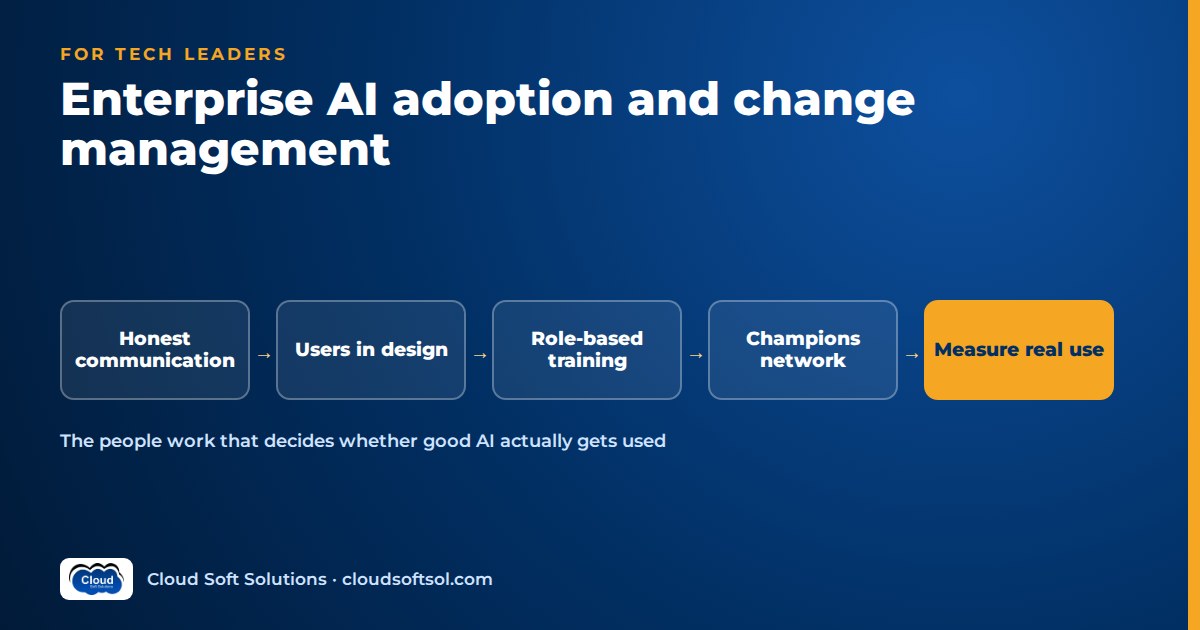
Most enterprise AI tools that go unused were not rejected for being bad technology. They were rejected because nobody explained what they meant for people's jobs, they sat outside the screens people already work in, the rules were vague and the first try was disappointing. AI adoption change management is the work of making an AI tool trusted, allowed, easy and useful inside real workflows: honest communication, role-based training, clear acceptable-use rules, champions, manager involvement and measurement that looks past logins. This guide is for business leaders, IT and HR teams who have a working AI capability and need people to actually use it.
Why technically good AI goes unused
When a pilot passes its technical evaluation and then stalls, the cause is usually one of five things, each with a different fix. Diagnose which one you have before launching another awareness campaign.
1. Trust
People will not rely on output they cannot check. If an assistant gives an answer without showing where it came from, a careful employee has to redo the work to verify it, which removes the benefit. Trust is built by showing sources, being open about known weaknesses and making it obvious when the tool is unsure. Our explainer on LLM hallucinations covers why confident wrong answers happen and how teams reduce them.
2. Workflow fit
A tool that requires a new tab, another login and copying results back is competing with habit and time pressure. For most employees those extra steps cost more than the AI saves.
3. Fear for jobs
If leadership talks about "efficiency" and says nothing else, employees fill the silence with the worst interpretation. People who believe a tool is being introduced to measure and replace them will use it minimally, or quietly prove that it does not work.
4. Unclear rules
Employees unsure whether they may paste customer data, internal documents or code into a tool will either avoid it or use an unapproved consumer tool. Vague rules suppress legitimate use and push risky use out of sight.
5. Poor first experiences
If someone's first few prompts produce generic or wrong answers, they conclude the tool is useless and rarely return. Engineer a good first week: realistic starter tasks, pre-built prompts for the role and clean, connected data behind the tool.
The people side of AI adoption
Communicate honestly about job impact
You cannot promise that nothing will change, and people will not believe you if you try. What you can do is be specific. Say which tasks the tool is meant to take over or speed up, what you intend to do with the time it frees, whether any roles are being redesigned and how decisions about that will be made and communicated. If you do not know yet, say so and say when you will. "We will tell you before we make any role changes and you will have a say in how this works" is more credible than "AI will empower everyone".
Repeat the message through managers, not only from the top. People ask their direct manager what something really means.
Involve end users in design
The people who do the work know where the friction is. Bring a small group in during use-case discovery, not after the tool is built. Let them shadow test early versions, write the starter prompts for their own role and decide which steps should stay manual. Users who helped shape a tool defend it to their colleagues. Users who had it handed to them look for reasons it fails.
Build a champions network
An AI champions program puts a trained, enthusiastic user inside each team. Champions answer quick questions, share examples that work, notice problems early and feed them back. A few practical points:
- Choose respected practitioners, not just the keenest technologists. A senior operations analyst whom everyone asks for help is more persuasive than a junior who likes new tools.
- Give them time. If championing is unpaid extra work on top of a full job, it fades within weeks. Agree a small, explicit time allocation with their manager.
- Give them a direct line. Champions should have a channel to the product or platform team where their feedback gets a response.
- Include a sceptic or two. Someone who has doubts and is won over by improvements carries more weight than a natural enthusiast.
Train by role, not in one generic session
A single all-hands "introduction to AI" session rarely changes behaviour. AI training for employees works when it is built around one role's real tasks, documents and systems.
| Audience | What the training should cover | Format |
|---|---|---|
| Frontline staff | Their three to five main tasks with the tool, how to check output, what not to enter, how to report problems | Short hands-on sessions on real cases, followed by office hours |
| Team managers | Where the tool fits in team workflows, how to review AI-assisted work, how to talk about job impact, what to measure | Working session with their own team's process |
| Champions | Deeper prompting and troubleshooting, known limits, how to collect and escalate feedback | Multi-session cohort with a community channel |
| Leaders | Risks, governance, realistic expectations, how adoption and value are measured | Briefing plus a hands-on session using the tool themselves |
| IT and engineering teams | Integration, access control, data handling, monitoring, evaluation | Technical training and labs |
Publish acceptable-use guidance people can actually follow
Acceptable-use guidance should fit on a page and answer the questions employees actually have: which tools are approved, what data may and may not be entered, when output must be reviewed by a person, how to label AI-assisted work where that matters, and who to ask when unsure. Write it with legal, security and HR, but test it with frontline users. If they cannot tell from the page whether a specific everyday task is allowed, rewrite it. The policy sits inside your broader enterprise AI governance framework, and in India it should reflect your obligations around personal data under the DPDP Act.
Open real feedback channels
Give users a one-click way to flag a bad answer inside the tool, plus a channel to describe problems in their own words. Then close the loop visibly with a regular "what we changed because of your feedback" note. Silence kills feedback fast.
If your organisation needs role-based programmes for frontline staff, managers, champions and technical teams, Cloudsoft designs corporate AI training for enterprise teams around your own tools, policies and use cases.
The workflow side: make the AI path the easy path
Driving AI adoption is mostly about removing effort. Communication earns permission; workflow design earns habit.
- Embed AI in the tools people already use. Put the assistant inside the ticketing system, CRM, email client, document editor or case management screen, not in a separate portal. If you are rolling out an assistant inside Microsoft 365, our Microsoft 365 Copilot readiness guide covers the permissions and data hygiene that decide whether answers are useful. For developer tools, see AI coding assistants in the enterprise.
- Use good defaults. Pre-fill the context the AI needs, such as the current case, customer or document, so the user does not have to describe it. Offer role-specific suggested actions rather than an empty chat box.
- Remove steps, do not add them. If a draft has to be copied into another system, integrate that write-back. If approvals are needed, make approve or edit a single action in the same screen. Our guide to human-in-the-loop AI design covers how to keep review meaningful without making it a chore.
- Keep a manual fallback, then simplify. People adopt faster when they can still do the task the old way. Retire duplicate manual paths only once the AI-assisted flow has earned trust.
Measuring adoption beyond logins
Logins show that people opened the tool, not that it helps them. A sound enterprise AI adoption strategy measures four layers.
| Layer | What to measure | Why it matters |
|---|---|---|
| Task completion | Share of target tasks completed with AI assistance; whether output was used, edited or discarded | Shows the tool is doing real work, not just being tried |
| Repeat use | Users returning week after week for the same task type; drop-off after first use | Habit is the real signal of value; one-time use is curiosity |
| Quality | Error and rework rates on AI-assisted work versus a baseline; reviewer corrections; escalations | Faster output that needs more rework is not a gain |
| User feedback | Thumbs-down reasons, survey comments, champion reports, reasons people stopped using it | Explains the numbers and points to fixes |
Capture a baseline before rollout, segment by team and role, and study non-adopting teams as closely as adopting ones. Adoption data then feeds the value case; our guide to enterprise AI ROI shows how to turn usage and quality data into a business case without inflating it. Tell people what is measured and why, and use it to improve the tool and training, not to rank employees.
The manager's role
Middle managers decide whether adoption happens in practice: they set priorities, define "good work" and control whether people have time to learn. They should:
- Use the tool themselves, visibly, on their own work.
- Protect learning time in the first weeks, accepting that output may dip briefly as people adjust.
- Adjust targets and quality checks so that AI-assisted work is reviewed sensibly rather than penalised or rubber-stamped.
- Have honest one-to-one conversations about how roles may change, and pass concerns upward.
If managers are measured only on short-term throughput, they will quietly deprioritise adoption. Give them adoption and quality goals, and the support to meet them.
Unions, works councils and employee representatives
Where employees are represented by a union, works council or similar body, AI tools that change how work is done, how performance is monitored or how roles are structured may need consultation or agreement before rollout. Requirements depend on the country, sector and agreements in place, so involve HR and employment counsel early. Even where it is not required, early engagement surfaces concerns about monitoring, workload and job security while they are still easy to address.
A 90-day AI adoption plan
This plan assumes the tool is technically ready and approved under your governance process.
| Period | People | Workflow | Measurement |
|---|---|---|---|
| Days 1–15: prepare | Leadership message on purpose and job impact; brief managers first; recruit champions; consult employee representatives where relevant | Pick two or three target tasks per role; confirm integration into existing tools; set defaults and starter prompts | Capture baselines for target tasks; define success measures |
| Days 16–30: pilot | Train pilot teams by role; publish one-page acceptable-use guidance; open feedback channel | Run with pilot teams; fix the top friction points weekly | Track task completion, first-week drop-off and feedback themes |
| Days 31–60: refine and expand | Publish "what we changed" notes; champions run team clinics; train the next wave of teams | Add write-back and approval steps in the same screen; improve data sources behind poor answers | Compare quality and rework against baseline; review non-adopting teams |
| Days 61–90: embed | Managers include AI-assisted work in team routines; refresh training for new features | Simplify duplicate manual paths where the AI flow is trusted; document the standard way of working | Report repeat use, quality and value to leadership; decide on next roles and use cases |
Illustrative example: bank operations
Consider a bank's back-office operations team in a Hyderabad GCC that handles trade finance document checks and customer service requests. IT has built an assistant that reads incoming documents, extracts key fields, flags discrepancies against the bank's rules and drafts responses. It performs well in testing. Four weeks after launch, few analysts use it.
Interviews reveal why. Analysts must upload documents to a separate page and re-key results into the workflow system. Team leaders still measure manual checklist completion. A rumour says the tool is the first step to moving the work elsewhere. The policy says "do not enter sensitive data", and nobody knows whether customer documents count. Several people tried it on unusual documents first and got poor results.
The bank responds on both sides. Leadership explains in team meetings, through each manager, that the goal is to clear the backlog and move analysts toward exception handling, and that any role changes will be discussed with staff first. The assistant is moved inside the workflow system, so extracted fields pre-fill the case and the analyst approves or corrects them in place. The acceptable-use page is rewritten with concrete examples of what may be processed. Two respected senior analysts become champions with protected time and write starter guidance for common document types. Team leader scorecards now include quality and rework on AI-assisted cases instead of checklist counts. Analysts get a one-click "this extraction is wrong" button, and the team publishes what was fixed each fortnight.
The bank now measures cases completed with the assistant, repeat use, correction rates and analyst comments rather than logins. The technology barely changed; the adoption did.
Common mistakes
- Measuring logins and licences. These hide whether real work is being done and whether quality holds.
- One generic training session for everyone. People need to see the tool on their own tasks.
- Silence on job impact, or bypassing managers. Rumours fill the gap, and a message managers do not repeat goes nowhere.
- Vague rules and a separate portal. Both push people toward avoidance or unapproved tools.
- Collecting feedback and never responding. Users stop reporting problems and stop trusting the tool.
- Forcing use before trust exists. Mandates without a good tool produce minimal compliance and workarounds.
- Starting with the wrong use case. A low-value or poorly suited task wastes the organisation's patience. Many failures that look like adoption problems are really the problems described in why AI demos fail in enterprise production.
Behind every adopted tool is engineering work: integration with existing systems, the right data, guardrails, observability and feedback-driven improvement. That is what Forward Deployed Engineers do; engineers who want to learn it end to end can look at Cloudsoft's FDE PRO program.
FAQ
What is AI adoption change management?
It is the structured work of getting people to trust and regularly use an AI tool in their real work. It covers communication about purpose and job impact, involving users in design, role-based training, acceptable-use rules, champions, manager involvement, workflow integration and measuring real usage and quality.
Why do employees not use AI tools that work well technically?
The usual reasons are low trust in the output, tools that sit outside existing workflows, fear about job security, unclear rules about what data may be used and a poor first experience. Each needs a different fix, so diagnose which applies before acting.
How should we structure AI training for employees?
Train by role using real tasks, documents and systems from that role. Frontline staff, managers, champions, leaders and technical teams need different content. Follow up with office hours and short refreshers when the tool changes.
What does an AI champions program involve?
It places trained, respected practitioners in each team to answer questions, share examples, spot problems and feed them back to the product team. Champions need protected time, a direct feedback channel and a mix of enthusiasts and converted sceptics.
How do we measure AI adoption properly?
Look beyond logins at four layers: task completion with AI assistance, repeat use over time, quality and rework compared with a baseline, and user feedback. Segment by team and role and study the teams that are not adopting.
Should we mandate the use of AI tools?
Mandates rarely work before the tool is trusted and embedded in the workflow. Make the AI-assisted path the easiest path first, keep a manual fallback and only simplify the old path once the new one has proven itself.
Do we need to consult unions or works councils before rolling out AI?
Where employees are represented, tools that change working practices, monitoring or roles may require consultation depending on the country, sector and agreements in place. Involve HR and employment counsel early. Early engagement usually helps even when it is not required.
How long does enterprise AI adoption take?
Expect a focused first phase of around 90 days to prepare, pilot, refine and embed for a set of roles, followed by continuous improvement. Adoption keeps needing attention as the tool, the data and the work change.
AI tools get used when the people who use them, and the people who build and run them, understand the tool, its limits and how it fits the work. Cloudsoft's corporate training programmes cover role-based AI enablement for business teams, managers and champions, alongside the engineering skills your IT teams need, delivered in our Ameerpet classroom or live online. Call +91 96660 19191 to discuss your teams or arrange a free demo.


