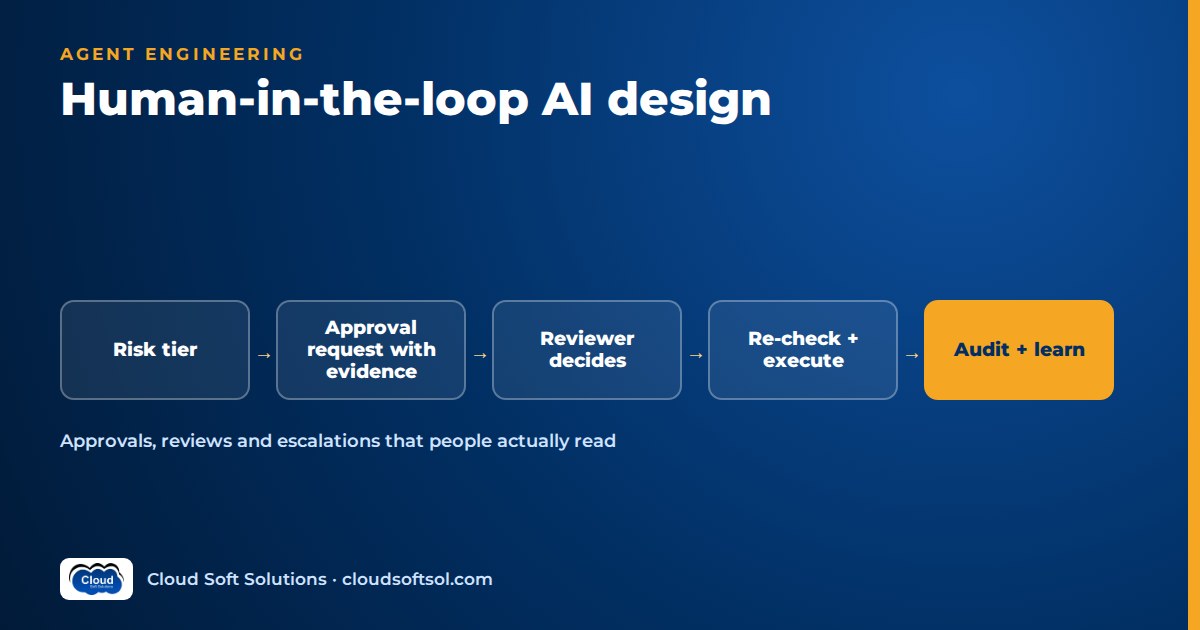
Human in the loop AI means a person reviews, approves or corrects what an AI system does at the points where a mistake would be expensive. Good human oversight is designed, not bolted on: you decide which actions need a human from a risk tier, show the reviewer exactly what will happen and why, bind the approval to those exact arguments, re-check the world before executing, and measure whether reviewers are actually reviewing. Done badly, approvals add delay without adding safety.
If you want the pattern-level view first, the human checkpoint is one of the patterns in agentic AI design patterns, and the identity side of approvals (who may approve, separation of duties) is in identity and access for AI agents. This article is the deep dive on designing the oversight itself.
Three modes of human oversight
"Human in the loop" is used loosely for any human involvement. Separate three modes, because each has a different cost and failure mode.
| Mode | What the human does | When it fits | Main risk |
|---|---|---|---|
| Human-in-the-loop (HITL) | Approves, edits or rejects before the action runs | Irreversible, high-value or regulated actions | Approval fatigue and rubber-stamping |
| Human-on-the-loop | Monitors actions as they happen or shortly after, and can pause, roll back or intervene | Reversible actions at volume where speed matters | Nobody actually watching the dashboard |
| Human-out-of-the-loop | Reviews aggregate metrics and samples, not individual actions | Low-risk, easily reversible, well-evaluated tasks only | Silent drift that no one notices for weeks |
Most real systems mix all three. A support agent might answer FAQ questions out of the loop, issue small goodwill credits on the loop (a supervisor sees a live feed and can reverse them), and require explicit approval for refunds above a threshold.
Deciding where approvals go: a risk-tier table
Score each tool action an agent can take on four dimensions, then let the tier decide the mode:
- Reversibility. Can the action be undone cleanly, by whom, and how fast?
- Money. Does the action move or commit funds, and how much relative to normal authority limits?
- Customer impact. Does a customer see it, does it change what they are charged or entitled to, or does it touch many customers at once?
- Regulatory exposure. Does it touch personal data, credit decisions, medical information, financial reporting or anything an auditor or regulator will ask about?
| Tier | Typical profile | Oversight mode | Example actions |
|---|---|---|---|
| Tier 0: Read | No side effects | Out of the loop; logged | Search knowledge base, look up order status |
| Tier 1: Reversible, internal | Easily undone, no customer or money impact | Out of the loop with sampling | Tag a ticket, draft a reply into a queue |
| Tier 2: Reversible, visible | Customer-visible or small money, undo path exists | On the loop, with thresholds | Small goodwill credit, reschedule a delivery |
| Tier 3: Hard to reverse | Money above limits, external communication, data changes | In the loop: single approver | Refund above threshold, vendor master update |
| Tier 4: Irreversible or regulated | Large money, regulated decisions, bulk changes | In the loop: two approvers or a specialist | Payment release, account closure, bulk customer notices |
Two rules keep this honest. An action takes the highest tier any dimension gives it. And tiers live in configuration owned with the business and risk team, never in prompts: the model must not decide whether its own action needs approval.
Designing the approval request
The single biggest predictor of whether an approval is meaningful is what the reviewer sees. A raw chat transcript produces rubber-stamping. A reviewer needs a decision card that answers "what exactly will happen, and should I believe it?" quickly.
What the decision card should contain
- The proposed action with exact arguments. Not "refund the customer" but the tool name, the account, the amount, the currency, the payment method and the reason code, exactly as they will be sent.
- The diff. For any update, show before and after side by side: the current bank details and the proposed ones, the current ticket priority and the new one. Highlight what changes.
- Evidence. The specific source records the agent relied on, with links: the invoice, the policy clause, the order history, the retrieved document passage. Evidence lets the reviewer verify instead of trust, which matters because models can produce confident, fluent and wrong justifications (see LLM hallucinations explained).
- Confidence signals that mean something. Not a self-reported "I am confident" from the model, but checkable signals: did validation rules pass, did amounts reconcile, is this customer or vendor new, does this match historical patterns, which checks failed or were skipped.
- Why it needs a human. The rule that triggered the review ("amount above single-approver limit", "bank details changed recently").
- The options. Approve, reject with reason, edit specific fields, or escalate.
Render the card from structured fields with code templates and let the model add only a short rationale, so the facts come from systems of record, not the model's retelling.
Avoiding rubber-stamping and approval fatigue
If reviewers approve nearly everything quickly, you have latency, not oversight. Fatigue is a design problem:
- Thresholds. Route only the cases rules cannot settle. Pair checkpoints with automated AI guardrails so policy violations are blocked outright and obvious low-risk cases pass, leaving humans the genuinely ambiguous middle.
- Sampling. For Tier 1 and some Tier 2 actions, review a random sample after the fact rather than every item up front. Random matters: flagged-only review cannot show what the flags miss.
- Batching. Group similar low-risk proposals into a reviewable batch with a summary table, so a reviewer can approve twenty routine tag changes in one pass and spend real attention on the outlier.
- Track override rates. Measure how often reviewers edit or reject, per action type and per reviewer. A near-zero override rate on a tier means either the agent is very good (consider loosening) or reviewers are not reading (test them). A high rate means the agent is not ready for that action.
- Measure time-to-decision. Approvals made in a couple of seconds on complex cards are a red flag. Some teams plant known-bad test proposals, clearly marked in the backend, to check that reviewers catch them.
- Limit load. Cap queue size per reviewer; endless queues produce skimming.
Timeouts, expiry and re-checking state
An approval is a decision about the world as it was when the card was created. By the time a human clicks approve, the invoice may be paid or the order cancelled. Two controls handle this.
Expiry. Every approval request has a time-to-live set by tier. When it expires, it is not silently executed or silently dropped. It moves to a defined state ("expired, needs re-proposal") and the requester is told. Never design a default where silence means yes.
Re-check at execution time. Just before executing an approved action, the system re-reads the relevant state and verifies the preconditions still hold: the balance, the record version, the status. If anything material changed, the approval is void and a new proposal is generated. Record version numbers make this simple.
[agent proposes] --> [policy: tier?]
        |                  |
     tier 0-1          tier 3-4
        |                  |
   [execute+log]   [decision card -> queue]
                           |
                [approve / edit / reject]
                           |
              [re-check state + hash match]
                     |            |
                  [execute]   [void, re-propose]
                     |
                 [audit log]
Escalation paths and handoff with context
Escalation is different from approval. An approval asks "may I do this?" An escalation says "I should not be handling this." Escalate on clear triggers: low retrieval relevance, repeated tool failures, out-of-scope requests, frustration or complaints, legal or safety mentions, and explicit requests for a human.
In customer support, the quality of the handoff decides whether escalation helps or annoys. A good handoff packet gives the human agent:
- A short summary of the issue and what the customer wants, written for a human, not the raw transcript (keep the transcript one click away).
- What the AI already tried and what it told the customer, so the human does not contradict it or repeat questions.
- The verified customer and order context, and the reason for escalation.
- The right queue, with priority set by the trigger.
Tell the customer honestly that a person is taking over. The enterprise AI customer support agent project walks through routing and handoff in a full build.
Implementation: interrupts, binding and audit
Interrupts and checkpoints
Graph-based agent frameworks generally support an interrupt: the run pauses at a defined node, its full state is persisted to a checkpoint store, and a later call resumes it with the human's decision. The important engineering points are framework-independent:
- Persist state in a database, not process memory; the approver may reply days later.
- Key the paused run to a business identifier such as a ticket or invoice number, so the approval UI and the run can find each other.
- Test all three resume paths: approve, reject and edit. Rejection paths are the ones most often broken.
- Make execution idempotent, so a double-click or a retried resume does not pay twice.
For a concrete framework treatment of interrupts and checkpointers, see LangGraph for enterprise AI.
Bind the approval to the exact arguments
Store the proposal as a canonical structured record, compute a hash over the tool name and its arguments, and attach the approval to that hash. The executor refuses to run unless the arguments it is about to send hash to the approved value. If the agent, a bug or an injected instruction changes the amount or payee after approval, execution fails closed. If a reviewer edits a field, that creates a new proposal with a new hash that the reviewer is approving.
Enforce this in the tool layer or a policy service outside the model. The agent should have no tool that marks its own proposals approved.
Audit
Every proposal, approval, rejection, edit, expiry and execution is an audit event: who requested, which agent and model version proposed, the exact arguments and hash, who decided and when, what they saw on the card, the re-check result and the downstream system's reference. Trace it alongside your AI observability data so a single request ID links the model calls to the human decision.
Designing approval flows that survive real customer systems, not just a demo, is core Forward Deployed Engineer work. If you want to practise it on enterprise projects, the Cloudsoft FDE PRO program builds approval-gated agents across banking, IT operations and ServiceNow integrations.
Using reviewer feedback to improve the system
Every edit and rejection is labelled data from a domain expert. Capture it in a structured way, not just as free text:
- Rejection reason codes (wrong amount, wrong policy applied, missing evidence, should have escalated) so you can count failure types.
- Field-level edits, which show exactly where the agent is wrong.
- Turn rejected cases into evaluation cases. Add them to your regression suite so a prompt or model change that reintroduces the mistake fails before release. The method is covered in AI agent evaluation.
- Fix the cause, not the instance. Repeated rejections usually point to a retrieval gap, missing tool, vague policy or bad threshold.
Oversight that never changes the system is just a cost.
Loosening control as evidence builds
Start tighter than you think you need, then earn autonomy action by action. A reasonable progression for a single action type:
- Shadow mode. The agent proposes; humans do the work as before; you compare.
- Approve everything. The agent proposes and humans approve each action with a full decision card.
- Thresholds. Low-risk cases within clear limits auto-execute with sampling; the rest still need approval.
- On the loop. The action runs automatically, monitored, with a fast undo and alerts on anomalies.
Move a step only on evidence: a sustained low override rate with demonstrated reviewer attention, a clean evaluation suite, no serious incidents, and sign-off from the business and risk owner. A model upgrade, a new data source or a spike in overrides should automatically drop the action back a level until it re-earns trust. This is how oversight fits into broader enterprise AI governance rather than being a one-time launch decision.
Illustrative example: an invoice-payment agent in finance ops
Consider a finance shared-services team at a GCC in Hyderabad that processes supplier invoices for a global manufacturer. An agent reads incoming invoices, matches them to purchase orders and goods receipts, and proposes payments.
- Tiering. Matching and coding invoices is Tier 1 (internal, reversible before posting) and runs with sampling. Proposing a payment for a fully matched invoice under the clerk's authority limit is Tier 3: one approver. Any payment where supplier bank details changed recently, any payment above the manager limit, and any first payment to a new supplier is Tier 4: two approvers, one from treasury. The agent cannot change supplier master data at all.
- Decision card. Supplier, invoice number, amount and currency, the three-way match result line by line, any tolerance used, the bank account (masked except for what the reviewer must verify) with a "changed on" date, and links to the invoice PDF, PO and receipt.
- Binding and re-check. The approval binds to supplier ID, bank account, amount and invoice ID. Before release, the system re-checks that the invoice is still unpaid, the bank details are unchanged and the PO is still open.
- Escalation. Mismatches beyond tolerance, duplicate-looking invoices and anything resembling a payment-redirection request go to a named AP specialist queue with the evidence attached.
- Improvement. Rejection codes show most rejections come from one supplier's unusual invoice format, fixed in extraction. After a sustained period of clean results, matched low-value invoices from long-standing suppliers move to auto-execution with sampling.
The full build of a finance agent, including data and tools, is in the finance AI agent project.
Common mistakes
- Gating everything. Uniform approvals breed fatigue; tier them.
- Letting the model decide if approval is needed. Tier rules live in policy code outside the model.
- Approval not bound to arguments. The proposal changes after approval and nobody notices.
- Silence means yes. Expired requests should never auto-execute.
- No re-check at execution. Approving a stale world leads to double payments and wrong updates.
- Untested reject and edit paths. The happy path works; the rejection silently executes anyway.
- Not measuring overrides. Without that data you cannot tell oversight from theatre.
- Escalation without context. The customer repeats everything to the human.
FAQ
What is human in the loop AI?
It is a design where a person reviews, approves, edits or rejects an AI system's proposed output or action before it takes effect, usually for actions that are irreversible, costly, customer-facing or regulated.
What is the difference between human-in-the-loop and human-on-the-loop?
In the loop, the human approves before the action runs. On the loop, actions run automatically while a human monitors them and can pause, reverse or intervene. On the loop suits reversible actions at volume.
Which AI agent actions need human approval?
Score each action on reversibility, money, customer impact and regulatory exposure, and apply the highest tier any dimension gives it. Irreversible, high-value or regulated actions need approval; reads and easily reversed internal actions usually do not.
What should an AI approval request show the reviewer?
The exact action and arguments, a before-and-after diff, links to the evidence used, checkable confidence signals such as validation results, the rule that triggered review, and clear options to approve, reject, edit or escalate.
How do you prevent approval fatigue?
Route only ambiguous cases using thresholds and guardrails, sample low-risk actions instead of reviewing all of them, batch routine items, cap reviewer queues, and track override rates and time-to-decision to detect rubber-stamping.
What happens if an approver does not respond in time?
The request expires into a defined state and the requester is notified. It should never execute by default. If it is approved later, the system re-checks current state before executing.
How do you bind an approval to a specific action?
Store the proposal as a canonical record, hash the tool name and arguments, attach the approval to that hash, and have the executor refuse to run if the arguments it would send do not match.
When can you reduce human oversight of an AI agent?
Move one action type at a time, from shadow mode to full approval to thresholds to monitoring, only after sustained low override rates, a clean evaluation suite and sign-off from the business and risk owner, with clear rules to move back.
Human oversight is where enterprise AI meets real accountability, and getting it right is a large part of moving from AI demo to enterprise outcome. To learn it hands on, with approval-gated agents, audit trails and evaluation on realistic customer projects, explore FDE PRO, Cloudsoft's AI Forward Deployed Engineer course. Classroom in Ameerpet or live online; book a free demo on +91 96660 19191.


