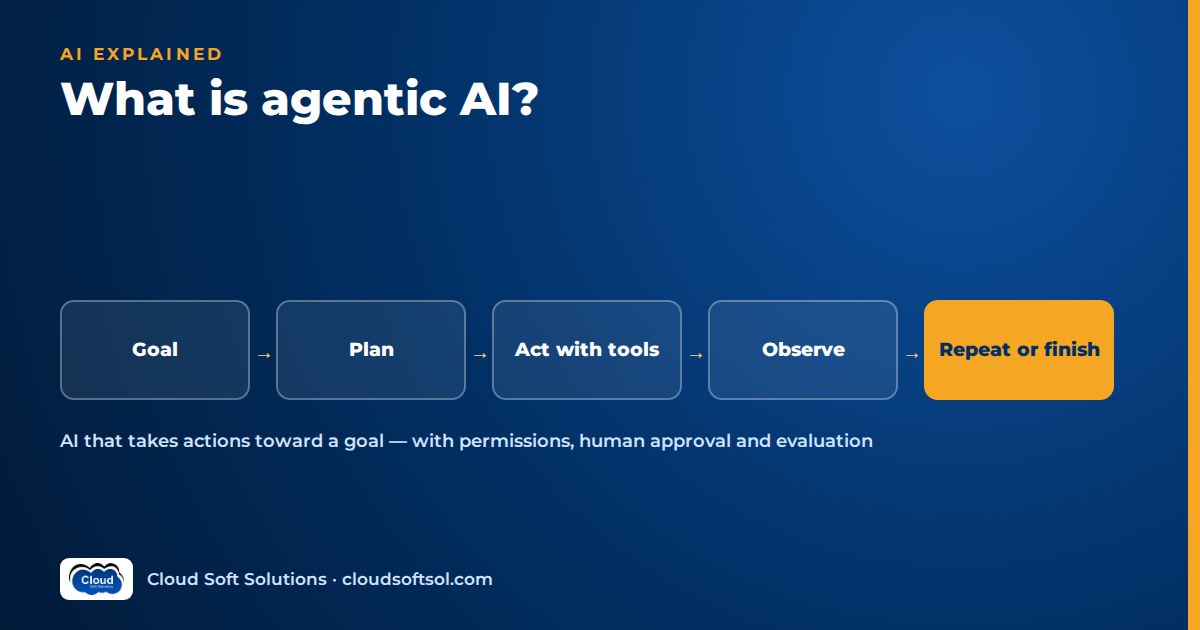
Agentic AI is a way of building AI systems in which a language model does not just answer a question but pursues a goal: it decides what to do next, calls tools such as APIs, databases or search, looks at the results and keeps going until the task is done or it needs a human. A chatbot replies. An agent acts. That single difference, from producing text to changing things in real systems, is what makes agentic AI both useful and risky, and it is why building agents is mostly an engineering discipline rather than a prompting trick.
This guide covers how agents work, their components, multi-agent design, examples, frameworks, risks and how to start learning. If you want the wider picture of how agentic AI relates to machine learning and generative AI first, read AI vs generative AI vs agentic AI.
What is agentic AI? A working definition
An AI agent is software that uses a large language model (LLM) as its reasoning engine, has access to a set of tools, keeps track of state across steps and operates in a loop toward a goal. "Agentic" describes the degree of autonomy: how much the system decides for itself about which steps to take, in which order, and when it is finished.
Autonomy is a spectrum. At one end is a fixed workflow where the model fills in one step and code decides everything else; at the other is an open-ended agent given a goal and a toolbox. Most systems that work reliably in enterprises sit in the middle: a defined workflow with a few points where the model is allowed to choose, retry or ask for help.
AI agents vs chatbots
| Aspect | Chatbot | AI agent |
|---|---|---|
| Unit of work | One reply to one message | A task that may take many steps |
| Access to systems | Usually none, or read-only knowledge | Tools that read and write: tickets, records, code, emails |
| Control flow | User drives every turn | The model chooses the next step inside limits you set |
| State | Conversation history | Task state, intermediate results, sometimes long-term memory |
| What failure looks like | A wrong answer a person can ignore | A wrong action taken in a real system |
A retrieval-augmented assistant sits between the two. It reads your documents to answer accurately, as explained in what is RAG, but it still only produces text. Many agents use RAG as one of their tools.
How AI agents work: the agent loop
Underneath every framework, an agent runs the same basic cycle. The model is called repeatedly, each time with the goal, the current state and the results of its previous actions.
   +-----------+
   |  Goal /   |
   |  request  |
   +-----+-----+
         |
         v
   +-----------+     +--------------+
   | Perceive  |<----|   Observe    |
   | (context, |     | (tool result,|
   |  state)   |     |  errors)     |
   +-----+-----+     +------+-------+
         |                  ^
         v                  |
   +-----------+     +------+-------+
   |   Plan    |---->| Act with a   |
   | (choose   |     | tool (API,   |
   |  next     |     | DB, search)  |
   |  step)    |     +--------------+
   +-----+-----+
         |
         v
   Done? -- yes --> answer / hand off
         |
         no: repeat the loop
- Perceive. The agent assembles context: the user's request, system instructions, the tool definitions it is allowed to use, relevant memory and the results so far.
- Plan. The model decides the next step. In practice this is usually a structured "tool call": the model returns the name of a tool and the arguments it wants to pass, instead of free text.
- Act. Your code, not the model, executes the tool call. This is where validation, permission checks and approval gates belong.
- Observe. The tool's output, or its error, is added back into the context.
- Repeat until the model signals it is done, a step limit is reached, or a human needs to decide.
Note that the model never touches your systems directly; it only proposes actions your runtime executes. And the loop needs explicit stop conditions (step, time and cost budgets), or a confused agent will keep calling tools.
The components of an agentic AI system
1. The model
The LLM provides reasoning, language understanding and tool selection. Enterprises typically reach models through managed platforms such as Amazon Bedrock, Azure OpenAI or Google's Gemini models on Vertex AI. A smaller, faster model often handles routing steps while a stronger one plans.
2. Tools
Tools are functions the agent can call, each described by a name, a description and an input schema. Examples: search_knowledge_base(query), get_invoice(invoice_id), add_work_note(incident_id, note). Tool design is where most agent quality is won or lost. Narrow, well-named, strictly validated tools produce predictable behaviour; a vague update_record(fields) invites trouble.
3. Memory and state
Short-term state holds what has happened in the current task: steps taken, tool results, pending approvals. Long-term memory, where used, stores facts across sessions, such as user preferences or past resolutions, usually in a database or vector store. Persisting state with checkpoints means a long task can pause for approval and resume later, or recover after a crash.
4. Planning and control flow
Some agents plan one step at a time (often called the ReAct pattern: reason, act, observe). Others write a plan first and then execute it, revising when a step fails. Production systems often encode the flow as a graph in code, with the model deciding only at specific nodes, which keeps behaviour explainable.
5. Guardrails
Guardrails are the controls around the loop: input filtering, output validation, permission checks on every tool call, policies on what data can leave the system, step and cost limits, and human approval for high-impact actions. They are covered in more detail in the risks section below.
Single-agent vs multi-agent systems
A single agent with a focused toolset is the right starting point for most problems: easier to test, cheaper and simpler to debug.
A multi-agent system splits work across several specialised agents. The most common and most manageable design is the supervisor pattern: one coordinating agent receives the request, routes sub-tasks to specialist agents, collects their results and decides what happens next.
            +--------------+
 request -->|  Supervisor  |--> final answer
            +--+---+----+--+
               |   |    |
       +-------+   |    +--------+
       v           v             v
 +-----------+ +-----------+ +-----------+
 | Diagnosis | | Knowledge | | Change /  |
 |   agent   | |   agent   | | ticket    |
 | (logs,    | | (RAG over | | agent     |
 |  metrics) | |  runbooks)| | (ITSM API)|
 +-----------+ +-----------+ +-----------+
Multi-agent designs help when tasks need genuinely different tools, permissions or instructions. They hurt when used for show: every extra agent adds latency, cost and new ways for information to get lost between hand-offs. Add an agent only when you can name the problem a single agent could not handle.
Agentic AI examples by business function
The examples below are illustrative patterns, not descriptions of any specific company's system.
IT operations
Consider an IT team at a Global Capability Centre in Hyderabad that receives a steady stream of alerts and incidents. An agent can read a new incident, pull recent logs and metrics for the affected service, search runbooks for similar past issues, add a structured diagnosis as a work note and suggest a fix. Restarting a service or rolling back a deployment stays behind a human approval step.
Customer support
Consider an insurer whose contact centre answers policy and claim-status questions. An agent can identify the customer, look up the policy and the claim in core systems, answer from approved policy documents and, when needed, draft a case summary and hand off to a human agent with full context. Refunds or policy changes stay with people or go through approval.
Finance operations
Consider a bank's accounts-payable team matching invoices against purchase orders and goods receipts. An agent can extract fields from incoming invoices, query the ERP for the matching records, flag mismatches with an explanation and prepare exceptions for a reviewer. Posting a payment remains a human decision, and every step is logged for audit.
Software engineering
Coding agents can read a repository, run tests, propose a change and open a pull request. They should run in sandboxes with limited credentials, and every change still goes through code review and CI.
If you want to build agents like these hands-on, with real tool calling, RAG, evaluation and deployment on cloud, Cloudsoft's AI, GenAI and Agentic AI course covers the path from first prompt to working agent.
Agentic AI frameworks and protocols
Frameworks
You can build an agent with nothing but a model API and a loop in Python, and doing that once is the best way to understand what frameworks do for you. For production work, frameworks help with state, retries, streaming and tracing:
- LangGraph models an agent as a graph of nodes and edges with explicit, persisted state. It supports checkpoints, human-in-the-loop interrupts and supervisor-style multi-agent setups, which is why it is widely used for controllable agents. Our LangGraph interview questions go deeper.
- LangChain provides building blocks for models, prompts, tools and retrieval, and is often used alongside LangGraph.
- CrewAI and Microsoft's AutoGen focus on role-based and conversational multi-agent setups.
- Cloud providers and model vendors offer their own options too, such as Amazon Bedrock Agents and vendor agent SDKs, which trade some flexibility for managed infrastructure.
Frameworks change quickly; learn the underlying concepts and you can pick up any of them.
Protocols: MCP and agent-to-agent
The Model Context Protocol (MCP) is an open protocol, introduced by Anthropic in late 2024, for connecting AI applications to tools and data through a standard interface. Instead of writing a custom integration for every pairing of agent and system, a team can expose a system once as an MCP server and let any MCP-capable client use it. Our guide what is MCP explains servers, clients, tools and resources in detail. Agent-to-agent protocols such as A2A similarly aim to standardise how independent agents talk to each other. A protocol makes connections easier; it does not decide permissions or approval rules for you.
Risks of agentic AI and how to control them
| Risk | What it looks like | Control |
|---|---|---|
| Excessive permissions | Agent uses one powerful service account for every user | Least privilege, per-user (on-behalf-of) access, narrow tools |
| Wrong or irreversible actions | Closes the wrong ticket, emails the wrong customer | Human approval for high-impact tools, dry-run modes, idempotent operations |
| Prompt injection | A document or email contains instructions the agent follows | Treat tool output as untrusted data, restrict tools by context, filter outputs |
| Silent quality drift | Behaviour degrades after a model, prompt or data change | Evaluation sets run on every change, tracing, production monitoring |
| Runaway cost and latency | Loops that call the model and tools many times per request | Step limits, token and cost budgets, smaller models for simple steps, caching |
| Poor auditability | No one can explain why an action was taken | Log every prompt, tool call, argument, result and approval with a trace ID |
Permissions
Run actions with the requesting user's identity wherever possible, for example through Microsoft Entra ID delegated permissions or OAuth scopes. The agent should never be able to do something the user could not.
Human approval
Classify tools by risk. Reads can run freely; low-risk writes can run with logging; high-risk writes pause for a person. Frameworks with checkpointing make this practical, because the agent can wait for approval without losing its place.
Evaluation
Agents need evaluation beyond "was the final answer good". You also check whether the agent chose the right tools, passed correct arguments, took a sensible number of steps and avoided forbidden actions. Teams build a test set of realistic tasks, run it on every change and inspect traces with tools like LangSmith or Langfuse. Our article on LLM evaluation covers methods and metrics.
Cost
Every loop iteration costs tokens and time. Keep tool outputs short, summarise long histories and measure cost per completed task, not just per call.
Taking agents from prototype into real enterprise systems is a large part of what Forward Deployed Engineers do; we cover that angle in why agentic AI is creating demand for FDEs, and Cloudsoft's FDE PRO program builds agents such as a ServiceNow AI agent via MCP and an IT-ops multi-agent platform.
How to start learning agentic AI
- Get comfortable with Python and APIs. Agents are mostly ordinary software, so a grounding in Python pays off immediately.
- Learn LLM basics. Prompts, tokens, context windows, structured output and tool calling with at least one model provider.
- Build a loop by hand. Write a small agent with two or three tools and a step limit, without a framework, so you see exactly what happens on each turn.
- Add retrieval. Give the agent a RAG tool over a small document set and observe how retrieval quality shapes its decisions.
- Move to a framework. Rebuild the agent in LangGraph with persisted state and a human approval step.
- Connect a real system through MCP. Expose a ticketing or database API as an MCP server and let the agent use it.
- Evaluate and observe. Write a set of test tasks, add tracing and track success rate, steps and cost as you change things.
- Deploy it. Containerise it, add authentication and run it on a cloud platform with monitoring.
For broader context on where agentic systems are heading, see our earlier piece on agentic AI in 2026, and when you are ready for interviews, practise with our agentic AI interview questions.
Frequently asked questions
What is agentic AI in simple terms?
Agentic AI is AI that can work toward a goal on its own instead of only answering a question. It uses a language model to decide the next step, calls tools such as APIs, databases or search to take actions, checks the results and repeats until the task is complete or it needs a human decision.
What is the difference between an AI agent and a chatbot?
A chatbot produces a reply to each message and the user drives every turn. An AI agent takes on a multi-step task, chooses which tools to use, reads and writes data in real systems and keeps state across steps. A chatbot's mistake is a wrong answer; an agent's mistake can be a wrong action, so agents need permissions, approvals and evaluation.
How do AI agents work?
AI agents run a loop. They gather context, the model plans the next step and usually returns a structured tool call, the application executes that tool, the result is added back to the context and the loop repeats. Stop conditions such as step limits, cost budgets and human approval points keep the loop under control.
What are some examples of agentic AI?
Common patterns include an IT operations agent that diagnoses incidents from logs and runbooks, a customer support agent that looks up policies and claims and hands off to humans with a summary, a finance operations agent that matches invoices to purchase orders and flags exceptions, and coding agents that propose changes and open pull requests for review.
Is LangGraph required to build AI agents?
No. You can build an agent with a model API and a simple loop in Python. LangGraph is popular because it gives you explicit state, checkpoints, human-in-the-loop interrupts and multi-agent patterns, which matter in production. Other options include LangChain, CrewAI, AutoGen, LlamaIndex and managed services such as Amazon Bedrock Agents.
What is the role of MCP in agentic AI?
MCP, the Model Context Protocol, is an open standard for connecting AI applications to tools and data. An enterprise system exposed as an MCP server can be used by any MCP-capable agent, which reduces custom integration work. MCP standardises the connection, but you still design permissions, approval rules and evaluation yourself.
Is agentic AI safe for enterprise use?
It can be, when it is engineered with controls. That means least-privilege tools, actions run with the user's identity, human approval for high-impact steps, protection against prompt injection, evaluation on every change, full tracing and hard limits on steps and cost. Without those controls, agents should stay in read-only or suggestion mode.
How long does it take to learn agentic AI?
It depends on your starting point. A developer comfortable with Python and APIs can build a basic tool-calling agent quickly, but becoming productive with state management, RAG, MCP integration, evaluation and cloud deployment takes structured practice over several months with real projects.
Agentic AI is easiest to learn by building: a small agent, then a better one, then one you can deploy and measure. Cloudsoft's GenAI and Agentic AI training in Hyderabad takes you through LLMs, RAG, tool calling, LangGraph, MCP and evaluation with hands-on labs, in our Ameerpet classroom or live online. Call +91 96660 19191 to book a free demo.


