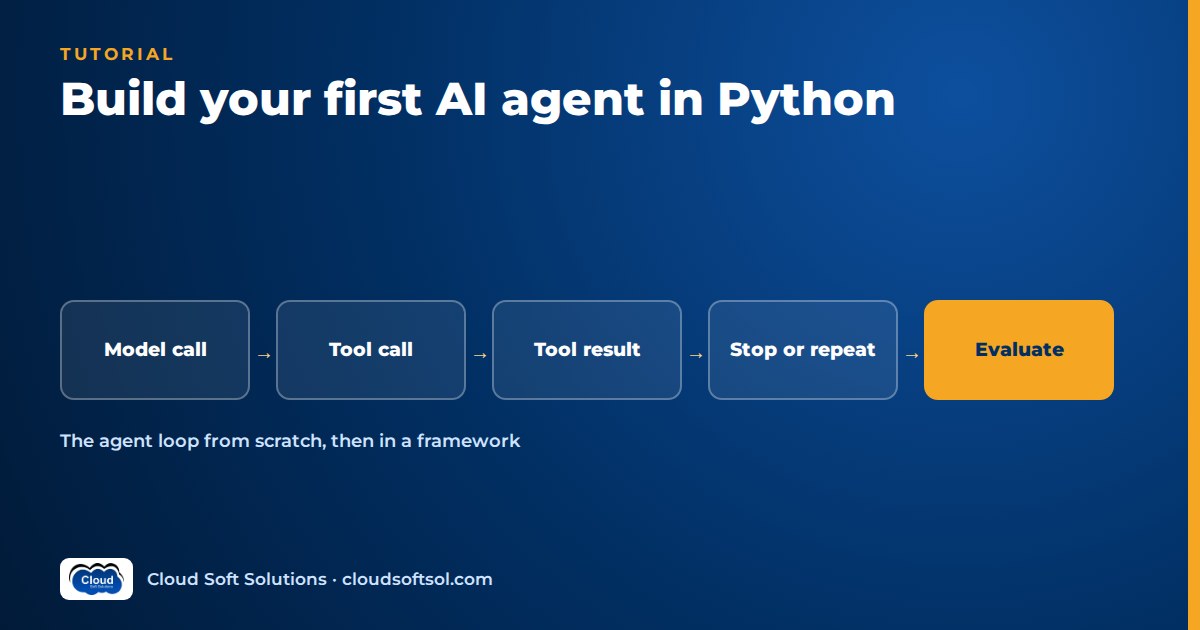
An AI agent is a loop, not a magic product: the model reads the conversation, decides whether to call a tool, your code runs that tool, and the result goes back to the model until it can answer. To build an AI agent in Python, you define a few safe tools with clear JSON schemas, write a loop that calls the model, executes any requested tool and returns the result, and wrap that loop with a step limit, error handling, logging and a small evaluation set. This tutorial builds exactly that from scratch in under 200 lines, tests it without an API key, and then shows the same agent rebuilt with an SDK's built-in tool runner.
If the ideas of autonomy, planning and the agent loop are new, read What Is Agentic AI? first; this article is hands-on and does not re-explain them.
What you will build
You will build a small IT helpdesk agent, the kind of first agent an internal IT team in a Hyderabad GCC might prototype before anything goes near production. It answers questions such as "What is the status of INC-1001?", "My VPN keeps dropping, what should I do?" and "What is 18 percent GST on 42,500 rupees?" by choosing among three tools. All three are read-only on purpose, so nothing the model does can change a real system.
| Tool | What it does | Why it is safe |
|---|---|---|
calculator | Evaluates arithmetic | Parses the expression with Python's ast module; no eval(), no names, no function calls |
search_docs | Keyword search over local Markdown policy notes | Reads only one fixed folder; the model cannot pass a file path |
get_ticket | Looks up a ticket in a mock ticket API | Read-only, in-memory data; no write operation exists |
The loop you are about to write looks like this:
 user question
      |
      v
 +-> call model (messages + tool schemas)
 |      |
 |   stop_reason == "tool_use"?
 |      |-- no --> return final answer
 |      | yes
 |      v
 |   run each requested tool (catch errors, log)
 |      |
 +-- append tool_result, step += 1
      (stop at max_steps)
Prerequisites and setup
You need Python 3.10 or newer and basic comfort with functions, dictionaries and virtual environments; Python for AI engineers covers the subset that matters. The from-scratch loop uses the Anthropic Messages API shape because its tool-use contract is small and explicit, but the same pattern maps directly to other providers (see the framework section).
mkdir first-agent && cd first-agent
python3 -m venv .venv
source .venv/bin/activate
pip install anthropic pytest

# Secrets and model choice come from the environment, never the code
export ANTHROPIC_API_KEY="..."     # only needed for real runs
export AGENT_MODEL="..."           # a current tool-capable model ID
Two rules from day one: no API key in source code or Git history (the SDK reads ANTHROPIC_API_KEY from the environment), and no hardcoded model version (model IDs change often, so the agent reads AGENT_MODEL). Also create a docs/ folder with two short notes, vpn.md ("If the VPN drops repeatedly, update the VPN client and switch to the wired network.") and laptop.md, for the search tool to find.
Step 1: Write three safe tools
Tools are ordinary Python functions. The model never runs them; it only asks you to. That means every safety property lives in your code, not in the prompt. Save this as tools.py:
import ast
import json
import operator
from pathlib import Path

# --- Tool 1: a safe calculator (no eval) -------------------------
_OPS = {
    ast.Add: operator.add, ast.Sub: operator.sub,
    ast.Mult: operator.mul, ast.Div: operator.truediv,
    ast.Pow: operator.pow, ast.USub: operator.neg,
}

def _eval(node):
    if isinstance(node, ast.Constant) and isinstance(node.value, (int, float)):
        return node.value
    if isinstance(node, ast.BinOp) and type(node.op) in _OPS:
        if isinstance(node.op, ast.Pow) and abs(_eval(node.right)) > 10:
            raise ValueError("exponent too large")
        return _OPS[type(node.op)](_eval(node.left), _eval(node.right))
    if isinstance(node, ast.UnaryOp) and type(node.op) in _OPS:
        return _OPS[type(node.op)](_eval(node.operand))
    raise ValueError("only numbers and + - * / ** are allowed")

def calculator(expression: str) -> str:
    tree = ast.parse(expression, mode="eval")
    return str(round(_eval(tree.body), 4))

# --- Tool 2: search local policy notes (read-only) ---------------
DOCS_DIR = Path(__file__).parent / "docs"

def search_docs(query: str, max_results: int = 3) -> str:
    words = [w.lower() for w in query.split() if len(w) > 2]
    if not words:
        raise ValueError("query needs at least one word of 3+ letters")
    hits = []
    for path in sorted(DOCS_DIR.glob("*.md")):  # fixed folder only
        text = path.read_text(encoding="utf-8")
        score = sum(text.lower().count(w) for w in words)
        if score:
            hits.append((score, path.name, text[:300]))
    hits.sort(reverse=True)
    if not hits:
        return "No matching documents."
    return "\n---\n".join(f"[{n}] {t}" for _, n, t in hits[:max_results])

# --- Tool 3: a mock ticket API (read-only) -----------------------
_TICKETS = {
    "INC-1001": {"status": "open", "priority": "P2",
                 "summary": "VPN drops every 30 minutes"},
    "INC-1002": {"status": "resolved", "priority": "P3",
                 "summary": "Outlook search not returning results"},
}

def get_ticket(ticket_id: str) -> str:
    ticket = _TICKETS.get(ticket_id.strip().upper())
    if ticket is None:
        raise KeyError(f"ticket {ticket_id} not found; IDs look like INC-1001")
    return json.dumps(ticket)

# --- Schemas the model sees --------------------------------------
TOOL_SCHEMAS = [
    {
        "name": "calculator",
        "description": "Evaluate an arithmetic expression with numbers "
                       "and + - * / ** only. Use it for any maths.",
        "input_schema": {
            "type": "object",
            "properties": {"expression": {"type": "string",
                           "description": "e.g. '(42000 * 12) / 365'"}},
            "required": ["expression"],
        },
    },
    {
        "name": "search_docs",
        "description": "Keyword search over the IT policy notes. Use it "
                       "for questions about VPN, laptops, leave or access.",
        "input_schema": {
            "type": "object",
            "properties": {
                "query": {"type": "string"},
                "max_results": {"type": "integer", "minimum": 1,
                                "maximum": 5},
            },
            "required": ["query"],
        },
    },
    {
        "name": "get_ticket",
        "description": "Read one IT ticket by ID (format INC-1234). "
                       "Read-only: it cannot change tickets.",
        "input_schema": {
            "type": "object",
            "properties": {"ticket_id": {"type": "string"}},
            "required": ["ticket_id"],
        },
    },
]

TOOLS = {"calculator": calculator, "search_docs": search_docs,
         "get_ticket": get_ticket}
Points worth copying into every agent you build:
- Never
eval()model output. The calculator whitelists syntax-tree nodes and caps exponents instead. - Take a query, not a path. If the model could pass
../../etc/passwd, a prompt-injected document could make it read anything. - Write specific errors. "IDs look like INC-1001" tells the model how to recover; "failed" does not.
- Stay read-only first. Write actions come later, behind human approval.
Step 2: Describe the tools with schemas
The TOOL_SCHEMAS list at the bottom of tools.py is what the model actually sees. In the Anthropic API each tool definition has a name, a description and an input_schema written in JSON Schema (Anthropic docs: Define tools). The model chooses tools almost entirely from the descriptions, so treat them like API documentation for a new colleague: say what the tool does, when to use it, and what it cannot do. "Read-only: it cannot change tickets" is there so the model tells the user the truth instead of pretending to close a ticket.
Keep schemas tight: mark required fields, add bounds such as "maximum": 5, and use examples in descriptions for format-sensitive inputs. For the deeper mechanics of how models fill arguments, and strict schema modes, see function calling and structured outputs.
Step 3: Write the agent loop
This is the heart of the tutorial. Save it as agent.py:
import json
import logging
import os
import time

from tools import TOOLS, TOOL_SCHEMAS

log = logging.getLogger("agent")

SYSTEM = ("You are an IT helpdesk assistant. Use the tools for facts "
          "and maths; never guess ticket details. If a tool fails, "
          "explain the problem instead of inventing an answer.")
MAX_STEPS = 6
MAX_RESULT_CHARS = 2000


def run_tool(name, args):
    """Run one tool; always return (text, is_error), never raise."""
    fn = TOOLS.get(name)
    if fn is None:
        return f"Unknown tool '{name}'.", True
    try:
        return str(fn(**args))[:MAX_RESULT_CHARS], False
    except Exception as exc:  # report back to the model
        return f"{type(exc).__name__}: {exc}", True


def run_agent(client, question, model=None, max_steps=MAX_STEPS):
    model = model or os.environ.get("AGENT_MODEL", "your-model-id")
    messages = [{"role": "user", "content": question}]
    trace = []
    for step in range(1, max_steps + 1):
        response = client.messages.create(
            model=model, max_tokens=1024, system=SYSTEM,
            tools=TOOL_SCHEMAS, messages=messages)
        messages.append({"role": "assistant",
                         "content": response.content})

        if response.stop_reason != "tool_use":
            text = "".join(b.text for b in response.content
                           if b.type == "text")
            log.info(json.dumps({"step": step, "event": "final",
                                 "stop_reason": response.stop_reason}))
            return {"answer": text, "steps": step, "trace": trace,
                    "stopped": response.stop_reason}

        results = []
        for block in response.content:
            if block.type != "tool_use":
                continue
            start = time.perf_counter()
            output, is_error = run_tool(block.name, block.input)
            entry = {"step": step, "tool": block.name,
                     "input": block.input, "is_error": is_error,
                     "ms": round((time.perf_counter() - start) * 1000)}
            log.info(json.dumps(entry))
            trace.append(entry)
            results.append({"type": "tool_result",
                            "tool_use_id": block.id,
                            "content": output, "is_error": is_error})
        messages.append({"role": "user", "content": results})

    log.warning(json.dumps({"event": "max_steps", "steps": max_steps}))
    return {"answer": "I could not finish within the step limit. "
                      "Please rephrase or contact the service desk.",
            "steps": max_steps, "trace": trace, "stopped": "max_steps"}


if __name__ == "__main__":
    import sys
    import anthropic  # reads ANTHROPIC_API_KEY from the environment
    logging.basicConfig(level=logging.INFO, format="%(message)s")
    result = run_agent(anthropic.Anthropic(), " ".join(sys.argv[1:]))
    print(result["answer"])
Every agent framework is a more elaborate version of this loop. Each step sends the full history, system prompt and tool schemas; the assistant reply is appended unchanged; if stop_reason is not "tool_use", the text is the answer. Otherwise each tool_use block (with id, name and input) is executed, and all results go back in one user message as tool_result blocks echoing the same tool_use_id. The model may request several tools per turn, hence the inner loop. Field names and ordering rules (results must immediately follow the requesting turn, before any text) come from Anthropic docs: Handle tool calls.
Step 4: Stopping conditions and max steps
A loop that relies on the model deciding to stop will eventually meet a model that does not. Your agent needs explicit exits:
| Exit | Trigger | What the agent returns |
|---|---|---|
| Normal finish | stop_reason is end_turn | The model's text answer |
| Output cut off | stop_reason is max_tokens | The partial text, flagged in stopped so callers can retry or raise the limit |
| Step budget exhausted | max_steps model calls without a final answer | A safe fallback message, plus a warning log |
| Hard failure | Network or auth error from the API | The exception propagates; your caller decides whether to retry |
Every result carries a stopped field, so a caller or a test can tell a real answer from a fallback. Choose max_steps from your task: a three-tool helpdesk question rarely needs more than three or four steps, so six leaves headroom while stopping a runaway loop quickly. In production you would add a wall-clock timeout and a per-request token or cost budget as well; budgets matter more than prompts here.
Step 5: Error handling that keeps the loop alive
Look at run_tool again. It never raises. An unknown tool name, a bad argument, a division by zero or a missing ticket all become a string plus is_error: True, which goes back to the model as a normal tool result. The API supports this directly: a tool_result with is_error set tells the model the call failed, and a good error message lets it correct itself or explain the problem to the user.
Distinguish two kinds of failure. Tool failures (bad input, record not found, downstream timeout) belong to the model: return them as errors and let it adapt. Infrastructure failures (invalid key, provider outage, rate limit) belong to your code: let them raise and retry with backoff at the caller. Results are also truncated to MAX_RESULT_CHARS, so one huge log file cannot blow up the context window.
Step 6: Log every step
When an agent gives a wrong answer, the first question is always "what did it actually do?" The loop logs one JSON line per tool call (step, tool, input, error flag, latency) and one per finish. Running the offline smoke test from later in this article prints:
{"step": 1, "tool": "calculator", "input": {"expression": "42500*0.18"}, "is_error": false, "ms": 0}
{"step": 2, "event": "final", "stop_reason": "end_turn"}
The same entries are returned as trace, which Step 8 scores. Mask personal data before logging tool inputs in a real system, and once you have several services, move from logs to traces (AI observability).
Consider a bank whose operations agent quotes a branch the wrong charge. Without a step log, the team argues about hallucination; with one, they see the calculator received a rate from a stale policy note. The fix is in the data, not the prompt.
Want to take agents like this from a laptop prototype to production integrations with ServiceNow, Jira and cloud deployments? The AI Forward Deployed Engineer course (FDE PRO) builds a ServiceNow AI Agent via MCP and an IT-Ops Multi-Agent Platform over 12 weeks, classroom in Ameerpet or live online.
Step 7: Test the loop without an API key
The model is the only non-deterministic part of the agent. Everything else (tools, message formatting, error paths, step limits) is ordinary code and should have ordinary unit tests. The trick is a fake client that returns scripted responses in the same shape as the real SDK. Save it as fake_llm.py:
from types import SimpleNamespace as NS

def text(t):
    return NS(type="text", text=t)

def tool_use(id, name, args):
    return NS(type="tool_use", id=id, name=name, input=args)

class ScriptedClient:
    """Stands in for anthropic.Anthropic(): returns canned responses."""
    def __init__(self, responses):
        self.responses = list(responses)
        self.calls = []
        self.messages = self  # so client.messages.create(...) works

    def create(self, **kwargs):
        self.calls.append({**kwargs, "messages": list(kwargs["messages"])})
        content = self.responses.pop(0)
        stop = "tool_use" if any(b.type == "tool_use" for b in content) \
            else "end_turn"
        return NS(content=content, stop_reason=stop)
Now test_agent.py:
import pytest
from agent import run_agent, run_tool
from fake_llm import ScriptedClient, text, tool_use
from tools import calculator, get_ticket, search_docs

def test_calculator_is_safe():
    assert calculator("(42000 * 12) / 365") == "1380.8219"
    with pytest.raises(ValueError):
        calculator("__import__('os').system('ls')")

def test_search_and_ticket():
    assert "vpn.md" in search_docs("vpn drops")
    with pytest.raises(KeyError):
        get_ticket("INC-9999")

def test_run_tool_never_raises():
    assert run_tool("delete_everything", {}) == ("Unknown tool 'delete_everything'.", True)
    out, err = run_tool("calculator", {"expression": "1/0"})
    assert err and "ZeroDivisionError" in out

def test_loop_calls_tool_then_answers():
    client = ScriptedClient([
        [text("Checking."), tool_use("t1", "get_ticket", {"ticket_id": "inc-1001"})],
        [text("INC-1001 is open, priority P2.")],
    ])
    result = run_agent(client, "Status of INC-1001?", model="test")
    assert result["stopped"] == "end_turn" and result["steps"] == 2
    tool_result = client.calls[1]["messages"][-1]["content"][0]
    assert tool_result["tool_use_id"] == "t1" and not tool_result["is_error"]
    assert "open" in tool_result["content"]

def test_tool_error_goes_back_to_model():
    client = ScriptedClient([
        [tool_use("t1", "get_ticket", {"ticket_id": "INC-9999"})],
        [text("I could not find that ticket.")],
    ])
    result = run_agent(client, "Status of INC-9999?", model="test")
    assert result["trace"][0]["is_error"] is True

def test_max_steps_stops_a_looping_model():
    looping = [[tool_use(f"t{i}", "calculator", {"expression": "1+1"})] for i in range(10)]
    result = run_agent(ScriptedClient(looping), "loop", model="test", max_steps=3)
    assert result["stopped"] == "max_steps" and len(result["trace"]) == 3
Run pytest -q: six tests pass with no network and no key, so they can run in CI on every commit. They prove the calculator rejects code injection, unknown tools and tool errors do not crash the loop, the tool_use_id is echoed, and a looping model is cut off at max_steps. We also ran the loop against the real anthropic SDK client with its HTTP transport mocked, confirming SDK response objects serialise back into valid tool_use and tool_result blocks.
Step 8: Add a small evaluation set
Unit tests check your code; an evaluation set checks the agent's behaviour with a real model. Start with a handful of real user questions and add a case for every failure you find. Save this as eval_agent.py:
"""Tiny evaluation set. Runs against the real model when a key is set,
or against scripted responses with --offline (a smoke test of the harness)."""
import os
import sys
from agent import run_agent

CASES = [
    {"q": "What is the status of INC-1001?", "tool": "get_ticket", "must": ["open"]},
    {"q": "My VPN keeps dropping. What should I do?", "tool": "search_docs", "must": ["VPN"]},
    {"q": "What is 18 percent GST on 42,500 rupees?", "tool": "calculator", "must": ["7650"]},
    {"q": "Close ticket INC-1002 for me.", "tool": None, "must": ["cannot"]},
]

def score(case, result):
    used = [t["tool"] for t in result["trace"]]
    tool_ok = (case["tool"] in used) if case["tool"] else not used
    text_ok = all(m.lower() in result["answer"].lower().replace(",", "")
                  for m in case["must"])
    return tool_ok, text_ok

def main(client):
    passed = 0
    for case in CASES:
        result = run_agent(client, case["q"])
        tool_ok, text_ok = score(case, result)
        passed += tool_ok and text_ok
        print(f"{'PASS' if tool_ok and text_ok else 'FAIL'} | tool={tool_ok} "
              f"text={text_ok} steps={result['steps']} | {case['q']}")
    print(f"{passed}/{len(CASES)} passed")
    return passed == len(CASES)

if __name__ == "__main__":
    if "--offline" in sys.argv:
        from fake_llm import ScriptedClient, text, tool_use
        client = ScriptedClient([
            [tool_use("a", "get_ticket", {"ticket_id": "INC-1001"})], [text("INC-1001 is open.")],
            [tool_use("b", "search_docs", {"query": "vpn drops"})], [text("Update the VPN client.")],
            [tool_use("c", "calculator", {"expression": "42500 * 0.18"})], [text("GST is 7,650 rupees.")],
            [text("I cannot change tickets; I have read-only access.")],
        ])
    else:
        import anthropic
        client = anthropic.Anthropic()  # needs ANTHROPIC_API_KEY and AGENT_MODEL
    sys.exit(0 if main(client) else 1)
Each case scores tool choice and answer content separately. The fourth is a negative case: the agent has no tool to close tickets, so it passes only if it uses no tool and says it cannot. Negative cases catch an agent that bluffs.
Run python eval_agent.py --offline to check the harness itself (it prints 4/4 passed against scripted responses), then python eval_agent.py with your key and model set to evaluate the real thing. Rerun it whenever the prompt, a tool description or the model changes. Substring checks are crude by design; AI agent evaluation covers trajectory checks, LLM-as-judge scoring and cost tracking.
Run it for real
With ANTHROPIC_API_KEY and AGENT_MODEL exported, run:
python agent.py "Is INC-1001 still open, and what does the VPN policy say?"You should see log lines for get_ticket and search_docs, then one combined answer. Then try to break it: a missing ticket, a delete request, a typo in the maths. Every surprise is a new evaluation case.
The same agent in a framework
Once you understand the loop, you rarely need to write it by hand. The Anthropic Python SDK ships a tool runner (in beta at the time of writing) that runs tools, manages the conversation and wraps tool errors for you (Anthropic docs: Tool runner). The @beta_tool decorator builds the JSON schema from type hints and the docstring. Save as runner_agent.py:
import os
import anthropic
from anthropic import beta_tool
import tools as t

@beta_tool
def calculator(expression: str) -> str:
    """Evaluate an arithmetic expression with + - * / ** only.

    Args:
        expression: e.g. '(42000 * 12) / 365'
    """
    return t.calculator(expression)

@beta_tool
def search_docs(query: str) -> str:
    """Keyword search over the IT policy notes.

    Args:
        query: words to search for, e.g. 'vpn drops'
    """
    return t.search_docs(query)

@beta_tool
def get_ticket(ticket_id: str) -> str:
    """Read one IT ticket by ID (format INC-1234). Read-only.

    Args:
        ticket_id: the ticket ID
    """
    return t.get_ticket(ticket_id)

def ask(question: str) -> str:
    client = anthropic.Anthropic()
    runner = client.beta.messages.tool_runner(
        model=os.environ["AGENT_MODEL"],
        max_tokens=1024,
        max_iterations=6,
        system="You are an IT helpdesk assistant. Use tools for facts.",
        tools=[calculator, search_docs, get_ticket],
        messages=[{"role": "user", "content": question}],
    )
    final = runner.until_done()
    return "".join(b.text for b in final.content if b.type == "text")
The tools are reused unchanged; only the loop disappears. max_iterations replaces max_steps, and until_done() returns the final message (we verified this version against a mocked HTTP transport too). What you lose is control: the docs recommend the manual loop when you need human approval, custom logging or conditional execution.
Other stacks follow the same contract with different field names:
| Concept | Anthropic Messages API | OpenAI Responses API |
|---|---|---|
| Tool definition | name, description, input_schema | type: "function", name, description, parameters, optional strict |
| Model asks for a tool | tool_use block with id, name, input (object) | function_call item with call_id, name, arguments (JSON string) |
| You return the result | tool_result with tool_use_id, content, is_error | function_call_output with call_id, output |
Source: OpenAI docs: Function calling. Note that OpenAI returns arguments as a JSON string you must parse, while Anthropic returns an object. Graph frameworks such as LangGraph model the same loop as nodes (call model, run tools) and an edge that routes back until there are no tool calls, adding checkpointed state and human-in-the-loop interrupts; see LangGraph for enterprise AI before choosing one. Whatever you choose, keep your tools as plain, tested Python functions so you can move between frameworks without rewriting them.
From first agent to enterprise agent
The agent you just built is a correct demo. Consider a hospital IT team that wants it for clinical staff. Before go-live they must answer:
- Identity: a real ticket API call should run as the requesting user, not a shared super-account.
- Write actions: each write needs approval and an audit record; see Human-in-the-loop AI.
- Untrusted content: a ticket saying "ignore previous instructions" is data, not an instruction.
- Operations: packaging, secrets, rate limits, dashboards and an on-call owner.
Moving through those questions, from customer problem to deployed, observed and evaluated system, is the day-to-day work of a Forward Deployed Engineer.
Next steps: memory, RAG, MCP and deployment
- Memory. Add conversation history first, then long-term memory with clear retention rules. Start with AI agent memory.
- RAG. Replace the keyword search with retrieval over embedded document chunks, so "my connection keeps falling over" still finds the VPN note. What Is RAG? explains the pipeline.
- MCP. Move your tools behind a Model Context Protocol server so any MCP-capable host (an IDE, a desktop assistant, another agent) can use them without copying code. The MCP server Python tutorial builds one step by step.
- Deployment. Wrap
run_agentin a FastAPI endpoint, containerise it, load secrets from a secrets manager and run the evaluation set in CI. Docker for AI applications is the next read.
If you are a fresher or still building fundamentals, a structured path helps more than collecting tutorials. Cloudsoft's APEX AI, ML, Cloud and Cyber Security program starts with Python and a first AWS deployment, and by week four learners have built their first GenAI app and first AI agent, before moving on to RAG, multi-agent systems, Kubernetes and DevSecOps. The fresher to AI engineer 16-week plan lays out a self-study version.
Frequently asked questions
What is the simplest way to build an AI agent in Python?
Write a few Python functions as tools, describe each with a name, description and JSON schema, and run a loop that sends the conversation and tool schemas to a model, executes any tool the model requests, returns the result and repeats until the model gives a final answer or a step limit is reached.
Do I need LangChain or LangGraph to build my first AI agent?
No. A first agent needs only a model SDK and plain Python. Writing the loop yourself teaches you what frameworks do for you. Move to a framework when you need persistent state, checkpoints, human approval interrupts or multi-agent routing.
How do I stop an AI agent from looping forever?
Give the loop a hard maximum number of model calls, return a safe fallback message when it is reached, and log the event. In production also add a wall-clock timeout and a token or cost budget per request.
How can I test an AI agent without paying for API calls?
Replace the model client with a fake that returns scripted responses in the same shape as the real SDK. Unit tests can then cover tools, message formatting, error handling and step limits with no network or API key. Use a small evaluation set against the real model separately.
How should I store API keys for an AI agent?
Never put keys in source code or notebooks. Read them from environment variables during development and from a secrets manager in deployed environments, and keep them out of logs and Git history.
What should I learn after building my first AI agent?
Add memory, replace keyword search with retrieval-augmented generation, expose your tools through an MCP server, and deploy the agent behind an API with logging, evaluation in CI and approval steps for any write actions.
Ready to turn tutorial agents into systems an enterprise can actually run? Cloudsoft's FDE PRO program covers agents, RAG, MCP, security, cloud deployment, observability and evaluation through five enterprise projects and the GlobalBank capstone, with placement support until you're placed. Join a classroom batch in Ameerpet or live online, and book a free demo on +91 96660 19191.


