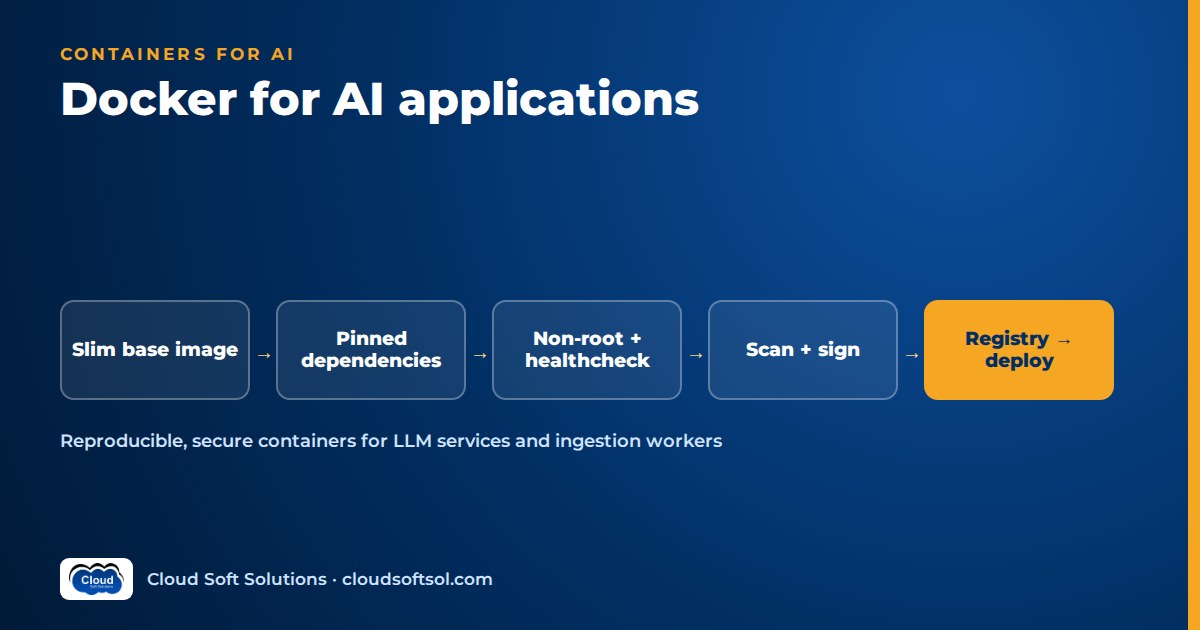
Docker for AI means packaging your LLM application, its exact Python and ML dependencies and its startup behaviour into one image that runs the same way on a laptop, in CI and in production. Done well, the image is small, built in stages, runs as a non-root user, carries no secrets and no multi-gigabyte model weights, and is scanned and signed before it reaches a registry. This guide covers the Dockerfile for a FastAPI LLM service, the image size traps specific to ML libraries, GPU containers, a docker compose stack for local RAG development, ingestion workers, and the supply-chain steps enterprises expect. It is the container layer that comes before orchestration; for running these images on a cluster, see Kubernetes for AI applications.
Why containers matter more for AI apps than for ordinary web services
A typical CRUD API has a handful of well-behaved dependencies. An LLM application usually has dozens, and several of them are unusually sensitive to version drift.
- Reproducibility of behaviour, not just of code. A different version of a PDF parser, text splitter or tokenizer changes how documents are chunked, which changes what retrieval returns, which changes the answers. Two engineers with the same Git commit but different library versions can get different evaluation scores and spend a day blaming the prompt.
- Dependency hell with ML libraries. Frameworks such as PyTorch ship compiled wheels tied to specific Python versions, CPU architectures and CUDA builds. Orchestration libraries (LangChain, LangGraph, provider SDKs) release often and occasionally change interfaces. Mixing these on a shared laptop or a long-lived VM is where "it worked yesterday" comes from.
- Parity from dev to prod. System packages matter too: OCR engines,
libmagic, fonts for document rendering, certificate bundles for calling model endpoints through a corporate proxy. If these are only installed on one engineer's machine, production will find out first.
Consider an insurer's GCC engineering team in Hyderabad building a claims-document assistant. After re-indexing on a shared VM instead of a developer laptop, answer quality dropped. The cause was not the model: the VM's older PDF library merged table cells differently, so chunks lost the column headers that made policy limits readable. Once ingestion and the API were built from one pinned image, the gap disappeared. That is the real value of containers in AI work: the thing you evaluated is the thing you ship.
A good Dockerfile for a FastAPI LLM service
Most enterprise LLM services call a managed model (Amazon Bedrock, Azure OpenAI or Gemini) over HTTPS, so the container itself is a plain Python web service. The principles that matter:
- Slim base image. Use an official
pythonslim image. Alpine uses musl libc, which forces many ML wheels to compile from source. - Multi-stage build. Install dependencies in a build stage (where compilers and headers can live) and copy only the resulting virtual environment into a clean runtime stage.
- Pinned dependencies. Commit a lock file with exact versions and hashes (generated with pip-tools, uv or Poetry) and install with hash checking. Pin the base image to a specific tag, and ideally a digest, so a rebuild next month does not silently change Python or system libraries.
- Layer order for caching. Copy the lock file and install dependencies before copying source code, so code changes reuse the cached layer.
- Non-root user. Create a dedicated user with a fixed UID and switch to it. Many enterprise clusters reject root containers outright.
- Healthcheck. Expose a cheap
/healthzendpoint for liveness. Keep "can I reach the database and the model provider" checks for a separate readiness endpoint, so a slow provider does not get your containers killed. - Exec-form
CMD. Use the JSON array form so the server process receivesSIGTERMdirectly and can finish in-flight streaming responses during a rollout.
Illustrative only, not a production file. Names, versions and paths are placeholders:
# ILLUSTRATIVE SKETCH - adapt before use
# Pin tag AND digest in real use
FROM python:3.12-slim AS build
WORKDIR /app
RUN python -m venv /opt/venv
ENV PATH="/opt/venv/bin:$PATH"
COPY requirements.lock .
RUN pip install --no-cache-dir \
    --require-hashes -r requirements.lock

FROM python:3.12-slim AS runtime
RUN useradd --create-home --uid 10001 app
COPY --from=build /opt/venv /opt/venv
ENV PATH="/opt/venv/bin:$PATH" \
    PYTHONUNBUFFERED=1
WORKDIR /app
COPY --chown=app:app src/ ./src/
USER app
EXPOSE 8000
HEALTHCHECK --interval=30s --timeout=3s \
  CMD python -c "import urllib.request as u; \
u.urlopen('http://127.0.0.1:8000/healthz')"
CMD ["uvicorn", "src.main:app", \
     "--host", "0.0.0.0", "--port", "8000"]
Pair it with a .dockerignore that excludes .git, .env, notebooks, local datasets, evaluation outputs and any models/ directory.
Kubernetes ignores HEALTHCHECK and uses its own probes, so define those in your manifests too.
Image size traps: CUDA, ML wheels and model weights
An LLM API that only calls a managed model should produce a modest image. When AI images balloon into many gigabytes, the cause is almost always one of three things.
1. Accidental CUDA and heavy ML wheels
Adding a local embedding or reranking library often pulls in PyTorch, and the default PyTorch wheels on Linux bundle CUDA libraries even if the container will never see a GPU. If the service runs on CPU, install CPU-only builds from the framework's CPU package index, or move the embedding step to a managed embedding API. Also keep compilers and package caches in the build stage, not the runtime image.
2. Model weights baked into the image
Do not COPY large model weights into an application image. It makes every build and every pull slow, couples model updates to code releases, pushes weights into every registry and cache that touches the image, and can create licensing and data-handling questions for weights under restrictive terms. Better options:
| Approach | How it works | When it fits |
|---|---|---|
| Mount a volume | Weights live on a host path, network file system or persistent volume and are mounted read-only | Self-hosted models on dedicated nodes; fastest restarts |
| Pull at start | An init step downloads a versioned artefact from object storage (S3, Blob Storage, GCS) into a cache directory | Elastic workers; weights versioned independently of code |
| Bake small assets only | Tokenizer files or a very small classifier included in the image | Assets small enough not to affect build and pull times |
Whichever you choose, record the model version and a checksum in the service's startup logs, so an incident review can tell which weights were serving at the time.
Docker GPU containers, in general terms
You only need GPU containers if you self-host a model (an open-weight LLM, an embedding model or a reranker) instead of calling a managed API. The moving parts:
- Host driver. The NVIDIA driver is installed on the host, not in the image. The container brings user-space CUDA libraries; the host driver must be new enough to support the CUDA version in the image.
- NVIDIA Container Toolkit. Installed on the host, it lets the container runtime expose GPUs to containers. With it in place,
docker run --gpus all(or a GPU device reservation in a compose file) makes the GPU visible inside the container. - Base images. NVIDIA publishes CUDA base images in variants such as
base,runtimeanddevel; usedevelonly in a build stage that compiles extensions, and aruntimevariant to run. Framework images (for example, official PyTorch images) and inference-server images already include a matching CUDA stack and are often the simpler starting point.
Scheduling GPU containers across a fleet, with node pools, taints and GPU resource requests, is an orchestration concern covered in the Kubernetes guide for AI workloads.
Docker compose for a local RAG stack
For local development, docker compose gives every engineer the same three services in one command: the API, a PostgreSQL database with the pgvector extension, and an ingestion worker built from the same image as the API. The model itself is still a managed API, reached with each developer's own development credentials.
Illustrative only, for local development:
# ILLUSTRATIVE SKETCH - local dev only
services:
  api:
    build: .
    ports: ["8000:8000"]
    env_file: .env        # git-ignored
    depends_on:
      db: { condition: service_healthy }
  worker:
    build: .
    command: ["python", "-m", "src.worker"]
    env_file: .env
    depends_on:
      db: { condition: service_healthy }
  db:
    image: pgvector/pgvector:pg16
    environment:
      POSTGRES_PASSWORD: localdev
    volumes: ["pgdata:/var/lib/postgresql/data"]
    healthcheck:
      test: ["CMD-SHELL", "pg_isready -U postgres"]
      interval: 5s
      retries: 10
volumes:
  pgdata:
A few practical notes. Use the healthcheck condition so the API does not start before Postgres accepts connections. For local work, the worker can poll a jobs table using SELECT ... FOR UPDATE SKIP LOCKED instead of running a separate queue; in production, swap in SQS, Pub/Sub or a similar queue behind the same interface. For a full walkthrough of the application that runs inside this stack, see the RAG knowledge assistant project.
Compose is a development and demo tool: it lacks rolling deploys, autoscaling and secret rotation, so it is not the production plan for an enterprise customer.
If you want to build this stack and take it all the way to a cloud deployment under a mentor's review, the AI Forward Deployed Engineer course (FDE PRO) does exactly that across its enterprise projects, including the Enterprise Knowledge Assistant.
Configuration and secrets: never in the image
An image should be promotable unchanged from staging to production. That only works if configuration is injected at runtime.
- Environment variables for non-secret configuration. Model ID, region, retrieval top-k, feature flags and log level belong in environment variables or a mounted config file, validated at startup (for example with Pydantic settings) so a missing value fails fast instead of at the first user request.
- Secret stores for secrets. Database passwords, API keys and signing keys belong in AWS Secrets Manager, Azure Key Vault or Google Secret Manager, injected at runtime by the platform or fetched by the app at start. Environment variables are an acceptable final delivery mechanism, but they can leak through crash dumps, debug endpoints and
docker inspect, so keep them out of logs and error pages. - Prefer no keys at all. On cloud platforms, give the workload an identity (an IAM role for the task or pod, a managed identity on Azure, a service account on Google Cloud) so it calls Bedrock, Azure OpenAI or Vertex AI without static credentials.
- Build-time secrets. If a build needs a token for a private package index, use BuildKit secret mounts (
RUN --mount=type=secret,...). Never pass secrets asARGorENVin a Dockerfile; they persist in the image history, and anyone who can pull the image can read them.
Image scanning, SBOMs and signing
Enterprise security teams ask three questions about every image: what is inside, what known vulnerabilities it has, and whether it provably came from your pipeline.
- Scanning. Run a vulnerability scanner such as Trivy or Grype in CI against every image, and enable registry scanning (Amazon ECR, Azure Container Registry and Artifact Registry all offer it). Fail the build on critical findings that have a fix available, and track the rest rather than ignoring them. Rebuild regularly, because base-image patches only reach you when you rebuild.
- SBOMs. Generate a software bill of materials in SPDX or CycloneDX format at build time (BuildKit attestations or a tool such as Syft) and store it with the image. When the next widely publicised library vulnerability lands, an SBOM lets you answer "which of our AI services ship that library?" in minutes instead of days.
- Signing. Sign images and attestations with Sigstore cosign or your cloud's signing service, and verify signatures before deploy, for example with an admission policy on the cluster. Unsigned images from a laptop should not be able to reach production.
Consider a bank's internal AI platform team: its security review will typically want the SBOM, the scan report and the signature for a release before approving it. Build them into the pipeline from the first sprint. The DevSecOps course covers this supply-chain tooling in depth, and AI security for enterprises covers the application-level controls that sit on top.
Running ingestion workers in containers
Ingestion (fetch, parse, chunk, embed, upsert) is bursty, memory-hungry on large documents and limited by embedding-provider rate limits, unlike the API.
- Same codebase, different entrypoint. Running the worker from the API image with a different command keeps chunking logic identical between ingestion and query time. If parsing needs heavy system packages (OCR engines, office-document converters), build a separate worker image from the same lock file so the API image stays lean.
- Idempotent jobs. Key each document by source ID and content hash, so a retried or duplicated job updates rather than duplicates vectors.
- Back-pressure. Batch embedding calls, cap concurrency per worker and back off on rate-limit responses. Scale workers on queue depth, not CPU.
- Graceful shutdown. Handle
SIGTERMby finishing or releasing the current job. Use exec-form commands, or Docker's--init, so signals reach your process.
The dev to CI to registry to deploy flow
The image is the unit of promotion. Build it once, give it an immutable tag, and move the same digest through every environment:
  Developer laptop
    | docker compose up (api, worker, pgvector)
    v
  Pull request
    v
  CI pipeline
    | lint, unit tests, evaluation set
    | build image (tag = git SHA)
    | scan + SBOM + sign
    v
  Registry (ECR / ACR / Artifact Registry)
    | same digest promoted, never rebuilt
    v
  Deploy: staging -> production
    (ECS, Container Apps, Cloud Run, Kubernetes)
The AI-specific part of that pipeline is the evaluation gate: a fixed question set scored on every change to prompts, retrieval settings or model configuration. That is covered in CI/CD for AI applications; the container's job is to make sure the image that passed the evaluation is byte-for-byte the image that serves users.
Common mistakes
| Mistake | What goes wrong | Better practice |
|---|---|---|
Unpinned requirements.txt | Rebuilds pull new library versions; chunking or SDK behaviour shifts silently | Lock file with hashes; pinned base image |
Using latest tags | No way to tell what is running or to roll back precisely | Tag with the Git SHA; deploy by digest |
| Baking model weights or sample data into the image | Huge images, slow pulls, data in places it should not be | Mount or pull at start; strict .dockerignore |
| Running as root | Rejected by enterprise cluster policies; larger blast radius | Dedicated non-root user with fixed UID |
API keys in ENV or ARG | Secrets readable by anyone who can pull the image | Secret store or workload identity; BuildKit secret mounts |
| Healthcheck that calls the LLM | Provider slowness gets healthy containers restarted, and every check costs tokens | Cheap liveness; dependency checks only in readiness |
| Ingestion inside the API container | Large uploads starve user requests | Separate worker process on a queue |
Frequently asked questions
Do I need Docker to build an LLM application?
Not to prototype, but almost always to ship. A container pins your Python version, ML libraries and system packages so the behaviour you evaluated is the behaviour in production, and it is the deployment format accepted by ECS, Container Apps, Cloud Run and Kubernetes alike.
Which base image should I use for a Python AI app?
For a service that calls a managed model API, an official Python slim image is a sensible default. Avoid Alpine for ML-heavy stacks because many wheels then compile from source. For self-hosted models on GPUs, start from a CUDA runtime image or an official framework image that already matches the CUDA stack you need.
Should I put model weights inside the Docker image?
Not large ones. Mount weights from a volume or download a versioned artefact from object storage at startup, and log the version and checksum. Baking large weights in slows every build and pull and ties model updates to code releases. Small assets such as tokenizer files are fine to include.
How do I use a GPU inside a Docker container?
Install the NVIDIA driver and the NVIDIA Container Toolkit on the host, use a CUDA-compatible base image, and start the container with GPU access, for example with the gpus flag in docker run or a GPU device reservation in docker compose. The host driver must support the CUDA version inside the image.
How should I pass API keys to a containerised LLM app?
Never bake them into the image. Prefer workload identity so the app calls the model provider without static keys. Where a secret is unavoidable, store it in a secret manager and inject it at runtime, and use BuildKit secret mounts for build-time tokens instead of ARG or ENV.
Should ingestion workers use the same image as the API?
Ideally they share the same code and lock file so chunking is identical at ingestion and query time. Running the same image with a different command is simplest; build a separate worker image only when parsing needs heavy system packages you do not want in the API.
Containerising an AI app well is part of the Deploy station in a longer journey from AI demo to enterprise outcome. To practise Docker alongside RAG, agents, MCP, EKS and evaluation on realistic enterprise projects, explore Cloudsoft FDE PRO: 12 weeks, classroom in Ameerpet beside the metro or live online. If you want to strengthen container and pipeline fundamentals first, start with our DevOps training in Hyderabad. Call +91 96660 19191 for a free demo.


