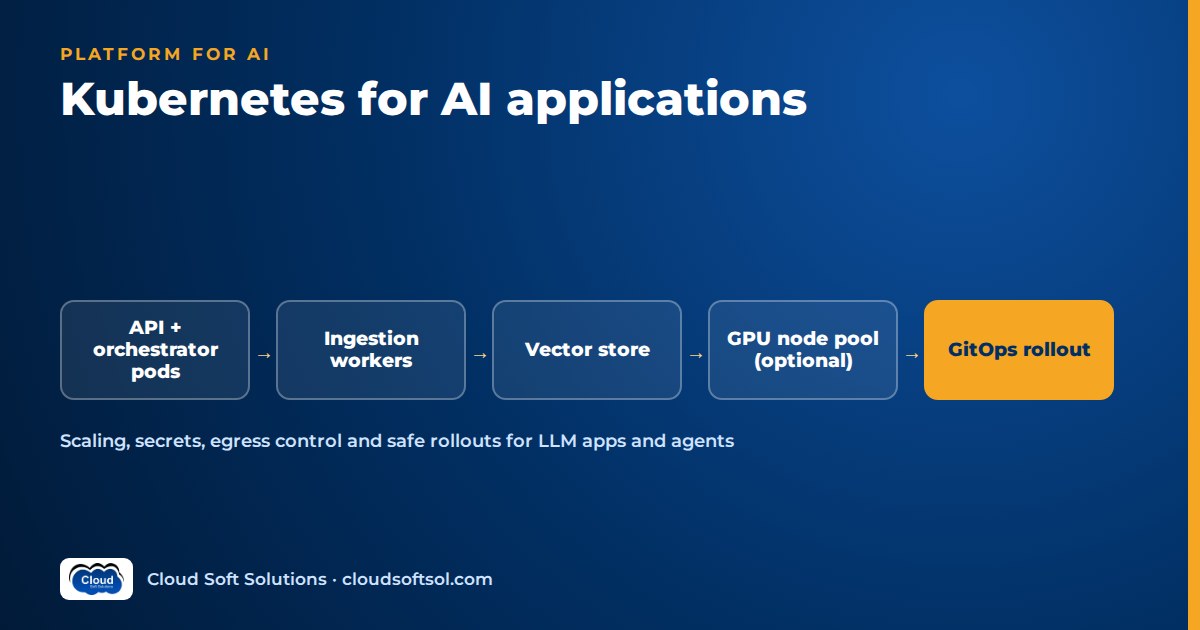
Kubernetes for AI applications makes sense when you run several long-lived services, background workers and possibly your own model servers, and need consistent scaling, isolation and rollout across environments. Most enterprise LLM apps call a managed model API (Amazon Bedrock, Azure OpenAI or Gemini) and run the surrounding system on the cluster: the API and agent orchestrator, ingestion workers, queues and sometimes the vector database. This guide covers how to lay that out on EKS or GKE, what changes compared with ordinary web services (long calls, streaming, token budgets, egress to model providers), and how to roll it out with Helm and Argo CD.
For the career angle, see how a DevOps engineer becomes a Forward Deployed Engineer. This guide assumes you know Deployments, Services and Ingress.
When Kubernetes is the right choice, and when it is not
Kubernetes is not the default answer for every AI app. The cluster pays off when the system has several moving parts, when the customer already has a cluster standard, or when you need GPU nodes for self-hosted models.
| Situation | Kubernetes (EKS / GKE / AKS) | Serverless or managed services |
|---|---|---|
| One API calling a managed LLM, low or spiky traffic | Usually overkill | Simpler: functions or a managed container service |
| API + agent orchestrator + ingestion workers + schedulers | Good fit: one platform, one rollout model | Workable, but configuration and deploys sprawl across services |
| Long-running agent runs and streaming responses | Good fit: you control timeouts and connection handling | Watch function time limits and streaming support |
| Self-hosted open-weight models on GPUs | Strong fit: GPU node pools, scheduling, autoscaling | Managed inference endpoints are simpler if they meet your needs |
| Customer mandates their existing cluster standard | Required | Not an option |
| Strict multi-tenant isolation for business units | Namespaces, network policies, quotas | Separate accounts or projects per tenant |
| Small team, no cluster operations experience | Operational burden is real | Usually the better choice |
A useful rule: do not build a cluster for a single stateless API, but if the customer already runs a hardened EKS or GKE platform, deploying onto it is usually faster than getting a new architecture through their security review.
The typical workload split for an LLM app
An enterprise GenAI system usually breaks into four kinds of workload, kept separate so each can scale, fail and deploy independently.
1. API and orchestrator services
The user-facing API (often Python/FastAPI) handles authentication, validation and streaming. The orchestrator runs the RAG pipeline or agent graph, for example a LangGraph workflow that retrieves context, calls the model and tools, and decides the next step. Both are stateless Deployments; conversation and agent state go to PostgreSQL or Redis, never pod memory, so any replica can resume a session.
2. Workers and queues for ingestion
Document ingestion (parse, chunk, embed, upsert) is bursty and slow, so run it as queue consumers (SQS, Pub/Sub, RabbitMQ), not inside the API. Scheduled re-syncs from SharePoint or Confluence run as CronJobs.
3. The vector database: managed or in-cluster
A managed option, such as PostgreSQL with pgvector on Amazon RDS or Cloud SQL, moves backups, patching and high availability to the provider. An in-cluster vector database on a StatefulSet keeps data inside the cluster boundary, but you now own upgrades, backup, restore and capacity. Start managed; go in-cluster only for a concrete reason such as data residency or an air-gapped environment.
4. Optional self-hosted model servers on GPU nodes
Some customers want an open-weight model inside their own boundary, or a small embedding or reranking model close to the data. In general terms:
- Node pools: a separate GPU node group (EKS managed node group, GKE node pool) so expensive nodes run only model servers.
- Scheduling: taint GPU nodes and add matching tolerations and node selectors or affinity to model pods, so ordinary services never land there.
- GPU requests: a device plugin exposes GPUs as an extended resource (for NVIDIA,
nvidia.com/gpu), which pods request in their resource limits. GPUs are not shared between containers by default. - Startup: large weights mean slow pod start; use generous readiness probes and cache weights on a volume.
Self-hosting adds real operational work; confirm the managed API fails a requirement first.
A reference cluster layout
Here is a layout that fits a typical internal knowledge assistant or agent platform:
        Users / internal apps
                 |
       Ingress / API gateway (TLS, auth)
                 |
  +-------- ns: assistant-prod ---------+
  | api (FastAPI, HPA)                  |
  |   -> orchestrator (RAG / agent)     |
  |        -> tool adapters (MCP, APIs) |
  | ingest-workers (queue, HPA)         |
  | cronjobs (re-sync, eval runs)       |
  +-------------------------------------+
        |            |             |
   Postgres +    Queue (SQS /   Egress gateway
   pgvector      Pub/Sub)            |
   (managed)                  Model APIs (Bedrock,
                              Azure OpenAI, Gemini)

  Optional: ns: models on GPU node pool
            (tainted, nvidia.com/gpu requests)
The cluster runs your code; managed services hold state and do inference unless there is a reason to bring them in.
Key manifest concepts, with an illustrative sketch
A few settings matter more than usual: realistic memory requests, a long terminationGracePeriodSeconds so in-flight streams finish during a rollout, readiness probes that check dependencies, and a service account bound to a cloud IAM role (IRSA or EKS Pod Identity on EKS, Workload Identity on GKE) so pods call Bedrock or Vertex AI without static keys.
Illustrative only, not a production manifest. Names, images and numbers are placeholders:
# ILLUSTRATIVE SKETCH - adapt before use
apiVersion: apps/v1
kind: Deployment
metadata:
  name: assistant-api
  namespace: assistant-prod
spec:
  replicas: 2
  selector:
    matchLabels: { app: assistant-api }
  template:
    metadata:
      labels: { app: assistant-api }
    spec:
      # service account is bound to a cloud IAM role
      serviceAccountName: assistant-api
      # give in-flight streams time to finish
      terminationGracePeriodSeconds: 120
      containers:
        - name: api
          image: REGISTRY/assistant-api:GIT_SHA
          ports: [{ containerPort: 8000 }]
          envFrom:
            - secretRef: { name: assistant-config }
          resources:
            requests: { cpu: "500m", memory: "1Gi" }
            limits:   { memory: "2Gi" }
          readinessProbe:
            httpGet: { path: /ready, port: 8000 }
---
apiVersion: autoscaling/v2
kind: HorizontalPodAutoscaler
metadata:
  name: assistant-api
  namespace: assistant-prod
spec:
  scaleTargetRef:
    apiVersion: apps/v1
    kind: Deployment
    name: assistant-api
  minReplicas: 2
  maxReplicas: 10
  metrics:
    - type: Resource
      resource:
        name: cpu
        target:
          type: Utilization
          averageUtilization: 70
In a real project these live in a Helm chart with per-environment values.
Configuration and secrets
AI apps carry more configuration than most services: model IDs, prompt versions, retrieval settings, tool flags and credentials for every system the agent touches. Keep the split clean:
- Non-secret config (model ID, retrieval depth, timeouts) in ConfigMaps or Helm values, versioned in Git so a change to the model or prompt is reviewable and revertible.
- Secrets (ServiceNow or Jira tokens, database passwords, any provider key you cannot replace with IAM) in AWS Secrets Manager, Azure Key Vault or Google Secret Manager, synced into the cluster with the External Secrets Operator or the Secrets Store CSI driver.
- Encryption: turn on envelope encryption of Kubernetes Secrets with a KMS key (EKS supports this with AWS KMS; GKE offers application-layer secrets encryption with Cloud KMS), and use KMS-backed encryption for the database and object storage that hold documents and embeddings.
- Prefer identity over keys: where the model provider supports IAM (Bedrock through IRSA or Pod Identity, Vertex AI through Workload Identity, Azure OpenAI through Entra ID workload identity), use it. There is then no long-lived key to leak.
Our AI security for enterprises guide covers the application-side controls (prompt injection, data leakage, tool permissions) that complement these controls.
Scaling: CPU, queue depth, long calls and streaming
An API pod waiting on a model response uses little CPU while holding a connection open for many seconds, so scaling on CPU alone can leave you with too few pods and a pile of queued requests.
Choose the right signal
- API pods: CPU is a reasonable starting point, but concurrent in-flight requests per pod is often a better signal. Expose it as a Prometheus metric and scale on it through the custom metrics API (Prometheus Adapter) or KEDA.
- Ingestion workers: scale on queue depth. KEDA has scalers for SQS, Pub/Sub, RabbitMQ, Kafka and Redis, and can scale workers to zero when the queue is empty.
- GPU model servers: scale on request queue length or GPU utilisation reported by the serving runtime, and remember that adding a GPU node takes minutes, not seconds.
Timeouts for long LLM calls
Agent runs with several tool calls take far longer than a typical web request. Set timeouts deliberately at every hop: load balancer idle timeout, Ingress proxy read timeout, application server and model client. A common failure is a gateway quietly cutting a connection while the agent is still working. For anything longer than a user will wait, return a job ID, run the work on a worker and let the client poll or receive a webhook.
Streaming responses
Token streaming over Server-Sent Events or WebSockets makes the assistant feel fast, but every hop must allow it. Disable response buffering at the Ingress for streaming routes, confirm the load balancer supports long-lived connections, and use graceful shutdown (a preStop hook plus termination grace period) so a rollout does not cut users off mid-answer.
Resilience: retries, circuit breakers and provider rate limits
Your most important dependency is a model API you do not control. It will throttle you, error occasionally and slow down under load:
- Retries with exponential backoff and jitter on throttling and transient errors, capped, and at one layer only; retries in the SDK, app and mesh multiply load during an incident.
- Circuit breakers around the model and each tool: fail fast or fall back to a secondary model or region instead of tying up every pod.
- Central rate limiting to stay inside provider request and token quotas, through a shared limiter in Redis or an LLM gateway rather than per pod.
- Per-tenant and per-user limits so one heavy team or a looping agent cannot exhaust the shared quota.
- Idempotent tools: if an agent can create a ServiceNow ticket, a retried call must not create two. Use idempotency keys.
Consider an insurer running a claims-assistant agent from its Hyderabad GCC. When the provider starts throttling, every pod retries independently, the HPA adds pods because latency is up, and they retry too, making throttling worse. With a shared token budget, a circuit breaker and a queue for non-urgent work, the same morning becomes a short slowdown rather than an outage.
Building exactly these resilience patterns on EKS, packaged with Helm and deployed through Argo CD, is part of Cloudsoft's AI Forward Deployed Engineer course (FDE PRO), where the IT-Ops Multi-Agent Platform and Secure Banking AI Assistant projects are taken to a production-style deployment.
Network policies and egress control to model APIs
By default every pod can talk to every other pod and to the internet, which is not acceptable for a system that holds sensitive documents and calls business tools.
- Default-deny NetworkPolicies in each application namespace, then allow only the paths you need: Ingress to API, API to orchestrator, orchestrator to database and tool adapters. Your CNI must enforce policies (for example Calico or Cilium, or the network policy support built into EKS and GKE).
- Egress control: model API calls are outbound traffic carrying prompts that may include customer data. Route them through private connectivity where it exists (AWS PrivateLink VPC endpoints for Bedrock, Private Service Connect on Google Cloud, private endpoints for Azure OpenAI), or through an egress gateway or proxy with an allow-list of provider domains.
- Log egress for audits.
Multi-tenancy with namespaces
Consider a bank where retail banking, cards and HR each want their own assistant with separate document sets on one platform. Namespaces give a practical boundary:
- One namespace per tenant, with its own service accounts, secrets and IAM role.
- ResourceQuotas and LimitRanges per namespace so one tenant's ingestion burst does not starve another.
- NetworkPolicies that block cross-tenant traffic.
- RBAC that gives each team access only to its own namespace.
- Separate vector indexes or schemas per tenant, with access checks enforced in the retrieval layer, not just at the cluster level.
Namespaces are soft isolation; where regulation demands more, use separate clusters or accounts per tenant, managed from one GitOps repository.
Observability for AI workloads on the cluster
Pod health and latency are not enough; you need to see which documents were retrieved, which prompt version ran, which tools were called and how many tokens were used. Instrument with OpenTelemetry and send LLM traces to LangSmith or Langfuse. Our AI observability guide covers what to trace and alert on; the Kubernetes addition is tagging every trace with namespace, image version and tenant so a quality regression maps to a specific rollout.
Cost: where the money goes
For most LLM apps, model tokens cost more than the cluster, unless you add GPU nodes.
- Tokens: control prompt size, retrieval depth and history; cache; route simple requests to smaller models; track tokens per tenant for chargeback.
- Right-size requests against real usage after the first weeks in production.
- Node autoscaling: use Cluster Autoscaler or Karpenter on EKS (GKE has its own cluster autoscaler and Autopilot) so nodes follow load. Spot or preemptible nodes suit interruption-tolerant ingestion workers, not the user-facing API.
- GPUs: idle GPU nodes waste budget fastest. Scale down out of hours where possible, and compare against the managed API before committing.
GitOps rollout with Helm and Argo CD
Package each service as a Helm chart with values files per environment (dev, UAT and prod differ in model ID, replicas, quotas and secret references). Argo CD watches a Git repository and reconciles each cluster to it. For AI systems that gives you:
- Reviewable changes: switching the prod model ID or prompt version is a pull request, not a console click.
- Promotion is explicit. CI builds the image and runs evaluation; if quality and safety thresholds pass, CI updates the image tag in the dev values, and promotion to UAT and prod is a reviewed change in Git. Our CI/CD for AI applications guide covers the evaluation gate in detail.
- Rollback is a revert of the commit.
- Progressive delivery: Argo Rollouts can send a small slice of traffic to a new version first, so you can compare latency, errors and online quality signals before full rollout.
The cluster itself, along with node pools, the VPC endpoints for model providers, the managed database, KMS keys and IAM roles, belongs in Terraform, so the same stack can be reproduced in the customer's accounts. If you want structured practice on these pieces, Cloudsoft runs Terraform training, a GitOps and GitHub Actions course, DevOps training and Google Cloud training that covers GKE for teams on GCP.
Consider a hospital group deploying a clinical-policy assistant across dev, UAT and prod AWS accounts, each with an EKS cluster from the same Terraform modules. A retrieval change goes through evaluation in CI, lands in UAT through Argo CD, gets clinical governance sign-off and reaches prod as a second pull request, giving compliance the audit trail it needs.
Frequently asked questions
Do I need Kubernetes to deploy an LLM application?
No. A single API calling a managed model provider runs well on serverless or a managed container service. Kubernetes becomes worthwhile when you have several services and workers, need strict isolation between tenants, want GPU nodes for self-hosted models, or must deploy onto a customer's existing cluster platform.
How do I deploy an LLM on Kubernetes with GPUs?
Create a dedicated GPU node pool, install the GPU device plugin, taint the GPU nodes and give model-serving pods matching tolerations and GPU resource requests. Plan for large weights, slow startup and autoscaling on request queue length rather than CPU.
Should the vector database run inside the cluster?
Usually not at first. A managed option such as PostgreSQL with pgvector on a managed database service handles backups, patching and high availability for you. Run it in-cluster on a StatefulSet only when you have a concrete reason, such as data residency rules, an air-gapped environment or a platform standard.
How should I autoscale LLM API pods?
Start with CPU, but add a signal for waiting work, such as in-flight requests per pod, through custom metrics or KEDA, and scale ingestion workers on queue depth. LLM calls mostly wait on the provider, so CPU alone under-scales.
How do I handle long-running agent requests and streaming?
Set timeouts deliberately at the load balancer, Ingress, application server and model client, and disable response buffering on streaming routes. For work that may take longer than a user will wait, return a job ID, run it on a worker and let the client poll or receive a callback.
Is EKS or GKE better for AI deployment?
Neither is better in general. Choose the cluster on the cloud where the customer's data, identity and model provider already live. EKS pairs naturally with Amazon Bedrock and AWS IAM, GKE with Vertex AI and Gemini. The patterns in this guide apply to both.
How do I control which external model APIs my pods can call?
Apply default-deny NetworkPolicies, allow egress only from the pods that need it, and route model traffic through private endpoints or an egress gateway with an allow-list of provider domains. Log egress so you can show auditors which service sent data to which provider.
What Kubernetes skills do AI engineers need?
Deployments, Services, Ingress, ConfigMaps and Secrets, HPA and KEDA, NetworkPolicies, namespaces with RBAC and quotas, workload identity, Helm and Argo CD, plus GPU scheduling basics if you will host models yourself.
Deployment is one station in a longer journey from AI demo to enterprise outcome. To practise the whole path, Cloudsoft FDE PRO covers EKS, Helm and Argo CD alongside RAG, agents, MCP and evaluation, over 12 weeks in our Ameerpet classroom beside Ameerpet Metro or live online, with placement support until you're placed. If you mainly need cluster fundamentals first, start with our Kubernetes course in Hyderabad. Call +91 96660 19191 for a free demo session.


