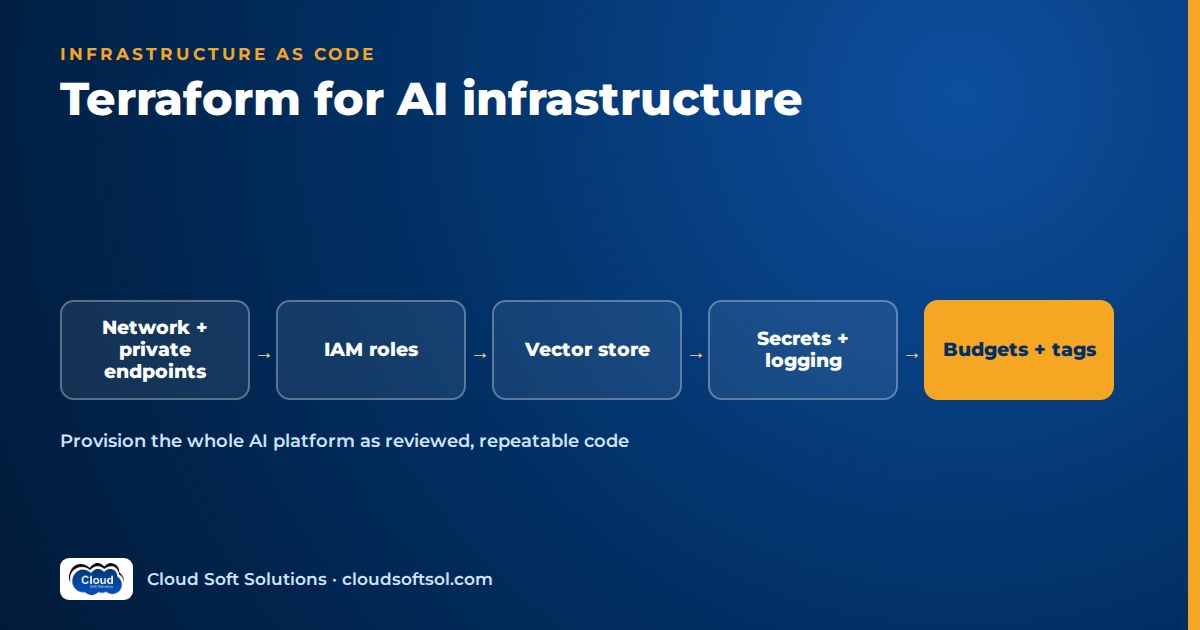
Terraform for AI infrastructure means codifying everything an LLM application depends on (private networking, identities scoped to model invocation, the vector store, model deployments and quotas, secrets, logging and budgets) so every environment is built the same way and every change goes through a reviewed plan. The model is usually a managed API such as Amazon Bedrock or Azure OpenAI, so the hard work is not in the model at all. It is the platform around it: who can call it, from which network, at what cost, with what audit trail. This guide covers how to structure, secure and roll out that platform as code.
For the AWS and Azure building blocks themselves, read AWS for AI engineers and Azure for AI engineers; for where these pieces sit in the bigger picture, see enterprise AI architecture. Provider resources and arguments change between releases, so treat every code sample here as illustrative and check it against the current provider documentation.
What to codify for an AI platform
A common failure: the proof of concept was built in a console, it worked, and nobody can say which settings made it work. Codifying the platform turns "probably private" into a line in a reviewed file.
| Layer | What to put in Terraform | Why it matters for AI |
|---|---|---|
| Networking | VPC or VNet, private subnets, private endpoints for the model API, vector store, secrets and storage | Prompts and retrieved documents often contain confidential data; keep them off the public internet |
| Identity | Workload roles or managed identities, scoped to invoking named models and reading named indexes | A role that can call every model in the account is an open cost and data risk |
| Vector store | Aurora PostgreSQL with pgvector, OpenSearch, Azure AI Search, with encryption and backups | The index holds your enterprise knowledge; treat it like a production database |
| Model access and quotas | Azure OpenAI deployments and their capacity, Bedrock provisioned throughput, guardrails, quota requests where the API supports it | Capacity is a real constraint; you want it visible and reviewable, not set by hand |
| Secrets | Secret containers, rotation settings and access policies, but not the secret values | Third-party API keys and database credentials must never land in state |
| Logging | Model invocation logging, diagnostic settings, log retention, access to the log store | Audit trails for prompts and responses, which are themselves sensitive data |
| Budgets and alerts | Budgets, cost anomaly alerts, token and error alarms, mandatory tags | Token spend can climb quickly when an agent loops or traffic spikes |
Not everything is codifiable: some model-access steps have been console-only, and some quota increases need human approval. Codify what the API allows and document the rest as checklisted prerequisites in the repository.
Module structure for an AI application
Split modules by lifecycle and ownership, not by cloud service. The network changes rarely and is often owned by a platform team; model deployments change whenever the application team adopts a new model. A layout that works for most AI applications:
ai-platform-infra/
├── modules/
│   ├── network/        # VPC/VNet, subnets, endpoints
│   ├── identity/       # app roles, CI OIDC roles
│   ├── model-access/   # deployments, guardrails
│   ├── vector-store/   # pgvector or search index
│   ├── secrets/        # secret containers, KMS keys
│   ├── observability/  # invocation logs, alarms
│   └── budgets/        # budgets, anomaly alerts
├── envs/
│   ├── dev/            # main.tf, backend.tf, tfvars
│   ├── staging/
│   └── prod/
├── policy/             # OPA / Conftest rules
└── .github/workflows/  # plan on PR, apply on approval
Each environment folder is a thin root module that calls the shared modules with environment-specific inputs: smaller instance sizes and lower model capacity in dev, private-only access everywhere. Pin module and provider versions so prod never silently picks up a change tested only in dev. Prompts and evaluation datasets live in the application repository, which consumes outputs such as endpoint names and role ARNs.
Environments: workspaces vs separate state
Terraform CLI workspaces let one configuration hold several state files. They are handy for short-lived copies, such as a per-branch sandbox for testing a new retrieval index. For long-lived dev, staging and prod, prefer separate root modules with separate state, and ideally separate cloud accounts or subscriptions.
| Approach | Good for | Watch out for |
|---|---|---|
| CLI workspaces | Ephemeral sandboxes, identical stacks | Same backend and credentials for every environment; easy to apply to the wrong one |
| Separate directories and state | Dev, staging, prod with different sizes and approvals | Some duplication in root modules; keep it thin |
| Separate accounts or subscriptions | Regulated workloads, hard blast-radius limits | More identity plumbing, which is worth it |
The test is blast radius: if one mistyped command can destroy the prod vector index, the separation is too thin.
Remote state with locking
Local state on a laptop does not survive a team. Use a remote backend with locking so two applies cannot run at once: an S3 bucket on AWS (recent Terraform versions support S3-native lock files; older setups use a DynamoDB lock table), an Azure Storage container on Azure (which locks through blob leases), or HCP Terraform. Then:
- Encrypt the state bucket or container, block public access and turn on versioning so you can recover a bad state.
- Restrict who can read state; it often holds attributes you would not publish.
- Use one state per environment and per layer (network, platform, application) so a change to an alarm does not need a lock on the whole estate.
An illustrative snippet: private endpoint plus a scoped role
The pattern below shows two of the most important controls on AWS: a private interface endpoint for the Bedrock runtime, and an application role that can invoke only an approved list of models. It is illustrative and version-agnostic; check resource and argument names against the provider version you use, and supply the trust policy and security group from your own modules.
# ILLUSTRATIVE ONLY - verify against your provider docs
variable "allowed_model_arns" {
  type        = list(string)
  description = "Approved model or inference profile ARNs"
}

resource "aws_vpc_endpoint" "bedrock_runtime" {
  vpc_id              = var.vpc_id
  service_name = "com.amazonaws.${var.region}.bedrock-runtime"
  vpc_endpoint_type   = "Interface"
  subnet_ids          = var.private_subnet_ids
  security_group_ids  = [var.endpoint_sg_id]
  private_dns_enabled = true
}

data "aws_iam_policy_document" "invoke_models" {
  statement {
    actions = [
      "bedrock:InvokeModel",
      "bedrock:InvokeModelWithResponseStream",
    ]
    resources = var.allowed_model_arns
  }
}

resource "aws_iam_role" "app" {
  name               = "${var.app}-${var.env}-invoke"
  assume_role_policy = var.app_trust_policy_json
}

resource "aws_iam_role_policy" "invoke_models" {
  role   = aws_iam_role.app.id
  policy = data.aws_iam_policy_document.invoke_models.json
}
Two refinements are worth adding. A condition on aws:SourceVpce means the role can invoke models only through your endpoint. And if you call models through cross-region inference profiles, the allowed resources must include the profile as well as the underlying models. The Azure equivalent is a Cognitive Services account of kind OpenAI with public network access disabled, a private endpoint in your VNet, and a role assignment that gives the app's managed identity only the data-plane role it needs.
Policy-as-code guardrails
Policy-as-code catches what tired reviewers miss. Run policies against the plan, as JSON, before anything is applied. Open Policy Agent with Conftest, Sentinel on HCP Terraform, or scanners such as Checkov all work. Rules that matter for AI platforms:
- Deny public network access on model accounts, vector stores and storage that holds source documents.
- Require mandatory tags (application, environment, owner, cost centre) on every taggable resource.
- Deny wildcard model permissions such as
bedrock:*on*for application roles. - Require encryption with customer-managed keys where your security standard demands it.
- Require invocation logging to be enabled in staging and prod, with retention set.
- Cap model deployment capacity in non-prod so a test cannot consume the shared quota.
Back these with service control policies on AWS or Azure Policy: the plan check gives fast feedback, the cloud policy catches anything created outside Terraform.
Drift detection
Drift usually comes from good intentions, such as raising a deployment's capacity in the portal during an incident. Schedule a nightly terraform plan -detailed-exitcode per environment; an exit code of 2 means the real infrastructure differs from code, and that should open a ticket or post to the team channel. A refresh-only plan shows what changed without proposing to revert it. Then decide deliberately: codify the change or let the next apply revert it.
Resources the provider does not support yet
AI services move faster than providers, so you will regularly meet a new feature with no Terraform resource. Options, in order of preference:
- Check the newer provider families. On Azure, the AzAPI provider can manage any resource type through the ARM API, often from the day a feature ships. On AWS, the Cloud Control provider (awscc) covers resources exposed through CloudFormation.
- Create it elsewhere, then import. Recent Terraform versions support
importblocks, so you can bring a resource under management once the provider catches up. - Script it as a last resort. A
terraform_dataresource with a provisioner calling the CLI works, but Terraform cannot detect drift on it. Make the script idempotent and leave a comment with a ticket to replace it.
Whichever you choose, keep it in the same repository and pipeline so the workaround stays reviewed and visible.
Secrets: never in state or plain variables
Anything Terraform reads or generates can end up in state in plain text. Marking a variable sensitive only hides it from plan output; it is still stored in state. For AI platforms, where you may hold a third-party model API key, a vector database password and connector credentials for SharePoint or ServiceNow, follow a few rules:
- Let Terraform create the secret container (Secrets Manager or Key Vault) and its access policy, but populate the value outside Terraform or let the service generate it, for example managed master passwords on RDS.
- Prefer identity over secrets: IAM roles for Bedrock and managed identities for Azure OpenAI remove API keys entirely. Disable key-based auth where the service allows it.
- Never pass secrets through
.tfvarsfiles or logged CI variables. - Newer Terraform releases add ephemeral values and write-only arguments designed to keep secrets out of state; use them where your provider supports them.
Want to work through this kind of platform as a full engagement, from discovery to a secured deployment? Cloudsoft's FDE PRO program builds the Secure Banking AI Assistant and the GlobalBank capstone on AWS with Terraform, GitHub Actions and Argo CD.
Cost tagging for AI spend
When finance asks what the assistant costs, "the Bedrock line on the bill" is not an answer once several teams share an account. Tagging attributes it:
- Set tags once at the provider level (
default_tagsin the AWS provider; a sharedlocalsmap merged into every resource on Azure). - Activate the tags as cost allocation tags in billing, or they will not appear in cost reports.
- For model spend specifically, use the service's own attribution features, such as application inference profiles on Bedrock or separate deployments per application on Azure OpenAI, so token cost can be split by app.
- Codify budgets and alerts per environment, and add alarms on token usage alongside the monthly budget.
Tagging gets you visibility; reducing the bill is a separate discipline covered in cloud cost optimization for AI.
CI/CD for Terraform: plan review and OIDC
Nobody should run terraform apply from a laptop against staging or prod; long-lived keys and missing audit trails follow. The pipeline does it:
- On a pull request:
fmt,validate, a linter, thenplanfor the affected environment, with the plan posted to the pull request. - Policy checks run against the plan JSON. A failure blocks the merge.
- A reviewer approves the plan, not just the code diff. A small HCL change can replace a database, and only the plan shows that.
- After merge, the pipeline applies the saved plan file, behind an environment approval for prod.
Authenticate with OIDC, not stored keys. GitHub Actions can exchange a short-lived token for an AWS role or an Azure federated credential, and the trust condition can restrict it to a specific repository and environment. Give the plan job a read-only role and the apply job a separate, stronger role available only to the protected branch. Application deployment, evaluation gates and model upgrades are a different pipeline, covered in CI/CD for AI applications.
An illustrative multi-environment rollout
Consider a bank's GCC IT team in Hyderabad running an internal policy assistant on Amazon Bedrock, with pgvector on Aurora PostgreSQL for retrieval. A business unit asks for a newer model and a larger index. The change flows like this:
PR: new model ARN + bigger index
  → fmt, validate, lint
  → plan dev + policy check
  → review plan, merge
  → apply dev → app evals pass
  → plan staging → approve → apply
  → plan prod → change approval
  → apply prod → watch alarms
  → nightly drift check
The new model ARN goes into the identity module's allow-list, so the role can call it only after review. The policy check catches a reviewer's oversight: the new index instance was missing the cost-centre tag. In staging, the application team runs its evaluation suite against the new model before prod is planned. During the prod rollout the old model stays in the allow-list, so rollback is an application config change, not an emergency apply. A week later the nightly plan flags a database parameter changed by hand during a load test; the team codifies it. Nothing here is exotic, which is the point.
Common mistakes
- One giant state. Network, data and alarms in one state file means every change needs a lock on everything and carries the full blast radius.
- Wildcard model permissions.
bedrock:*on all resources "for now" tends to become permanent. - Prompt logs with no access control. Turning on invocation logging is right; letting everyone read those logs is not.
- Secrets in tfvars. They end up in Git history and in state.
- Ignoring quotas. Environments share model capacity; a dev load test can starve prod if limits are not codified.
Frequently asked questions
Can Terraform manage Amazon Bedrock resources?
Yes, for much of it. The AWS provider covers resources such as guardrails, knowledge bases, provisioned throughput and invocation logging, plus the surrounding VPC endpoints and IAM. Some model-access steps have been account-level or console actions, so check current documentation and document anything you cannot codify.
How do I provision Azure OpenAI with Terraform?
Create a Cognitive Services account of kind OpenAI with public network access disabled, add a private endpoint and private DNS, then create model deployments with their capacity. Grant the application's managed identity a data-plane role instead of distributing API keys.
Should I use Terraform workspaces for dev, staging and prod?
For long-lived environments, separate root modules with separate state and ideally separate accounts or subscriptions are safer. Workspaces suit short-lived, identical sandboxes.
How do I keep secrets out of Terraform state?
Let Terraform create secret containers and access policies but not the values, prefer managed identities and IAM roles over API keys, and use ephemeral values or write-only arguments where your Terraform and provider versions support them.
What should a policy-as-code check block for AI infrastructure?
Public network access on model and data services, missing mandatory tags, wildcard model permissions, missing encryption and disabled invocation logging in staging and prod. Run the checks against the plan before apply.
Is Terraform or CDK better for AI platforms?
Terraform suits multi-cloud teams and services firms that work across AWS and Azure. CDK suits AWS-only teams who prefer TypeScript or Python. The practices in this guide apply to both.
Do Forward Deployed Engineers need to know Terraform?
Yes. FDEs often deploy into a customer's own cloud account, where infrastructure must be reviewable, repeatable and compliant with the customer's policies. Terraform is a common way to deliver that.
If you want to take an AI application all the way from discovery to a secured, observable deployment in a realistic customer setting, learn Forward Deployed Engineering with FDE PRO: 12 weeks, 60+ labs and five enterprise projects, in Ameerpet beside the Metro or live online, with placement support until you're placed. To focus on infrastructure as code first, start with Cloudsoft's Terraform training in Hyderabad. Call +91 96660 19191 for a free demo.


