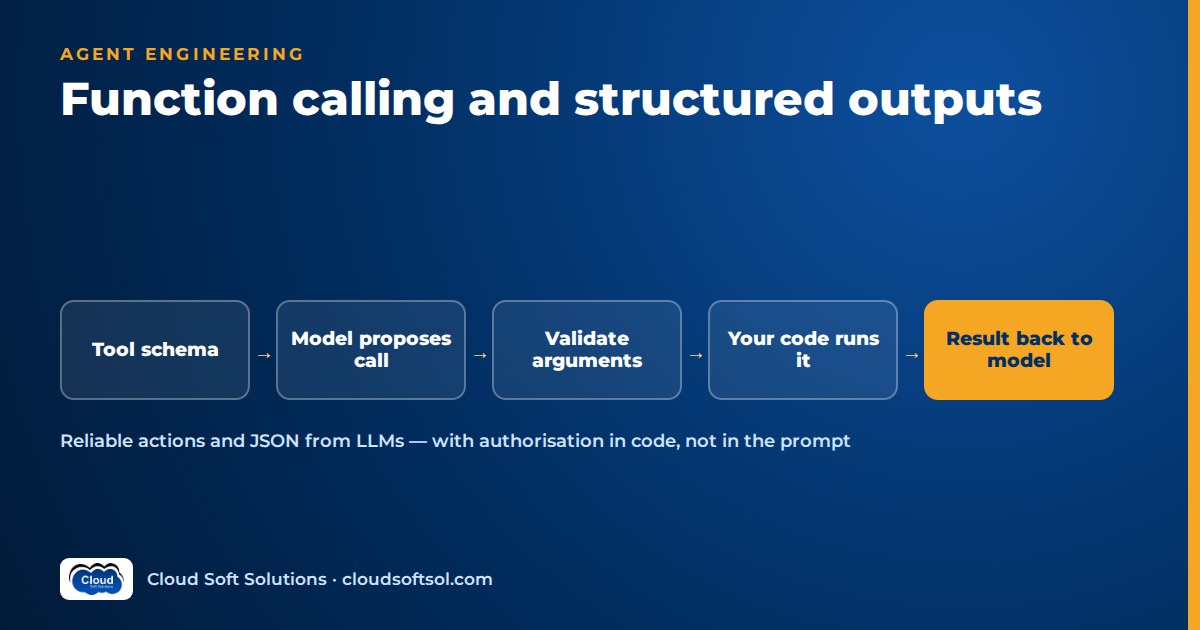
Function calling lets an LLM return a structured request, a tool name plus JSON arguments, which your code checks, runs and answers with a result. The model never runs anything itself. Structured outputs apply the same idea to the final answer: the model's reply follows a JSON Schema you supply. Reliability comes from engineering basics: clear tool definitions, validation on every call, error handling and authorisation in your own code.
This guide is provider-neutral: the mechanics are similar across major model APIs. For a refresher on how models generate text, read what an LLM is.
What function calling actually is
With each request you send the model a list of tool definitions. Each one has a name, a description and a JSON Schema for its parameters. The model then picks one of two kinds of reply:
- A normal text answer, when it can respond without outside help.
- One or more tool calls, each with a tool name, an arguments object and a call ID. The response is flagged so your code knows it is a tool request rather than a final answer.
Your application reads the tool call, checks the arguments, runs the real function (a database query, a REST call, a calculation) and sends the result back as a tool-result message linked to the call ID. The model reads that result and either answers the user or asks for another tool.
On naming: "function calling", "tool calling" and "tool use" mean the same thing. OpenAI's API originally said "functions" and later moved to a broader "tools" parameter; Anthropic says "tool use"; Gemini says "function calling". So "OpenAI function calling vs tool use" is about vocabulary, not two techniques. Real differences lie in field names, schema strictness and the parallel-call and tool-choice settings.
Crucially, the model never runs your function, connects to your database or sees your credentials. Everything that touches a real system is your code.
The tool-calling loop
User message + tool definitions
          |
          v
   +-------------+
   |    Model    |<-----------------------+
   +-------------+                        |
          |                               |
   text answer? ---yes---> return to user |
          | no (tool calls)               |
          v                               |
  Validate arguments (schema + rules)     |
          |                               |
  Authorise for this user, then execute   |
          |                               |
  Append results (by call ID) ------------+
Two practical details. The model is stateless: each turn you resend the user message, the assistant's tool-call message and the tool results, in order; drop the tool-call message and most providers reject the request. And always cap the loop with a maximum number of turns per request. Once the loop grows into multi-step planning, you are building an agent; agentic AI design patterns covers what sits on top of this loop.
Defining tools the model can use correctly
The model only knows what the tool definition tells it, so treat the definition as a prompt written for the model, not as API documentation. Most "the model picked the wrong tool" bugs come down to a poor definition.
Names
Use specific verb-noun names: get_claim_status, search_policies, create_callback_request. Avoid vague names like process or handle_request, and avoid near-duplicates such as get_customer and fetch_customer, which force the model to guess.
Descriptions
A good description says what the tool does, when to use it, when not to use it, and what it returns. For example: "Get the status of one claim by claim number. Do not use to search by name or date; use search_claims. Returns status, last update and handler." The "do not use" sentence often matters most.
Parameters as JSON Schema
- Types and formats. Use
integerrather thanstringwhere it fits, and give each field its own description with an example of the expected format ("Claim number, e.g. CLM-2026-004512"). - Enums for closed sets. If a field can only be
open,pendingorclosed, say so with anenum. Enums are among the cheapest reliability improvements you can make. - Required fields. List truly mandatory fields in
required. Then tell the model in the description or system prompt to ask the user for missing values rather than inventing them. - No extra fields. Set
additionalProperties: falseso stray keys are rejected rather than silently ignored. - Keep it flat. Deep nesting and long optional-field lists cause more argument errors; split huge tools.
How many tools?
More tools means more wrong choices and more input tokens on every request. Offer only the tools relevant to the current task or role; with dozens, classify the request first and expose the matching subset.
Structured outputs: JSON mode vs schema-constrained decoding
Sometimes you don't want an action at all, just machine-readable output: fields pulled from an invoice, a ticket classification, a routing decision. That is LLM JSON output, and there are three levels of control.
| Approach | What it ensures | What it does not |
|---|---|---|
| Prompt-only ("reply in JSON") | Nothing; the model usually complies | Valid JSON, correct fields, no extra prose |
| JSON mode | The output parses as JSON | That it matches your schema: keys may be missing, renamed or wrongly typed |
| Schema-constrained decoding (structured outputs) | The output matches the supplied JSON Schema's structure | That the values are true, sensible or consistent with each other |
Schema-constrained decoding works at generation time. The provider restricts which tokens the model can emit so only schema-valid output is possible. Major providers offer it for final responses (a response-format or response-schema setting) and for tool arguments (often a "strict" flag on the tool). Strict modes usually accept only a subset of JSON Schema and may require every property to be listed as required, with optional fields made nullable, so check your provider's current documentation.
A useful trick for structured outputs with a JSON Schema: an extraction can be modelled as a tool. Define a record_invoice_fields tool whose parameters are your target schema and force the model to call it. This works even where no separate structured-output setting exists.
Why you still validate
Constrained decoding enforces shape, not truth. A schema-valid response can still carry a made-up policy number, a negative amount or an end date before the start date. Validate every response in code with a library such as Pydantic, using field constraints and cross-field checks that JSON Schema cannot express. That also protects you when you switch providers or fall back to a model without strict mode.
Parallel tool calls and tool choice settings
Parallel tool calls
Many models can return several tool calls in one turn, for example fetching a customer's policy and their open claims at the same time. Your code should:
- Execute independent calls concurrently where safe (reads usually are).
- Return one result per call ID, including failures, in the next request. A missing result for any call usually breaks the conversation.
- Not assume order. If one call depends on another's output, the model should make them in sequence across turns.
Most APIs let you disable parallel calls, which is sensible when side effects must happen in strict order.
Tool choice
Providers expose a tool-choice setting, usually with these options (names vary):
- Auto: the model decides whether to call a tool. This is the default for conversational assistants.
- None: tools are visible but cannot be called, which is useful for a final summarising turn.
- Required / any: the model must call some tool.
- A specific tool: the model must call this one, which is ideal for extraction-as-a-tool and deterministic pipeline steps.
If code already knows the next step is classification, force the classifier tool rather than hoping the model picks it.
If you want to practise these loops end to end, against real cloud model endpoints with evaluation and tracing, Cloudsoft's AI, GenAI & Agentic AI course builds them in hands-on labs.
Error handling: invalid arguments, retries and timeouts
Invalid arguments
Without strict mode you will see malformed JSON, wrong types and missing fields; with it, values that pass the schema but fail business rules. Either way, don't crash and don't silently fix the arguments. Return a tool result marked as an error with a short, specific message: "claim_number must look like CLM-YYYY-NNNNNN; received '4512'. Ask the customer for the full claim number."
Retries
- Model-side retries: feed the error back and let the model try again, with a limit of a few attempts per call. After that, escalate to a human or reply with a graceful failure.
- Infrastructure retries: retry transient failures (timeouts, rate limits, upstream errors) in code with exponential backoff, before the model sees them.
- Idempotency: a retried write must not create two refunds. Use idempotency keys derived from the call ID or the business operation.
Timeouts
Give every tool a timeout and return a clear timeout error rather than hanging the conversation. For slow jobs, return "job started, ID X" plus a status-check tool. Keep results small, too: huge JSON dumps eat context.
Security: never trust the arguments
Every tool call is input written by a model that may have read attacker-controlled text: an email, a web page or a document retrieved in RAG. Prompt injection can steer which tool gets called and with what arguments. The defences belong in code:
- Authorise in code, not in the prompt. A system-prompt rule is a request, not a control. Take the user's identity from the authenticated session, never from a model-supplied
user_idargument, and enforce access checks in the backend. - Separate read tools from write tools. Reads can often run freely. Writes (refunds, account changes, emails) need tighter scopes, rate limits and, for high-impact actions, human confirmation outside the model.
- Least privilege and public-API hygiene. Run tools with the user's scoped credentials, not a shared admin account. Use parameterised queries and allow-lists; never pass arguments into shell commands or raw SQL.
- Treat tool results as untrusted too. Data that comes back can carry injected instructions into the next model turn.
- Log every call: tool, arguments, user, status and latency.
For layered controls around these tools, see AI guardrails and the wider enterprise AI security guide.
Illustrative scenario: an insurer's claims assistant
Consider an insurer building a claims assistant for policyholders. A sensible design offers three read tools (get_claim_status, list_my_claims, get_policy_summary) and one write tool (request_callback). Identity comes from the logged-in session, never a model argument, and the backend checks claim ownership. The callback tool validates its inputs, uses an idempotency key and is rate-limited. Payout changes are deliberately not tools: they stay with human handlers. When the model passes "my car claim" as a claim number, the validator's error tells it to call list_my_claims first, and the conversation recovers.
How function calling relates to MCP
Function calling is how a model asks for a tool. The Model Context Protocol (MCP) is how tools are packaged and shared across AI applications: a host lists server tools, passes them to the model via function calling and routes each call back. Everything here still applies inside an MCP server. For the full comparison, read MCP vs API and function calling; for the protocol itself, see what MCP is.
Illustrative Python sketch: a tool definition with validation
The sketch below is illustrative only. It is not tied to any SDK or version, and you would adapt how tool calls arrive and how results are returned to your provider's client library. It shows the core pattern: one Pydantic model drives both the JSON Schema sent to the model and the validation of what comes back.
# Illustrative sketch - adapt to your provider's SDK
from typing import Literal
from pydantic import BaseModel, Field, ValidationError

class GetClaimStatus(BaseModel):
    claim_number: str = Field(
        pattern=r"^CLM-\d{4}-\d{6}$",
        description="Claim number, e.g. CLM-2026-004512")
    detail: Literal["summary", "full"] = "summary"

TOOL = {
    "name": "get_claim_status",
    "description": (
        "Get the status of ONE claim by claim number. "
        "Do not use to search by name or date; "
        "use list_my_claims instead."),
    "parameters": GetClaimStatus.model_json_schema(),
}

def run_tool_call(raw_args: dict, session) -> dict:
    try:
        args = GetClaimStatus.model_validate(raw_args)
    except ValidationError as e:
        # Short, actionable error for the model
        return {"is_error": True,
                "message": f"Bad arguments: {e.errors()}"}
    claim = claims_api.get(args.claim_number)  # your code
    if claim is None or claim.owner_id != session.user_id:
        # Same answer for "missing" and "not yours"
        return {"is_error": True,
                "message": "No such claim for you."}
    return {"status": claim.status,
            "updated": claim.updated_at.isoformat()}
The ownership check uses session.user_id from your auth layer, not anything the model sent, and "not found" and "not yours" look identical, so the tool cannot probe which claims exist. In practice you would also add a timeout and logging. Need the Python foundation? Cloudsoft's Python training covers it.
Testing tool calls
Tool calling needs its own tests, separate from your general answer-quality checks:
- Unit tests for tools, with no model involved: validators accept good input and reject bad input, and authorisation blocks cross-user access.
- Tool-selection tests: realistic requests labelled with the expected tool (or "no tool"), rerun whenever descriptions, tools or models change.
- Argument-accuracy tests: check that the extracted arguments match expected values, not just that they validate.
- Trajectory tests for multi-step flows: the right calls in a sensible order, recovery after errors, and no unnecessary calls.
- Adversarial cases: injected instructions, requests for another user's data, unconfirmed write attempts.
Scoring trajectories, tool accuracy and task success is covered in depth in AI agent evaluation.
Common mistakes
- Trusting model arguments for identity or permissions, such as a
user_idparameter. - Thinking JSON mode means schema compliance. It only ensures parseable JSON.
- Skipping validation because strict mode is on. The shape is fine, but the values can still be wrong.
- Developer-oriented descriptions that say nothing about when to use the tool.
- Too many overlapping tools in every request.
- Crashing on bad arguments instead of returning an actionable error.
- Dropping tool results for some parallel calls, or losing the assistant's tool-call message from the history.
- No loop limit, no timeouts and no idempotency on write tools.
- Exposing high-impact writes without human confirmation.
Getting this right inside a real customer's identity, API and audit landscape is much of what Forward Deployed Engineers do. Cloudsoft's FDE PRO program covers that production side, including an MCP-based ServiceNow agent and a secure banking assistant.
Frequently asked questions
What is function calling in an LLM?
Function calling is a model API feature where you describe tools with names, descriptions and JSON Schema parameters. Instead of answering in text, the model can return a structured request to call a tool with specific arguments. Your application validates and executes it and returns the result.
Is tool calling the same as function calling?
Yes. Function calling, tool calling and tool use describe the same mechanism. Providers use different names and field formats, but in every case the model emits a structured tool request and your code executes it.
Does the model execute the function itself?
No. The model only produces the tool name and arguments as structured output. Your code decides whether to run it, runs it with its own permissions and returns the result, which is what lets you validate, authorise and log every action.
What is the difference between JSON mode and structured outputs?
JSON mode ensures the response is valid, parseable JSON but not that it follows your schema. Structured outputs with schema-constrained decoding restrict generation so the response matches a supplied JSON Schema. Neither ensures the values are correct, so you still validate in code.
Do I still need Pydantic if the provider enforces my schema?
Yes. Schema enforcement covers structure, while Pydantic or similar validation covers business rules such as ranges, formats, cross-field consistency and permissions.
What are parallel tool calls?
Parallel tool calls are several tool requests returned by the model in a single turn, each with its own call ID. Your code can run independent calls concurrently but must return one result per call ID. You can usually disable parallel calls when actions must happen in strict order.
How should I handle invalid tool arguments?
Return a tool result marked as an error with a short, specific message explaining what was wrong and how to fix it, then let the model retry a limited number of times. Retry network and rate-limit failures in code with backoff, and escalate to a human if retries run out.
How is function calling related to MCP?
Function calling is how a model requests a tool. MCP, the Model Context Protocol, is a standard way to package tools in servers so many AI applications can share them. An MCP host passes server tools to the model through function calling and routes each call back to the right server.
Want to build tool-using assistants that hold up in production? Explore Cloudsoft's GenAI and agentic AI training in Hyderabad, in our Ameerpet classroom beside the Metro or live online. Call +91 96660 19191 for a free demo. Preparing for interviews? Work through the agentic AI interview questions.


