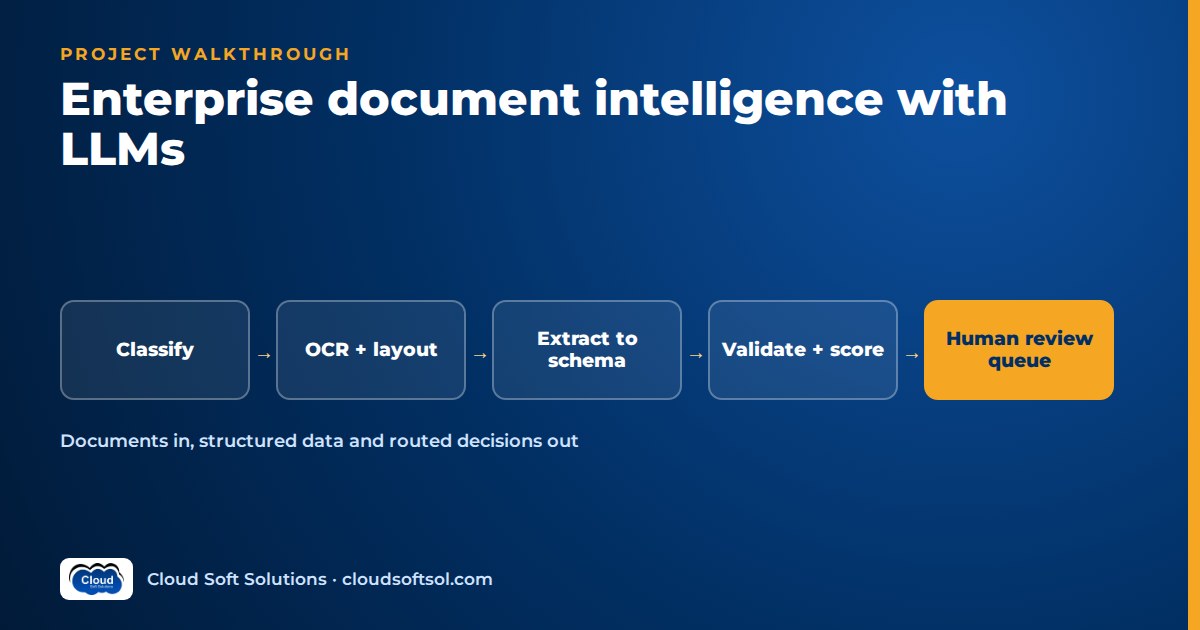
This is a document intelligence project walked through the way a Forward Deployed Engineer would deliver it: documents go in, structured data and decisions come out. An enterprise document intelligence pipeline is only "done" when every extracted field carries evidence and a confidence, low-confidence work lands in a human review queue instead of a downstream system, and the straight-through rate is measured honestly against a labelled test set. The scenario is illustrative; the build plan at the end turns it into a portfolio project you can defend in an interview.
Our RAG knowledge assistant project answers questions over documents. This one turns documents into structured data and routing decisions, so the hard problems are schemas, scan quality, validation and confidence, not retrieval.
Business problem
Illustrative scenario. Consider a health and motor insurer whose claims operations team, partly run from a GCC in Hyderabad, receives claim packs by email, a customer portal, a partner hospital channel and scanned post. A pack can mix a claim form, hospital bills, pharmacy receipts, an identity document, a garage estimate and a covering letter, from clean PDFs to angled phone photos and handwritten forms.
Today, data-entry staff open each pack, work out what each page is, and key policy number, claimant details, dates, line items and amounts into the claims system. The symptoms:
- Claims sit in a queue for days before anyone even reads them.
- Keying errors (a swapped date, a missed line item) cause rework and disputes later.
- Volumes spike after floods or festival travel seasons, and the team cannot scale overnight.
The customer wants claims registered faster with fewer errors, not "AI that reads PDFs". From AI demo to enterprise outcome: extracting a clean invoice is easy; handling a blurry handwritten form safely is the job.
Requirements
Discovery with claims, data-entry staff, fraud, compliance and security produces these requirements.
Functional
- Classify every page of a claim pack by document type and split multi-document PDFs.
- Extract an agreed set of fields per document type into a versioned JSON schema.
- Every field links to its source page and bounding box.
- Apply business validation rules.
- Route each document: straight through to the claims system, or to a human review queue with the reason.
- Never approve or reject claims; assessors decide.
Non-functional
- Personal and health data stays in the customer's account and approved region.
- Clear surge backlogs within an agreed window, inside model rate limits.
- Full audit trail: original file, model and prompt version, extracted values, reviewer corrections.
- Cost per document tracked and within an agreed budget.
Success metrics
| Metric | How it is measured | Owner |
|---|---|---|
| Field-level precision and recall | Labelled test set, per field and document type | Engineering + claims SME |
| Straight-through rate (STR) | Documents with zero human touch, audited by sampling | Operations |
| Error escape rate | Wrong values found in straight-through documents | Quality team |
| Time to register a claim | Receipt to claim created, before vs after | Operations |
| Cost per document | OCR + model + compute + review time | Engineering + finance |
Architecture
The pipeline is a sequence of stages connected by a queue, so each stage scales and fails independently.
Email / portal / scans
        |
        v
 [1] Ingest: store original, hash, dedupe
        v
 [2] Classify + split pages by doc type
        v
 [3] OCR + layout: text, tables, boxes
        v
 [4] LLM extraction -> JSON schema
        v
 [5] Validation rules (deterministic)
        v
 [6] Confidence scoring per field
        |
   all fields high + rules pass?
     | yes                  | no
     v                      v
 [8] Route to claims   [7] Human review
     system, DMS           queue + UI
                            |
                corrected --+--> [8]
Key decisions:
- OCR and layout parsing are separate from LLM extraction. A managed service such as Azure AI Document Intelligence or Amazon Textract (or an open-source parser for clean digital PDFs) returns text, tables, key-value pairs, word confidences and coordinates; the LLM maps that into the schema. Coordinates become evidence, and either layer can be swapped.
- Deterministic code owns validation and routing. The model proposes values; rules and thresholds decide what happens to them.
- State lives in PostgreSQL (documents, extractions with evidence, reviews); originals in object storage.
Data
Schema design
The schema is the contract with downstream systems, so design it with the claims system owners. Rules that hold up:
- One schema per document type (claim form, hospital bill, ID document, garage estimate, letter), versioned like an API.
- Every field is nullable. "Not present on the document" must be expressible; otherwise the model invents a value to fill the slot.
- Normalised types: dates in ISO format, amounts as decimal plus currency, codes as enums where a list exists.
- Evidence per field: raw text as printed, page, bounding box.
- Line items as arrays, with a separately extracted printed total so validation can cross-check.
{
  "doc_type": "hospital_bill",
  "schema_version": "1.3",
  "admission_date": {"value": "2026-03-14",
    "raw": "14/03/26", "page": 1, "bbox": [...]},
  "line_items": [...],
  "printed_total": {...}
}
Handwriting and poor scans
This is where demos break. Plan for it explicitly:
- Pre-processing: de-skew, rotate, crop and denoise images before OCR. Detect blank and near-blank pages.
- Quality gate: score each page (resolution, blur, mean OCR confidence). Below a threshold, route to review or request a rescan instead of extracting garbage confidently.
- Handwriting: managed OCR handles it to a degree, but accuracy varies. Measure it separately and apply stricter thresholds to handwritten fields.
- Multimodal models read page images directly and help with stamps and tick boxes. Use them as a second opinion on hard pages, not a replacement for OCR coordinates.
Label a de-identified sample of real packs early. Its quality mix, not a vendor demo, tells you what straight-through rate is achievable.
LLM
The model's job is narrow: given the layout output for a classified document, fill the schema. Practical patterns:
- Structured output: use the platform's JSON schema or tool-calling mode, validate with Pydantic, retry on invalid JSON.
- Prompt per document type, with field definitions written by claims SMEs ("admission date is the date the patient was admitted, not the bill date") and a few worked examples.
- Instruct for null: "if a field is not on the document, return null; never infer."
- Two tiers: a cheaper model for classification; a more capable one for complex documents such as itemised bills.
Validation rules
Deterministic checks catch what the model cannot know: policy exists and is active on the incident date, line items sum to the printed total, discharge is not before admission, claimant matches a listed member (fuzzy match). Each failure carries a reason code.
Confidence scoring
Do not ask the model "how confident are you?" and trust the number. Combine signals per field:
- OCR word confidences for the evidence span.
- Whether the extracted value appears verbatim (or normalised) in the OCR text.
- Validation results for rules touching that field.
- Agreement between two extraction passes on high-value fields.
- Page quality score and whether the field was handwritten.
Combine them into a score and calibrate thresholds per field on the labelled set: pick the threshold where precision of auto-accepted values meets the target agreed with the business. A policy number and a claim amount deserve stricter thresholds than a hospital's address.
RAG
This pipeline needs very little RAG. Two narrow uses earn their place: fetching the policy record to validate fields (really a database lookup), and retrieving previously corrected documents as few-shot examples for unusual layouts. Retrieval mechanics are in the knowledge assistant walkthrough linked above.
Agent
The agent is deliberately light: an exception handler that runs only when a document fails validation or confidence checks. It resolves cheap exceptions and explains the rest to a human.
exception (doc_id, reason codes)
        v
 cheap fix possible?
  - re-OCR page at higher resolution
  - re-extract with image model
  - look up policy by name + DOB
        | resolved            | not resolved
        v                     v
 re-run validation      write review note:
        |               what failed, why,
        v               suggested value
 pass -> route          -> review queue
Build it as a small LangGraph state machine or plain Python with bounded steps. Its tools are read-only or re-run a stage; it cannot write to the claims system, and a resolved exception still passes the same validation and thresholds.
Human-in-the-loop UI
The review queue is where value is won or lost. A good reviewer screen shows:
- The page image on one side, extracted fields on the other; clicking a field highlights its bounding box.
- Only the flagged fields highlighted, with the reason code and the agent's note, so reviewers confirm rather than re-key.
- Keyboard-first correction, and one-click "rescan requested" or "wrong document type".
- Priority by urgency and age; assignment by skill.
Every correction is stored with the original value. Those corrections are your next labelled data and the input to threshold tuning.
Tools
| Tool | Purpose | Guardrails |
|---|---|---|
| get_policy | Validate policy number, members, dates | Read-only; scoped to fields needed |
| reocr_page | Higher-resolution or alternate OCR | Budget cap per document |
| reextract_fields | Image-based second pass | Only flagged fields |
| create_review_task | Push to review queue with note | Idempotent per doc_id |
| register_claim | Create claim in claims system | Called by routing code only, never by the agent |
MCP/API
The pipeline exposes a REST API (POST /documents, GET /documents/{id}) plus webhooks. Claims and document-management integrations use their existing APIs with a least-privilege service account and idempotency keys, so a retried batch never registers a claim twice.
MCP (Model Context Protocol, an open protocol introduced by Anthropic in late 2024 for connecting AI applications to tools and data) is useful at the edges: exposing get_policy and document status as an MCP server lets other assistants, such as an assessor copilot, reuse them. The same extraction-validation-exception pattern appears in our finance AP AI agent project, where invoices replace claim documents.
If you want to practise this style of delivery (typed integrations, MCP servers, evaluation gates and deployment) with a trainer reviewing your decisions, FDE PRO covers it through five enterprise projects and the GlobalBank capstone.
Security
Claim packs are dense with personal and health data, so PII handling is designed in from day one:
- Data minimisation: extract only fields the process needs and mask identifiers not needed in full; compliance sets the rules, including obligations under India's Digital Personal Data Protection Act.
- Encryption and access: customer-managed keys at rest; reviewers see only their line of business's queues via SSO groups (for example Microsoft Entra ID).
- Logs and traces: store document IDs and field names, not values.
- Model access: private endpoints to the model service in the approved region, and confirmed terms that inputs are not used for training.
- Prompt injection: a covering letter can contain instructions. Treat document text as data; the agent's tools cannot change claim outcomes.
- Retention: delete page images and OCR output on an agreed schedule.
The wider threat model is in AI security for enterprises.
Cloud
- On AWS: S3 for originals, Amazon Textract for OCR and layout, Amazon Bedrock for extraction, SQS between stages, workers on ECS or EKS, RDS for PostgreSQL, KMS and VPC endpoints. Details in AWS for AI FDE engineers.
- On Azure: Blob Storage, Azure AI Document Intelligence, Azure OpenAI, Service Bus queues, workers on AKS or Container Apps, Azure Database for PostgreSQL, Key Vault and private endpoints. See Azure for FDE engineers.
Scaling batch workloads
Claims arrive in bursts. Design for backlogs:
- Workers that autoscale on queue depth, one queue per stage.
- A rate limiter in front of OCR and model calls; back off on throttling.
- Priority lanes: urgent health claims ahead of routine backlog.
- Discounted batch inference, where offered, for the backlog lane.
- Idempotent stages keyed on document hash, so retries never duplicate claims.
Observability
Trace each document through every stage with OpenTelemetry spans, and use Langfuse or LangSmith for the LLM calls (prompt version, model ID, tokens, latency). Dashboards that matter here:
- Documents per stage and queue age, so backlogs are visible early.
- STR by document type and channel; a sudden drop often means a new form layout or scanner problem.
- Top validation failure codes and top corrected fields.
- Cost per document by type, broken into OCR, model and review time.
More patterns in AI observability.
Evaluation
Build a labelled test set of de-identified packs that mirrors the real mix: channels, document types, clean and poor scans, handwriting, and edge cases such as multi-page bills and missing fields. SMEs label the correct value (or null) for every field.
Field-level precision and recall
- Precision: of the values the system extracted, how many were correct?
- Recall: of the values present on the document, how many did it extract correctly?
- Report per field and document type, not one blended number. Define "correct" per field: exact match for policy numbers, normalised match for dates and amounts, fuzzy match for names and addresses.
- A value invented for an absent field is a precision error, and the one that hurts most.
Straight-through rate, measured honestly
STR is easy to inflate. Measure it honestly:
- Count a document as straight-through only if no human touched it at any stage, including rescans and reclassification.
- Report STR together with the error escape rate: audit a random sample of straight-through documents every week. A high STR with escaping errors is worse than a lower STR.
- Report it by channel and document type.
- Measure on the live mix and never drop "hard" documents from the denominator.
Run the test-set evaluation in CI on every prompt, model or schema change. The general method is in our LLM evaluation guide.
Deployment
- GitHub Actions runs unit tests, schema tests and the extraction evaluation; the build fails if any critical field's precision drops below its threshold.
- Container images are built, scanned and pushed; Terraform manages infrastructure; Argo CD syncs Kubernetes manifests on EKS or AKS.
- Shadow mode first: the pipeline processes live packs in parallel with manual entry, and you compare its output against what staff keyed in. Nothing is routed automatically yet.
- Then enable straight-through for one document type and channel with conservative thresholds, and widen as the audited error escape rate stays within target.
Prompts, schemas and thresholds are versioned configuration and go through the same gate as code.
ROI
Start from cost per document, then compare with the current manual cost. All inputs below are hypothetical placeholders to show the method, not results.
| Input | Placeholder | Where the real value comes from |
|---|---|---|
| Documents per month (N) | e.g. 50,000 | Intake logs |
| OCR cost per page × pages per doc | vendor price × average | Price sheet, sample |
| Model tokens per doc × price | from traces | Langfuse / billing |
| Compute and storage per doc | from billing | Cloud cost reports |
| Review rate (1 − STR) | measured | Pipeline metrics |
| Minutes per review (Mr) vs manual entry (Mm) | e.g. 2 vs 8 | Timed sample |
| Loaded cost per hour (C) | customer's figure | Finance |
Cost per document = OCR + model + compute + (1 − STR) × Mr ÷ 60 × C. Manual cost per document = Mm ÷ 60 × C. Monthly saving = N × (manual − automated) − platform run and support cost. Report rework avoided and faster registration separately. Reducing cost per document (cheaper classifiers, skipping the LLM for clean structured forms, batch lanes) is covered in cloud cost optimisation for AI.
Build it yourself: milestone plan
Use synthetic documents only: generate forms and bills, fill some by hand and photograph them badly. Never use real personal data.
| Milestone | Deliverable |
|---|---|
| 1. Dataset | A small set of synthetic packs across four document types, labelled field by field |
| 2. Ingest and classify | Upload API, storage, page splitter and classifier with accuracy reported |
| 3. OCR and extraction | Managed OCR or open-source parser, schema-validated JSON with evidence |
| 4. Validation and confidence | Rule engine, per-field scores, calibrated thresholds |
| 5. Review UI and exception agent | Side-by-side reviewer screen; bounded exception handler |
| 6. Evaluation | Field precision/recall, STR and error escape rate in a report and in CI |
| 7. Scale and ops | Queue workers, rate limiting, tracing, Terraform, deploy to AWS or Azure |
| 8. Value | Cost-per-document breakdown and ROI method, README, demo video |
In the README, show a poor scan routed to review with a clear reason, and an honest STR beside its audited error rate. For more portfolio ideas, see 10 projects every AI FDE should build.
Frequently asked questions
What is document intelligence?
Document intelligence is the automated classification and extraction of information from documents such as forms, bills, IDs and letters into structured data, with validation and human review for uncertain cases.
How is intelligent document processing with LLMs different from traditional OCR?
OCR turns images into text and layout. An LLM maps varied layouts into a fixed schema and normalises values where templates struggle. OCR remains essential for coordinates and word confidences.
Is a document AI pipeline different from a RAG project?
Yes. RAG retrieves passages to answer questions. A document AI pipeline turns every incoming document into structured fields and routing decisions, so its core problems are schemas, scan quality, validation, confidence and human review.
How do you handle handwriting and poor-quality scans?
Pre-process images, score page quality, and route low-quality pages to review or a rescan request. Measure handwriting accuracy separately and apply stricter thresholds to handwritten fields.
How should straight-through rate be measured?
Count a document as straight-through only if no human touched it at any stage, report it by document type and channel, and always pair it with an error escape rate from regular random audits of straight-through documents.
How do you protect PII in AI document extraction?
Extract only needed fields, mask identifiers, encrypt data, restrict reviewers by SSO group, redact values from logs and traces, use private model endpoints in an approved region, and enforce retention.
Ready to go from AI demo to enterprise outcome? Cloudsoft's AI Forward Deployed Engineer course is a 12-week program with five enterprise projects and the GlobalBank capstone, in our Ameerpet classroom beside Ameerpet Metro or live online. Call +91 96660 19191 for a free demo.


