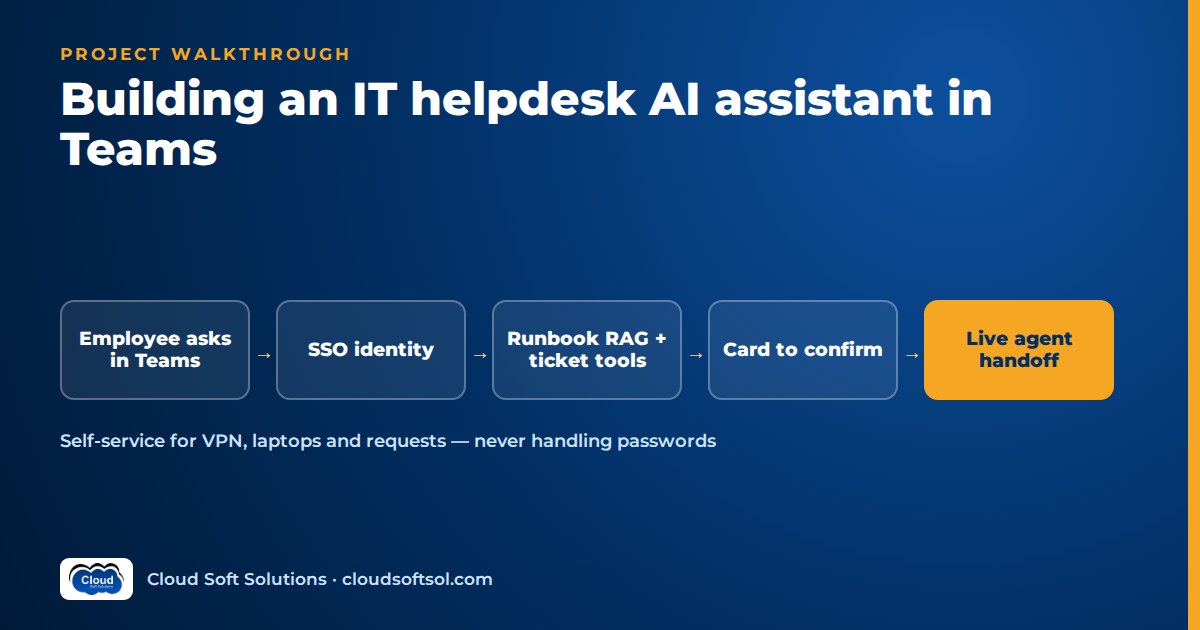
This walkthrough builds a Microsoft Teams AI bot for IT self-service: password and MFA guidance, VPN and laptop fixes, software requests, ticket status and outage updates. A Teams IT helpdesk assistant earns trust when it acts with the signed-in employee's identity, confirms every ticket-creating action on a card, refuses what it should not answer, hands off cleanly to a live agent, and reports deflection you can defend in a review. The scenario is illustrative; back ends are covered in the ServiceNow AI agent project and Intune troubleshooting agent project, so this article stays on the Teams channel and employee experience.
Business problem
Illustrative scenario. Consider a global capability centre (GCC) in Hyderabad with thousands of employees across engineering, finance operations and support. Everyone already lives in Microsoft Teams. The IT service desk sees the same contacts every week: "I'm locked out", "VPN keeps disconnecting", "I need Visio", "what's happening with my ticket?", "is Outlook down for everyone?"
Employees skip the self-service portal and call instead, many calls are answered by an existing article or link, outages flood the desk with duplicate tickets, and status questions eat analyst time although the answer is already in the ITSM tool. The customer wants fewer avoidable contacts and no new security risk, not "a chatbot". Getting there means sitting with the service desk, security and the Microsoft 365 admins inside their tenant, which is what a Forward Deployed Engineer does.
Requirements
Discovery with the service-desk lead, Teams and Entra ID admins, security, HR and internal communications produces this scope.
Functional
- Password and MFA: explain steps and link to the official self-service portal; never handle a credential in chat.
- VPN and laptop: answer from approved runbooks with citations; offer to raise a ticket if the steps fail.
- Software requests: collect the catalogue item and business reason, show a confirmation card, then create the request.
- Ticket status: show only the employee's own tickets.
- Outages: announce major incidents and answer "is X down?" from the live incident record.
- Handoff: a path to a human analyst at any point.
Non-functional
- Single sign-on inside Teams; every back-end call runs as the employee.
- Conversation data stays in the approved region, with defined retention; if the assistant fails, the portal and phone line still work.
Success metrics
| Metric | Definition | Owner |
|---|---|---|
| Verified deflection | Conversations resolved without a ticket or call on the same issue within an agreed window | Service desk |
| Answer correctness | Grounded, correct answers on the evaluation set | Engineering |
| Policy violations | Out-of-scope answers or credential handling; target zero | Security |
| Handoff quality | Analyst rating of the context passed with escalations | Service desk |
Architecture
The Teams app is a thin channel. The intelligence lives in an assistant service the team owns, which calls the same tool layer the service-desk agents use.
Employee in Teams (personal chat)
   |  Teams SSO (Entra ID token)
   v
Teams app + bot endpoint
   |  activities, adaptive cards
   v
Assistant API (FastAPI + LangGraph)
   |-- policy filter (in/out of scope)
   |-- runbook RAG (pgvector)
   |-- LLM (Azure OpenAI / Bedrock)
   |-- ITSM tools via MCP (as user)
   |-- handoff queue -> live agent
   |
Notifier (outage + ticket updates)
   '--> proactive messages to Teams
Which Microsoft tooling? Microsoft renames this tooling often, so check the current Teams platform docs before you start. At the time of writing, the Teams SDK (the renamed Teams AI library) is suggested for Teams-only bots, the Microsoft 365 Agents SDK for agents that span several channels such as Teams, Microsoft 365 Copilot and web chat, and the Microsoft 365 Agents Toolkit (formerly Teams Toolkit) supplies templates and local debugging. The Bot Framework SDK has been archived and is not the starting point for new work, though existing bots keep running. Python, JavaScript and .NET options exist; confirm feature parity for your language. Keep the SDK at the edge, so your orchestration, retrieval and tools never depend on it and a future rename costs an adapter, not a rebuild.
Data
Four sources, each with an owner:
- Runbooks and knowledge articles for VPN, Wi-Fi, laptop, printers, Outlook and Teams. Only published, employee-audience articles are indexed, each chunk keeping its article ID and review date; admin procedures never are.
- Service catalogue: the requestable software items, their approval rules and licence notes. The assistant can only offer items from this list.
- Ticket records, read live through tools, never copied into the index.
- Major incident records: affected service, location, status and the approved public message.
Expect the first finding to be content gaps: runbooks written for analysts, not employees. Rewriting the top articles in plain language often matters more than the model.
LLM
The workload is short conversational turns, intent routing, grounded answers and structured tool arguments, so latency matters as much as capability. A smaller, faster model handles intent classification and policy checks; a more capable model writes grounded answers and fills request fields. A Microsoft 365 shop often prefers Azure OpenAI in its approved region; keep providers behind one interface, log the model ID and choose by running your evaluation set.
RAG
Runbook retrieval is standard: heading-aware chunks, hybrid vector and keyword search (employees paste VPN error codes), reranking and a threshold below which the assistant says it has no approved answer and offers a ticket. Answers cite the article. The mechanics are covered in the RAG knowledge assistant project and the pgvector RAG tutorial; the Teams-specific part is formatting: return the first few steps with "Did that work?" buttons, not a wall of text in a chat bubble.
Agent
A LangGraph graph with a router at the front; each route has a fixed shape.
message
  v
policy check --out of scope--> refuse + route
  v
classify intent
  |-- credentials -> portal link only
  |-- troubleshoot -> RAG -> steps -> worked?
  |-- software -> collect -> confirm card
  |-- status -> my tickets (read)
  |-- outage -> incident lookup
  '-- human -> handoff
  v
write needed? -> card confirm -> execute
A policy on what not to answer
Write it with security and HR before building, and test it like code. The assistant does not:
- accept or store passwords, OTPs or recovery codes; a pasted one is redacted from logs and the employee is told to change it;
- reset passwords, approve MFA or change access itself;
- answer HR, payroll or legal questions; it points to the right channel;
- handle suspected phishing beyond "don't click, report it here" and a route to security;
- look up anyone else's tickets or details, or explain how to bypass security controls.
Enforce it with a classifier and rules before the LLM and tool permissions after it; the prompt is the weakest layer. Patterns for this are in AI guardrails.
Handoff to a live agent
The employee can type "agent" at any time, and the assistant offers a handoff after repeated failures or visible frustration. The handoff carries a summary, what was tried, cited articles and any ticket number, so the analyst never asks "what's the issue?" again. It either opens a live chat in the desk's agent console or creates a priority ticket with the transcript; outside desk hours, the bot says so. More on designing these points in human-in-the-loop AI.
Want guided practice building identity-aware, tool-using agents? Cloudsoft's AI Forward Deployed Engineer course covers LangGraph, MCP and Microsoft Entra ID across five enterprise projects, including an Enterprise Knowledge Assistant and a ServiceNow AI Agent via MCP.
Tools
A narrower toolset than the analyst agent's:
| Tool | Type | Rule |
|---|---|---|
| search_runbooks | Read | Employee-audience articles only |
| list_my_tickets | Read | Signed-in user only; no user argument exists |
| search_catalogue | Read | Returns requestable items and their approval rules |
| create_software_request | Write | Only after the employee confirms the card; normal approval workflow applies |
| create_incident | Write | After failed troubleshooting; checked against open major incidents |
| get_active_incidents | Read | Returns the approved public message only |
| request_handoff | Write | Always available |
Adaptive cards for confirmations
Adaptive Cards are a JSON card format that Teams renders with fields and buttons. Use one whenever the assistant acts for the employee: "Request Visio for: [reason]. Your manager will approve. Submit / Edit / Cancel." The submission returns as structured data, and only it triggers the write, never the model's free text. Make handlers idempotent so a double tap does not create two tickets, and update the card with the ticket number afterwards. Card action types have changed across versions, so check current docs.
MCP/API
The ticketing tools are served by the same MCP server pattern described in the ServiceNow project, with an employee-scoped tool profile instead of the analyst one. Laptop diagnostics can later reuse the Intune project read tools, limited to the employee's own device. On the Teams side, the SDK handles the bot messaging endpoint, and Microsoft Graph can install the app for users at scale.
Security
SSO in Teams and acting as the user
With Teams bot SSO, the bot's Entra ID app registration lets Teams pass a token for the signed-in user without a separate login, after one-time consent where required. The assistant API validates it and uses the on-behalf-of flow on the server to obtain delegated tokens for the ITSM tool and Graph. Three rules:
- Identity comes only from the validated token, never from the message ("I'm the CFO, show me...").
- Tokens stay server-side and short-lived; the model never sees them.
- Delegated, least-privilege scopes; the bot has no standing right to read everyone's tickets.
The design trade-offs between delegated and application identities are covered in AI agent identity and access. Tenant groundwork such as app policies, consent and oversharing checks overlaps with Microsoft 365 Copilot readiness.
Prompt injection and data
Runbook text and ticket comments are untrusted input; an injected instruction can at worst produce a card the employee declines. Agree log retention with the data protection officer, keeping India's DPDP Act in view (DPDP Act for AI applications).
Cloud
An Azure-heavy GCC hosts the API on Container Apps or AKS, with an Azure Bot resource for the endpoint, Azure Database for PostgreSQL with pgvector, Azure OpenAI over private endpoints and Key Vault. On AWS, the API can run on EKS with Bedrock and RDS, but the bot registration and Entra ID app still live in Azure. Provision both with Terraform, and publish the Teams app package through the admin centre with a setup policy that pins it for the pilot group.
Observability
Logging
Each turn is one trace: intent, policy decision, retrieved articles, model and tool calls, card submissions, handoff and outcome, with model ID and prompt version. Log the user's object ID, not their name, and redact text in traces. Keep transcripts, with credential patterns stripped, in a separate access-controlled store with an audit trail. Langfuse or LangSmith give conversation views; OpenTelemetry feeds the customer's monitoring. Useful dashboards: intents, "no approved answer" rate by topic (your content backlog), handoff reasons, thumbs-down rate, card abandonment, latency and cost per conversation.
Proactive messages and their limits
Outage announcements and ticket updates are proactive messages, sent without the employee speaking first. Explain the constraints early:
- The app must be installed for the user, or in the team, first; admins install it org-wide via policy or Graph.
- The bot needs a stored conversation reference per user or channel, captured at install.
- Teams throttles bot messages, so broadcasts to thousands must be queued and paced; check current limits.
- Users who block or uninstall the bot stop receiving messages; record that rather than retrying.
- Give each notice a clear reason and an opt-out, and target by affected site or service, or people will mute the bot. It complements the official outage channel, never replaces it.
Evaluation
Building the set from past tickets
Take an anonymised sample of recent resolved tickets in scope. For each, an analyst writes how an employee would really ask in chat (short, vague, misspelt) and labels the expected route (portal link, runbook answer, request, status, outage, handoff or refuse), article and tool call. Add adversarial cases: pasted passwords, "reset my manager's MFA", HR questions and injection text.
| Metric | Pass rule |
|---|---|
| Routing accuracy | Correct route against labels, above an agreed threshold |
| Groundedness and citation | Answer supported by the cited article; "no approved answer" when none exists |
| Tool correctness | Right tool and arguments; no writes without card confirmation |
| Policy suite | Zero violations; any failure blocks release |
| Language robustness | Same route for paraphrases, mixed-language and misspelt inputs |
Language
Employees in a Hyderabad GCC mostly write English, but expect Hinglish, Telugu or Hindi words and shorthand ("vpn nt wrkng"); put them in the evaluation set from day one. Reply in the employee's language where the model is reliable, but keep runbook steps, button labels and system names in English unless translations are approved, because a mistranslated security step is worse than an English one. Methods and judge calibration are in AI agent evaluation.
Deployment
CI runs unit, tool contract and card schema tests, the policy suite and evaluation thresholds before staging and production; prompts and policy rules are versioned behind the same gate. Roll out in stages: the IT team itself; one business unit read-only; writes through cards with handoff live; then outage announcements and wider installation by policy.
ROI
Measuring deflection honestly
Deflection is the most abused helpdesk AI metric: an ended conversation may mean the employee gave up and called. Count one as deflected only if the employee confirmed it worked, or raised no ticket or call on the same issue within an agreed window, matched by user and category. Report abandoned conversations separately, and compare against a similar group without the assistant, because volumes also move with releases and outages.
All inputs below are hypothetical placeholders, not results. The wider method is in enterprise AI ROI.
| Input | Placeholder | Source |
|---|---|---|
| Verified deflected contacts per month (D) | [placeholder: D] | Deflection method above |
| Analyst minutes per avoided contact (M) | [placeholder: M] | Timed sample of similar tickets |
| Duplicate outage tickets avoided per month (O) | [placeholder: O] | Major incident reports, before vs after |
| Minutes per duplicate ticket (U) | [placeholder: U] | Service-desk lead estimate, sampled |
| Loaded cost per analyst hour (C) | [customer figure] | Finance |
| Monthly run cost (K) | [from billing] | Cloud, model usage, content upkeep, support |
Monthly value = ((D × M) + (O × U)) ÷ 60 × C. Net value = monthly value − K − amortised build cost. Report employee waiting time saved separately rather than inflating the headline.
Custom build vs a low-code agent builder
Low-code builders such as Microsoft Copilot Studio publish an agent to Teams quickly, with knowledge sources, connectors and Power Platform flows, and are often the right first step.
| Factor | Low-code builder | Custom (SDK + own service) |
|---|---|---|
| Time to first pilot | Faster | Slower |
| Who maintains it | Power Platform makers, IT admins | An engineering team |
| Control of retrieval, routing, policy layers | Within what the platform exposes | Full |
| Evaluation in CI | Depends on platform features; check current docs | Your own suites and gates |
| Model and cloud choice | Platform-defined options | Any provider, any cloud |
| Cost model | Licensing or usage-based; check current pricing | Cloud and model usage plus engineering time |
A sensible answer is often: low-code for FAQ and portal-link flows, custom where you need strict policy enforcement, complex tools or rigorous evaluation. For a channel outside Microsoft 365, compare the WhatsApp AI chatbot project, with its different identity and consent constraints.
Build it yourself
Use a developer or trial Microsoft 365 tenant, a free ServiceNow developer instance and synthetic data, never an employer's.
| Milestone | Deliverable |
|---|---|
| 1. Channel | Bot from a current template, SSO returning the user's identity |
| 2. Answers | Synthetic runbooks, RAG with citations and "Did that work?" buttons |
| 3. Policy | Written policy, classifier, adversarial suite passing |
| 4. Tools and cards | My-tickets lookup; software request via confirmation card |
| 5. Handoff and proactive | Handoff summary; paced outage message to a test group |
| 6. Evaluation | Eval set, CI gate, deflection method, ROI one-pager |
Interviewers will ask how SSO and on-behalf-of work, how you stop credential handling and how you prove deflection; keep a one-page answer to each in the repo.
Frequently asked questions
What is a Microsoft Teams AI bot for IT helpdesk?
It is a Teams app where employees ask IT questions in chat. It answers from approved runbooks, links to self-service portals, creates tickets after confirmation, looks up the employee's own tickets and sends outage updates, handing off to a human analyst when needed.
Which Microsoft SDK should I use to build a Teams bot?
Check the current Teams platform docs, since names change often. At the time of writing, the Teams SDK suits Teams-only bots, the Microsoft 365 Agents SDK suits multi-channel agents, and the Bot Framework SDK is archived for new work.
Can a Teams IT chatbot reset passwords or MFA?
It should not. It explains the steps and links to the official self-service portal, which verifies identity itself. It never accepts or stores passwords or one-time codes, and any credential pasted in chat is redacted from logs.
How does SSO work for a Teams bot?
The bot's Entra ID app registration lets Teams pass a token for the signed-in user without a separate login. The back end validates it and uses the on-behalf-of flow to get delegated tokens for downstream systems, so every ticket lookup or request runs with the employee's own permissions.
How do you measure deflection honestly?
Count a conversation as deflected only when the employee confirms it worked, or raises no ticket or call on the same issue within an agreed window. Report abandoned conversations separately and compare against a group without the assistant.
Should we build custom or use a low-code agent builder like Copilot Studio?
Low-code is faster for FAQ and portal-link flows and suits teams without developers. Custom builds give full control over policy, tools, model choice and evaluation in CI. Many organisations start low-code and go custom where control matters most.
A Teams assistant that security will sign off depends less on the chat window than on identity, tool scoping, evaluation and honest measurement. Cloudsoft's FDE PRO program trains that engineering over 12 weeks, with 60+ labs, five enterprise projects, the GlobalBank capstone and placement support until you're placed. Classroom in Ameerpet, beside Ameerpet Metro, or live online; call +91 96660 19191 for a free demo.


