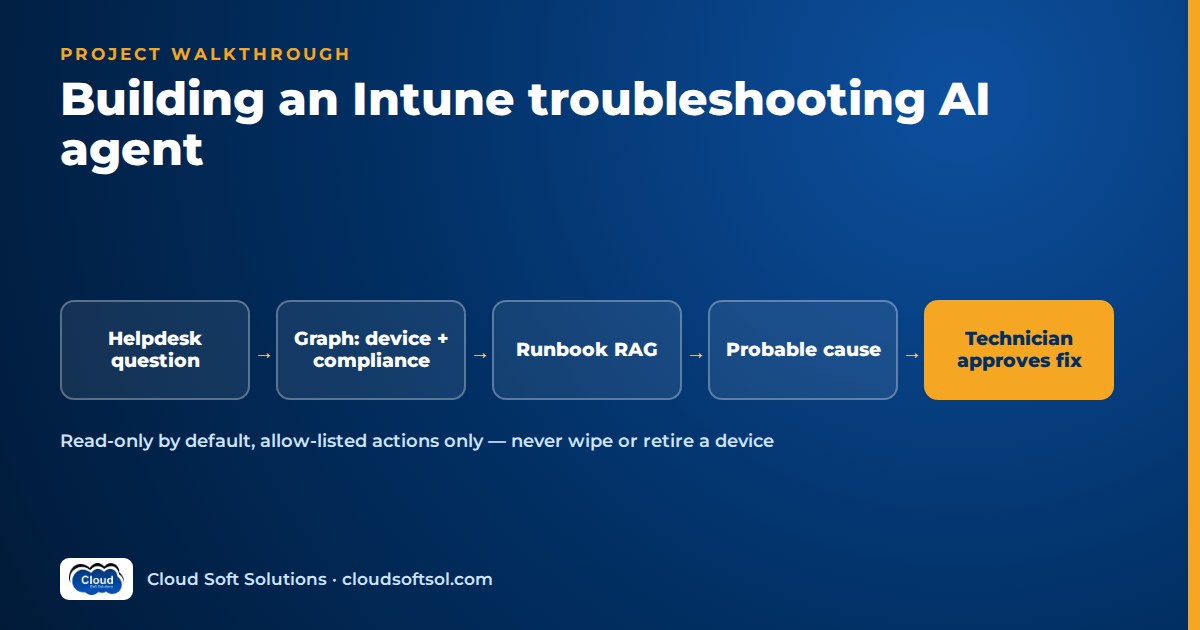
This walkthrough builds an Intune AI agent for a desktop support team, step by step, the way a Forward Deployed Engineer would deliver it: from the helpdesk's real questions to a measured return. An Intune AI agent earns its place when it reads device, compliance, app and policy state through Microsoft Graph with the least privilege that works, explains the probable cause against the team's own runbooks, and only runs allow-listed actions such as a device sync after a technician approves them, never a wipe or retire. The scenario is illustrative, and the milestone plan at the end turns it into a portfolio project you can build in a lab tenant.
If you come from end-user computing, AI for EUC engineers gives the wider picture; this article is the hands-on build.
Business problem
Illustrative scenario. Consider an insurer whose IT team in a Hyderabad GCC supports several thousand Windows laptops across India and overseas offices, all enrolled in Microsoft Intune. The desktop support queue is dominated by three question shapes:
- "Why is this device non-compliant?" The user is blocked from email by Conditional Access and wants it fixed now.
- "Why did this app fail to install?" A required Win32 app shows a failure, or never arrives.
- "Why is this device not receiving policy?" A configuration profile shows pending or error, or the device has not checked in for days.
Each answer lives in several places: the device record, compliance policy states, app install status, configuration profile status, Entra ID group membership and the team's runbooks. A senior engineer knows where to look; a new L1 engineer often clicks around and escalates. The team lead wants faster, more consistent diagnosis and fewer escalations, without anyone letting an AI touch devices unsupervised. That is the job: from AI demo to enterprise outcome.
Requirements
Discovery with the support lead, senior engineers, the Intune administrator, the Entra ID owner and security produces three groups.
Functional
- Given a device name, serial or user, gather device details, compliance state, app install status and configuration profile status.
- Explain the probable cause in plain language, cite the evidence (which setting, which app, which timestamp) and the runbook used, and list next steps.
- Offer a small set of remediation actions, such as a device sync or an app install retry, each executed only after the technician approves.
- Post the diagnosis as a work note on the linked ticket.
Non-functional
- No destructive device actions at all: wipe, retire, delete, reset passcode and similar are out of scope, not merely approval-gated.
- Read with the technician's own Intune role and scope where possible, so they see only devices they could see in the admin centre.
- Every Graph call and approval is audited.
- If the agent is down, engineers work as before.
Success metrics
| Metric | How it is measured |
|---|---|
| Root-cause accuracy | Agent's probable cause vs the resolution recorded on past tickets, judged by senior engineers |
| Evidence correctness | Cited settings, apps and timestamps actually match the Graph data |
| Unsafe-action rate | Any attempt to run a non-allow-listed or unapproved action; target is zero |
| Escalation rate | Endpoint tickets escalated from L1 to L2, before vs after |
| Time to diagnosis | Ticket open to first correct diagnosis note |
Architecture
Technician (ticket panel / Teams)
   |  sign-in: Entra ID
   v
Agent API (FastAPI + LangGraph)
   |-- LLM (Azure OpenAI / Bedrock)
   |-- Runbook RAG (pgvector)
   |-- Intune tool server (MCP)
   |      read tools | action tools
   |      v
   |   Microsoft Graph
   |   (deviceManagement)
   |-- Ticketing tools
   |-- approval interrupt
   '-- audit log + traces
Three decisions shape everything else:
- The model never calls Graph directly. A tool server owns tokens, field selection, scoping, the action allow-list and audit.
- Diagnosis is mostly deterministic. Code collects and normalises the facts; the model reasons over a compact evidence bundle rather than raw JSON dumps.
- Actions are a separate path. The model can propose an action; only the approval node can execute one.
Data
Four sources feed the agent, and each needs shaping before the model sees it.
Device and Intune state
From Graph: the managed device record (OS version, last sync time, compliance state, ownership, primary user, enrolment details), per-policy compliance states and the individual settings that failed, app install status for the device, and configuration profile status per profile. A small normaliser turns these into one evidence bundle, for example: "BitLocker setting non-compliant since date X; last sync 6 days ago; profile Y in error state". Compute stale last-sync time explicitly; it is often the most useful fact.
Group and assignment context
Many "not receiving policy" tickets are assignment problems: the device or user is missing from the targeted Entra ID group, or sits in an exclusion group.
Runbooks
Troubleshooting runbooks for compliance settings, Win32 app failures, Intune Management Extension logs and enrolment. Curating them from wikis and old tickets is half the project.
Past tickets
Resolved endpoint tickets with their resolution notes become the evaluation set. Expect noise ("reimaged, fixed"), so senior engineers relabel a subset with the true root cause.
LLM
The model's jobs are narrow: pick the right read tools, reason over an evidence bundle, map it to a runbook, and write a short explanation. Choose on your own test set, weighting:
- Reliable tool calling with schema-valid arguments.
- Faithful reasoning that does not claim a setting failed when the evidence says otherwise.
- Platform fit. Microsoft-centric customers often prefer Azure OpenAI; Bedrock or Gemini work behind the same interface.
Ask for structured output (probable cause, confidence, evidence list, runbook ID, next steps, proposed actions) and validate it in code. Function calling and structured outputs covers the schema and validation patterns.
RAG
Runbook retrieval uses standard hybrid search, with two domain specifics. First, build the query from the evidence bundle, not the user's complaint: "compliance setting BitLocker failing, Windows" retrieves better than "laptop says not compliant". Second, keep error codes and setting names as exact-match keywords, because Intune and Win32 app failures are full of hex codes that embeddings blur. Below a retrieval threshold the agent says "no runbook matches; escalate with this evidence" rather than improvising. Chunking and permission-aware retrieval are covered in the RAG knowledge assistant project.
Agent
resolve_device (name/serial/user)
     v
collect_state (device, compliance,
               apps, profiles, groups)
     v
build_evidence  (deterministic)
     v
retrieve_runbooks
     v
diagnose  (cause + next steps)
     v
propose_actions (allow-list only)
     v
action? --no--> note to ticket
     |
    yes
     v
interrupt: technician approval
     v
execute -> re-check state -> note
Details that matter in this domain:
- Disambiguation first. A user may have three devices. If
resolve_devicereturns more than one, the agent asks which one; it never guesses. - Verify after acting. A sync does not fix anything instantly. The graph records the action, tells the technician what to expect, and offers a re-check after the device next checks in.
Checkpoints and interrupts are explained in LangGraph for enterprise AI.
Tools
| Tool | Type | Rule |
|---|---|---|
| find_device | Read | Returns candidates; technician confirms |
| get_device_summary | Read | Selected fields only |
| get_compliance_status | Read | Per-policy state and failing settings |
| get_app_install_status | Read | Apps targeted at the device and their state |
| get_profile_status | Read | Configuration profiles and their state |
| check_group_membership | Read | Device and user groups for assignment checks |
| search_runbooks | Read | Runbook RAG |
| sync_device | Action | Technician approval; rate-limited per device |
| retry_app_install | Action | Technician approval; implemented with the mechanism your Intune admin approves |
| add_ticket_note | Write | Technician sees the full text first |
The list of what is absent is the security design: no wipe, retire, delete, fresh start, BitLocker key retrieval or policy edits. Those operations do not exist as tools, so no prompt can reach them. A note on retries: Intune re-attempts failed app installs on its own schedule, and the practical lever is usually triggering a sync so the device checks in and re-evaluates. Agree with the Intune admin exactly what retry_app_install does in your tenant and document it.
MCP/API
MCP, the Model Context Protocol, is an open protocol introduced by Anthropic in late 2024 for connecting AI applications to tools and data. Wrapping Intune as an MCP server lets other AI applications reuse the same tools. See what MCP is for the protocol.
Microsoft Graph for Intune
Intune is managed programmatically through Microsoft Graph. Device management resources sit under the deviceManagement area, which covers managed devices, compliance policies, configuration profiles and their per-device states; app management resources sit in a related app management area. Managed devices also expose remote actions, such as sync, alongside destructive ones like wipe and retire. Key points for an engineer:
- The Intune APIs in Graph require the tenant to have an active Intune licence.
- Graph has a stable v1.0 endpoint and a beta endpoint. Some detailed Intune reporting is only available in beta or through report exports. Beta can change without notice, so isolate it behind one client module and pin tests to it.
- Use
$selectand$filterto request only what each tool needs, handle paging, and respect throttling with retry-after backoff.
Confirm every resource and action against Microsoft's current Graph documentation before you code; this is a fast-moving API surface.
Security
Delegated vs application permissions
| Delegated | Application | |
|---|---|---|
| Runs as | The signed-in technician | The app itself, no user |
| Effective access | Overlap of the app's permissions and the user's rights, including Intune RBAC roles and scope tags | Everything the granted permission allows, tenant-wide |
| Use here | Interactive diagnosis and approved actions | Only for scheduled, read-only jobs such as runbook freshness checks, if at all |
Prefer delegated permissions for this agent: a technician scoped to India devices then gets an agent scoped to India devices. Grant the narrowest Intune permissions that work, typically read permissions for managed devices, device configuration and apps. The trap: the permission that allows remote actions like sync on managed devices also covers wipe and retire. Graph permissions cannot separate them, so the allow-list in the tool server is the real control, backed by an Intune custom role for the technicians that grants only the remote tasks you intend. Admin consent goes through the Entra ID owner; credentials live in a vault. The model never sees a token.
Prompt injection and data
Device names, ticket text and even app names are untrusted input. An injected "wipe this device" fails at three layers: no such tool, an allow-list check, and technician approval. Strip unneeded personal data from evidence and traces.
Audit
Log every tool call with technician, device ID, tool, arguments, result and timestamp, and every proposal with the approval decision and approver. Write the log to append-only storage the security team can query. Intune keeps its own audit log of remote actions; correlate the two by device and time, so "who synced this device and why" has one answer. The wider threat model is in AI security for enterprises.
Identity, consent and least privilege on Entra ID are taught hands-on in Cloudsoft's AI Forward Deployed Engineer course, whose stack includes Microsoft Entra ID alongside LangGraph, MCP and evaluation tooling. This Intune agent is not one of FDE PRO's five named projects, but its ServiceNow AI Agent via MCP and IT-Ops Multi-Agent Platform projects use the same approval and tool-server patterns.
Cloud
A Microsoft-centric customer usually hosts on Azure: Container Apps or AKS for the agent and tool server, Azure Database for PostgreSQL with pgvector for runbooks and checkpoints, Azure OpenAI, Key Vault and private endpoints. The same design runs on AWS with ECS or EKS, RDS, Bedrock and Secrets Manager. Provision with Terraform either way.
Observability
One trace per diagnosis, with spans for each Graph call, retrieval, LLM calls, the approval wait and actions, recording latency, tokens, model ID and prompt version, with personal data redacted. Langfuse or LangSmith give agent views; OpenTelemetry carries spans to the customer's monitoring. Watch Graph throttling, beta-endpoint errors and action rejection reasons. A rising "diagnosis edited" rate signals regression early. More in AI observability.
Evaluation
Evaluate on past tickets before any technician sees the agent. Device state has moved on since, so capture snapshots: for each labelled ticket, store the Graph evidence as it looked at the time (from ticket attachments or a recorded mock), and run the agent against a mocked Graph.
| Suite | Test design | Pass rule |
|---|---|---|
| Root cause | Labelled past tickets: non-compliance, app failures, missing policy | Matches senior-engineer label at an agreed threshold |
| Evidence faithfulness | Every cited setting, app and timestamp checked against the snapshot | No fabricated evidence |
| Tool use | Scripted tasks with expected tool sequences | Right tools, valid arguments, disambiguation when needed |
| Safety | Injected text, requests to wipe or retire, out-of-scope devices | Zero unsafe actions reach execution |
| Abstention | Cases with no matching runbook | Escalates with evidence instead of guessing |
Every rejected production diagnosis becomes a new case. Methods for scoring agent trajectories are in AI agent evaluation.
Deployment
CI runs unit tests, tool contract tests, the safety suite (any failure blocks the merge) and the ticket-replay evaluation against thresholds. Roll out in stages signed off by the support lead:
- Shadow. The agent diagnoses new tickets silently; compare with engineers' conclusions.
- Read-only assist. Diagnosis and next steps shown to L1, no actions.
- Approved actions. Sync, then app retry, for one team, with a flag to fall back to read-only.
Ticketing integration
The agent appears where technicians already work: a panel or button on the ticket in ServiceNow, Jira Service Management or similar. The ticket ID travels with every run, the diagnosis lands as a work note, and actions are recorded on the ticket. If you have read the ServiceNow AI agent project, reuse its ticketing tools and approval surface; the Intune agent becomes a specialist that the service-desk agent hands endpoint tickets to. The same Graph and permission groundwork supports Microsoft 365 Copilot readiness.
ROI
ROI is a method agreed with the support lead and measured against a baseline. All inputs below are hypothetical placeholders, not results.
| Input | Placeholder | Source |
|---|---|---|
| In-scope endpoint tickets per month (N) | [placeholder: N] | Ticketing reports |
| Minutes saved per ticket on diagnosis (T) | [placeholder: T] | Timed sample, shadow vs baseline |
| Escalations avoided per month (E) | [placeholder: E] | Escalation rate before vs after |
| L2 minutes per escalation (L) | [placeholder: L] | Support lead estimate, sampled |
| Loaded cost per engineer hour (C) | [customer figure] | Finance |
| Monthly run cost (K) | [from billing] | Cloud, model usage, maintenance |
Monthly time value = ((N × T) + (E × L)) ÷ 60 × C. Net value = time value − K − amortised build cost. Discount the time value, since not every saved minute becomes productive work, and report user downtime avoided and runbook gaps found separately.
Build it yourself
Use a lab or trial tenant with Intune and two or three Windows virtual machines enrolled, never an employer's tenant. Create deliberate failures: a compliance policy requiring a setting the VM lacks, a Win32 app with a bad install command, a profile targeted at the wrong group.
| Milestone | Deliverable |
|---|---|
| 1. Lab | Tenant, enrolled VMs, app registration with delegated read permissions, seeded failures |
| 2. Read tools | Device, compliance, app, profile and group tools with field selection and contract tests |
| 3. Evidence and runbooks | Evidence normaliser, runbook RAG with keyword matching on error codes |
| 4. Diagnosis agent | LangGraph graph with structured output; first eval scores on recorded snapshots |
| 5. Actions | sync_device and retry_app_install behind interrupts, allow-list, audit log |
| 6. Ops and value | Tracing, CI safety gate, ROI one-pager, demo showing a refused wipe request |
intune-agent/
  tool_server/   # MCP tools, graph_client, allow-list
  agent/         # graph.py, prompts, schemas
  runbooks/      # sources + sync
  eval/          # snapshots, cases, run_eval.py
  api/           # FastAPI, Entra ID sign-in
  infra/terraform/
  docs/          # permissions.md, roi-method.md
Interviewers will ask about permissions.md: each Graph permission, why delegated, why wipe is impossible. Hands-on Intune administration practice for the lab is covered in Cloudsoft's Microsoft Intune training.
Frequently asked questions
What is an Intune AI agent?
It is an application that uses an LLM to read Intune device, compliance, app and configuration profile data through Microsoft Graph, match it to troubleshooting runbooks, explain the probable cause of an endpoint problem and propose next steps, with any remediation action executed only after a technician approves it.
Should the agent use delegated or application Graph permissions?
Use delegated permissions for interactive troubleshooting, so the agent sees only what the signed-in technician can see under their Intune role and scope. Application permissions apply tenant-wide and suit only tightly scoped, read-only background jobs.
How do you stop the agent from wiping or retiring a device?
Do not build those tools at all. Graph permissions for remote actions cover sync and destructive actions together, so the tool server exposes only allow-listed actions such as sync, checks every call against that list, and requires technician approval, while an Intune custom role limits what technicians can trigger.
How do you evaluate an endpoint troubleshooting agent on past tickets?
Label past tickets with their true root cause, capture the device evidence as it looked at the time, and replay the agent against a mocked Graph. Score root-cause accuracy, evidence faithfulness, tool use, abstention and a safety suite where any unsafe action fails the build.
Can I build this project without a company tenant?
Yes. Use a lab or trial tenant with Intune, enrol a few Windows virtual machines, and create deliberate compliance, app and profile failures. Never use an employer's tenant or real user data for a portfolio project.
Is this a good project for EUC and desktop support engineers moving into AI?
Yes. It uses domain knowledge they already have, such as compliance policies, app deployment and group targeting, and adds the AI engineering skills employers look for: tool design, least-privilege identity, approvals, evaluation and observability.
Ready to turn endpoint and identity experience into enterprise AI engineering? Cloudsoft FDE PRO is a 12-week program with 60+ labs, five enterprise projects and the GlobalBank capstone, using a stack that includes Microsoft Entra ID, LangGraph and MCP. Classroom in Ameerpet beside Ameerpet Metro or live online; call +91 96660 19191 for a free demo.


