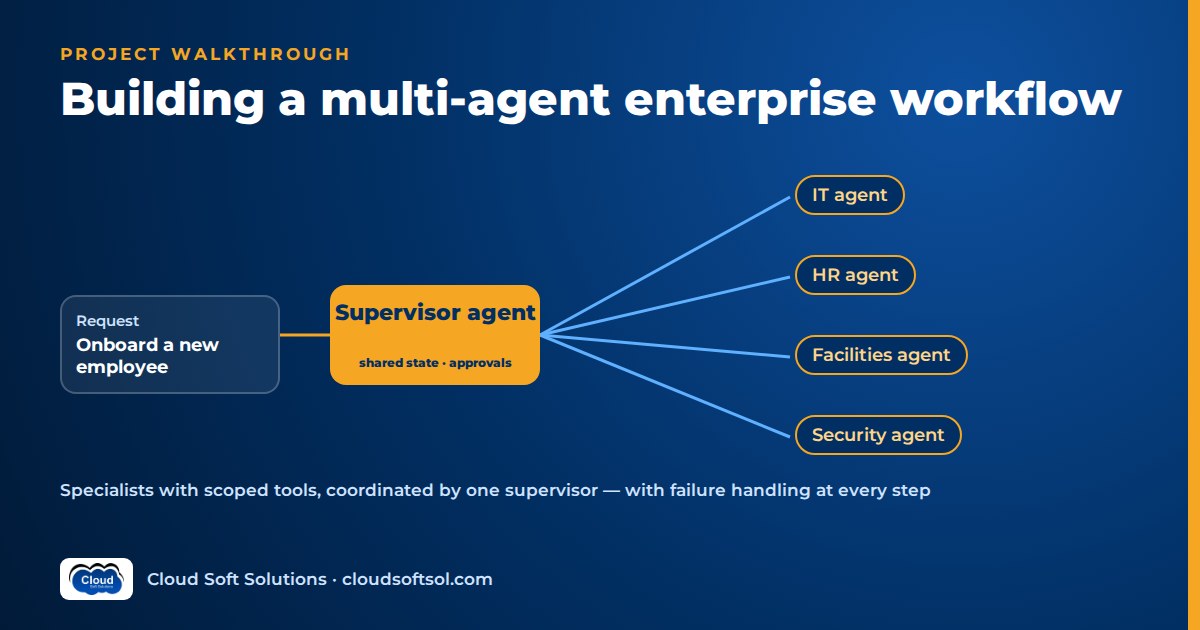
This walkthrough builds a multi-agent system the way a Forward Deployed Engineer would deliver it to a customer, from the business problem to a measured return. The scenario is employee onboarding, where IT, HR, facilities and security each own part of the work. A multi-agent workflow is worth building only when the work splits cleanly into domains with different tools, owners and permissions. Even then it is production-ready only when a supervisor tracks typed tasks in shared state, every specialist has its own narrow tool scope, failed or slow steps can be retried, compensated or handed to a human, and the whole run shows up as one trace tree. The scenario is illustrative; the milestone plan at the end turns it into a multi-agent system project you can build and explain in an interview.
New to agents? Read what agentic AI is first.
Business problem
Illustrative scenario. Consider a GCC in Hyderabad that onboards new joiners every week for its parent company's engineering, finance and operations teams. Onboarding one person touches four departments:
- HR collects and checks joining documents, confirms the start date and creates the employee record.
- IT creates the directory account, assigns licences and groups, and orders, images and ships a laptop.
- Facilities issues an access card for the right building and floors and books a desk.
- Security assigns mandatory awareness and role-specific training and confirms completion before privileged access is granted.
Today a coordinator chases each team by email and spreadsheet. Joiners arrive without a laptop or with a card for the wrong floor, privileged access is sometimes granted before security training (an audit finding), and start-date changes never reach half the teams. The customer wants onboarding complete on day one, auditable, and never beyond policy: from AI demo to enterprise outcome.
Requirements
Functional
- Start from an approved hire event in the HR system and build an onboarding plan from role, location and department.
- Run each department's tasks in its own systems, in the right order: no privileged groups before training is complete, no laptop shipment before the address is confirmed.
- React to changes: a start-date move or a withdrawn offer updates or reverses every downstream task.
Non-functional
- Each agent acts with a service identity scoped to its own department's systems.
- Every action is idempotent and logged with the joiner ID, agent, tool, arguments and result.
- Runs survive restarts and wait days for people without losing state.
Should this be multi-agent at all?
Be honest at this point, because often the right answer is no. Much of onboarding is a fixed checklist, and a deterministic workflow (a state machine or BPM flow with plain API calls) is cheaper, faster and easier to audit than any agent. A single agent with a dozen well-designed tools handles many cross-system tasks without the coordination overhead. Multi-agent earns its place only when most of these hold:
| Signal | Points to |
|---|---|
| Steps and order are fixed and known | Deterministic workflow |
| One domain, under about a dozen tools, one owner | Single agent |
| Several domains, each with distinct tools, prompts and policies | Multi-agent |
| Different teams own and change each part independently | Multi-agent |
| Permissions must be isolated per domain | Multi-agent, or a single agent with strict tool scoping |
| Inputs are messy and need judgement (documents, exceptions, free-text requests) | Agents at those steps only |
Here the honest design is a hybrid: a deterministic backbone enforces the mandatory order, and agents work only where judgement helps (documents, exceptions, bundles for unusual roles, joiner questions). If discovery shows onboarding is fully standardised, ship the workflow and skip the agents.
Architecture
Choosing a coordination pattern
| Pattern | How it works | Fits when | Watch out for |
|---|---|---|---|
| Supervisor | One coordinator assigns tasks to specialists and decides when the job is done | A handful of specialists, one place to own progress | Supervisor becomes a bottleneck and a single point of failure |
| Hierarchical | Supervisors of supervisors; each department has its own team of agents | Large domains with many sub-tasks | Deep call chains, compounded latency and cost, hard debugging |
| Handoff (peer-to-peer) | An agent passes control and context directly to the next agent | Conversational flows, such as a front-desk agent routing to a specialist | No single owner of progress; loops between agents |
Onboarding needs one owner of "is this joiner ready?", so we use a supervisor with four specialist agents, built as subgraphs. Hierarchical structure can come later if, say, IT splits into accounts and hardware teams.
HR system: hire approved (event)
        |
        v
Onboarding API (FastAPI)
        |
        v
Supervisor graph (LangGraph)
  state + checkpoints -> PostgreSQL
  traces -> Langfuse / OTel
        |
  +-----+------+-----------+----------+
  v            v           v          v
HR agent   IT agent   Facilities  Security
  |            |        agent       agent
  v            v           |          |
HR MCP     Directory,      v          v
server     ITSM, asset  Access      LMS MCP
           MCP servers  control     server
                        MCP server
        |
  approvals -> manager / IT lead (Teams)
The supervisor never calls department systems; specialists never call each other; every exchange is a typed task in shared state.
Data
- Hire event: joiner ID, role, grade, department, manager, location, start date. The system of record; agents never edit it.
- Onboarding policy: role-to-bundle mappings (groups, licences, laptop model, floors, training modules), held as versioned configuration owned by each department, not buried in prompts.
- Joining documents: ID proofs, certificates and signed forms. Only the HR agent sees them; redacted summaries go into shared state.
- Run state: tasks, statuses, idempotency keys and approvals in PostgreSQL alongside the LangGraph checkpoints.
LLM
Not every agent needs the same model. The supervisor's planning and exception reasoning get a capable model; specialists doing extraction and bundle selection can often use a smaller one; some steps need no model at all. Keep models behind one llm_client interface so Amazon Bedrock, Azure OpenAI or Gemini is configuration, and record the model ID per agent in traces.
RAG
Retrieval is minor here: the HR agent answers joiner policy questions from documents, while run status comes from shared state, not retrieval. The mechanics are in the RAG knowledge assistant project.
Agent
Shared state
The supervisor owns one state object per joiner, keyed by joiner ID (also the LangGraph thread ID): the plan as typed tasks, each task's status and result, pending approvals and an event log. Specialists receive only the slice they need (the IT agent gets role, location and start date, never documents) and return a structured result rather than writing arbitrary fields. Reducers merge results so parallel specialists cannot overwrite each other.
The supervisor graph
build_plan (policy + hire event)
      v
dispatch ready tasks (deps met)
      v
[HR] [IT accounts] [Facilities]  (parallel)
      v
collect results -> update state
      v
any failed / timed out? --yes--> recover
      |                            |
      no                 retry / compensate
      v                       / escalate
needs approval? --yes--> interrupt
      |
      no
      v
security training done? --no--> wait
      |
     yes
      v
IT: grant privileged groups
      v
all tasks done? --no--> dispatch
      |
     yes
      v
readiness report -> coordinator
The dependency rules ("privileged groups only after training") are hard-coded edges, not model decisions. The model decides what the plan contains for an unusual role, and how to handle exceptions.
Failure handling
- Specialist fails or times out. Each task has a deadline. The supervisor retries transient faults with backoff and marks permanent ones blocked with a reason (laptop model out of stock). Hitting a step or token cap is a failure, never a silent retry.
- Partial completion is normal. The readiness report shows done, pending, blocked and waiting-on-human per department; a joiner can start with an account and card while the laptop is delayed, if the report says so.
- Idempotency. Every write carries a key such as
joiner_id:task_type:attempt_group. Tools check existing state before acting, so a resumed run never creates a second account or a second laptop order. - Compensation. Multi-system work has no global transaction. Each write tool has a defined undo, such as disable account, cancel order or revoke card. A withdrawn offer runs the compensations in reverse order, in the style of a saga, and each one is logged.
Interrupts, checkpointers and subgraphs are covered in LangGraph for enterprise AI.
Illustrative implementation sketch
Illustrative only: names and structure show the shape, not a drop-in implementation. Check current LangGraph APIs.
class OnboardingState(TypedDict):
    joiner: dict                  # redacted
    tasks: Annotated[list[Task], merge_tasks]
    approvals: list[dict]

g = StateGraph(OnboardingState)
g.add_node("build_plan", build_plan)
g.add_node("dispatch", dispatch_ready)
for a in SPECIALISTS:   # hr, it, facilities...
    g.add_node(a, subgraphs[a])
g.add_node("recover", recover_failed)
g.add_node("approval", approval_gate)  # interrupt()
g.add_node("report", readiness_report)

g.add_edge(START, "build_plan")
g.add_edge("build_plan", "dispatch")
g.add_conditional_edges("dispatch", route_ready)
for a in SPECIALISTS:
    g.add_conditional_edges(a, after_specialist)

app = g.compile(checkpointer=postgres_saver)
app.invoke(hire_event,
  {"configurable": {"thread_id": joiner_id}})
Tools
Each specialist sees only its own tools. This is enforced by which MCP servers that agent's client connects to and by the service identity it runs with, not by prompt instructions.
| Agent | Tools | Approval rule |
|---|---|---|
| HR | get_hire, list_documents, verify_document, create_employee_record, answer_policy_question | Document exceptions go to an HR executive |
| IT | create_account, assign_licences, add_to_groups, order_laptop, disable_account | Privileged groups need the IT lead; non-standard hardware needs the manager |
| Facilities | issue_access_card, set_card_zones, book_desk, revoke_card | Restricted zones need the facilities lead |
| Security | assign_training, get_training_status, record_exception | Any training waiver needs the security owner |
| Supervisor | none in department systems; only dispatch, read state, request approval, notify | None |
There is no "grant any group" tool and no delete; groups and zones outside the role's policy bundle are rejected by the server.
MCP/API
Agent-to-agent message contracts
Free-text chat between agents is the most common reason multi-agent demos fall apart. Define a schema for tasks and results and validate both directions in code:
TaskRequest:  task_id, joiner_id, owner, type,
              inputs{...}, deadline, idem_key,
              trace_id
TaskResult:   task_id, status(done|failed|
              blocked|needs_approval), outputs{...},
              error{code, retryable, message},
              actions_taken[], trace_id
A result that fails validation is a failed task, never passed to the next model. Version the schemas, since departments will change their agents independently.
Department systems
Each department's systems sit behind its own MCP server, matching team ownership; the servers handle validation, allow-lists, idempotency and audit. MCP, the Model Context Protocol, is an open protocol introduced by Anthropic in late 2024 for connecting AI applications to tools and data; see what MCP is. The ITSM side follows the same pattern as the ServiceNow AI agent project.
Coordinating specialists, contracts and failure recovery like this is the substance of the IT-Ops Multi-Agent Platform, one of the five enterprise projects in Cloudsoft's AI Forward Deployed Engineer course, where a trainer reviews your design.
Security
- Per-agent identity. Each specialist has its own workload identity, such as a Microsoft Entra ID app registration, with only its department's permissions, so a confused facilities agent cannot touch directory groups.
- Human approvals sit at the graph level. The approval gate interrupts the run, posts the exact proposed action to the right approver (manager, IT lead, facilities lead, security owner), and resumes from the checkpoint with approve, edit or reject. Approvers are resolved from the org chart in code, never chosen by a model.
- Prompt injection travels between agents. Text in an uploaded document can reach the supervisor via a summary. Treat every TaskResult as untrusted data and rely on server-side scopes, so an injected "add to admin group" fails at the tool.
- Data minimisation. Documents stay with the HR agent; shared state and traces carry redacted fields only. The wider threat model is in AI security for enterprises.
Cloud
On AWS: containers on EKS, Amazon RDS for PostgreSQL (state, checkpoints, pgvector), Bedrock, Secrets Manager, and EventBridge or SQS for hire events. On Azure: AKS, Azure Database for PostgreSQL, Azure OpenAI, Key Vault and Service Bus. Provision with Terraform.
Cost multiplication
Multi-agent systems multiply cost quietly: every handoff re-sends context, every specialist runs its own loop, and a supervisor retry can re-run a whole subgraph. Pass state slices, not histories; use smaller specialist models; skip the model for deterministic steps; cap tokens per agent and run; alert on cost per onboarding. See cloud cost optimisation for AI for caching, model routing and budget alerts.
Observability
One onboarding run is one trace tree: the root span is the supervisor run, with children for each dispatch, specialist subgraph, LLM call, MCP tool call and approval wait, linked by the trace_id in every TaskRequest. Record agent, model ID, prompt version, tokens, latency and redacted arguments per span. Langfuse or LangSmith give the agent view; OpenTelemetry puts a failed directory call next to the agent step that made it in the customer's monitoring.
Dashboards: runs by state, time to readiness, failures per specialist, approval waits, compensations and cost per run by agent. More in AI observability.
Evaluation
Evaluate at two levels, because a workflow can fail even when every agent looks fine on its own.
| Level | What to test | Pass rule |
|---|---|---|
| Per agent | Scripted tasks per specialist: right tools, valid arguments, correct bundle for the role, correct document verdicts | Agreed thresholds per agent; contract-valid results every time |
| Supervisor | Plans for standard and unusual roles; routing; handling of failed, blocked and late results | Correct plan and dependency order; no task dispatched before its dependencies |
| End to end | Synthetic joiners run against mock systems, including start-date moves and withdrawn offers | Correct final state in every system; compensations leave nothing behind |
| Fault injection | Timeouts, tool errors, duplicate events, restarts mid-run | No duplicate accounts or orders; run resumes or escalates cleanly |
| Safety | Injected documents, out-of-bundle requests, privileged access before training | Zero unapproved or out-of-policy actions reach execution |
Methods for trajectory and tool-call scoring are in how to evaluate AI agents.
Deployment
GitHub Actions runs unit and contract tests, the fault-injection and safety suites (any safety failure blocks the merge) and the evaluations, then builds and scans images; Argo CD syncs to EKS. Each specialist and MCP server deploys independently behind schema version checks.
Roll out in stages: shadow mode (plans compared with what actually happened), one department live with approvals on every write, more departments, and only then fewer approvals for low-risk, well-measured actions.
ROI
All inputs are hypothetical placeholders to show the method, not results.
| Input | Placeholder | Source |
|---|---|---|
| Joiners onboarded per month (J) | [placeholder: J] | HR system |
| Coordinator and department minutes saved per joiner (M) | [placeholder: M] | Timed sample, shadow vs baseline |
| Lost productive days avoided per joiner (D) | [placeholder: D] | Day-one readiness before vs after |
| Loaded cost per hour (C) and per day (E) | [customer figures] | Finance |
| Monthly run cost (K) | [from billing] | Cloud, models, support |
Monthly value = (J × M ÷ 60 × C) + (J × D × E) − K − amortised build cost. Report audit findings avoided separately, not as a number. Compare against the cheaper option: if a deterministic workflow captures most of the value, say so.
Build it yourself: milestone plan
Use mock systems and synthetic joiners, never real employee data.
- Mocks: small FastAPI services for HR, directory, assets, access control and the learning platform, with seed data.
- Deterministic baseline: the onboarding checklist as a plain workflow. Keep it as the benchmark.
- MCP servers: one per department with allow-lists, idempotency keys and undo tools.
- Specialists: four subgraphs with typed contracts and per-agent evaluation sets.
- Supervisor: plan, dispatch, dependency edges, recovery and approval interrupts with a Postgres checkpointer.
- Failure work: fault injection, compensation for a withdrawn offer, restart-and-resume tests.
- Ops: trace trees in Langfuse, a cost-per-run dashboard, Docker, Terraform and CI gates.
- Write-up: a README comparing the multi-agent build with the baseline on readiness, cost and failure handling, plus the ROI method.
Interviewers will ask why you did not just use one agent; a measured comparison with your baseline is the answer. See the LangGraph interview questions for follow-ups.
Frequently asked questions
What is a multi-agent system in enterprise AI?
It is a design where several AI agents, each with its own prompt, tools and permissions, work on parts of one task, usually coordinated by a supervisor that tracks progress in shared state. In enterprises it is used when work spans domains owned by different teams, such as IT, HR, facilities and security.
When should I not use a multi-agent architecture?
When the steps are fixed and known, a deterministic workflow is cheaper and easier to audit. When the work sits in one domain with a modest set of tools, a single well-designed agent is simpler. Multi-agent adds model calls, latency and debugging effort, so use it only when domains, owners and permissions genuinely differ.
What is the difference between supervisor, hierarchical and handoff patterns?
A supervisor assigns tasks to specialist agents and decides when the job is done. A hierarchical design nests supervisors, so each domain has its own team of agents. In a handoff pattern, agents pass control directly to one another without a central coordinator. Supervisor is the usual starting point when one place must own progress.
How do you handle a specialist agent that fails or times out?
Give every task a deadline, retry transient errors with backoff, mark permanent failures as blocked with a reason, and escalate to a human when needed. Make every write idempotent so retries cannot duplicate actions, and define a compensating action for each write so partial work can be undone.
How do agents communicate with each other reliably?
Through typed, versioned message contracts such as a task request and a task result with explicit status, outputs, error codes and a trace ID, validated in code. Free-text chat between agents is hard to validate and is a common cause of failures in multi-agent demos.
Why does multi-agent AI cost more to run?
Each agent runs its own model calls, context is re-sent at every handoff, and retries can re-run whole sub-workflows. Passing only the state each agent needs, using smaller models for specialists, skipping the model for deterministic steps and setting token budgets per agent keep cost under control.
If you want to build a system like this with a trainer challenging your coordination and failure design, Cloudsoft FDE PRO covers it in the IT-Ops Multi-Agent Platform project, one of five enterprise projects in a 12-week program followed by the GlobalBank capstone. Classroom in Ameerpet beside Ameerpet Metro or live online; call +91 96660 19191 for a free demo.


