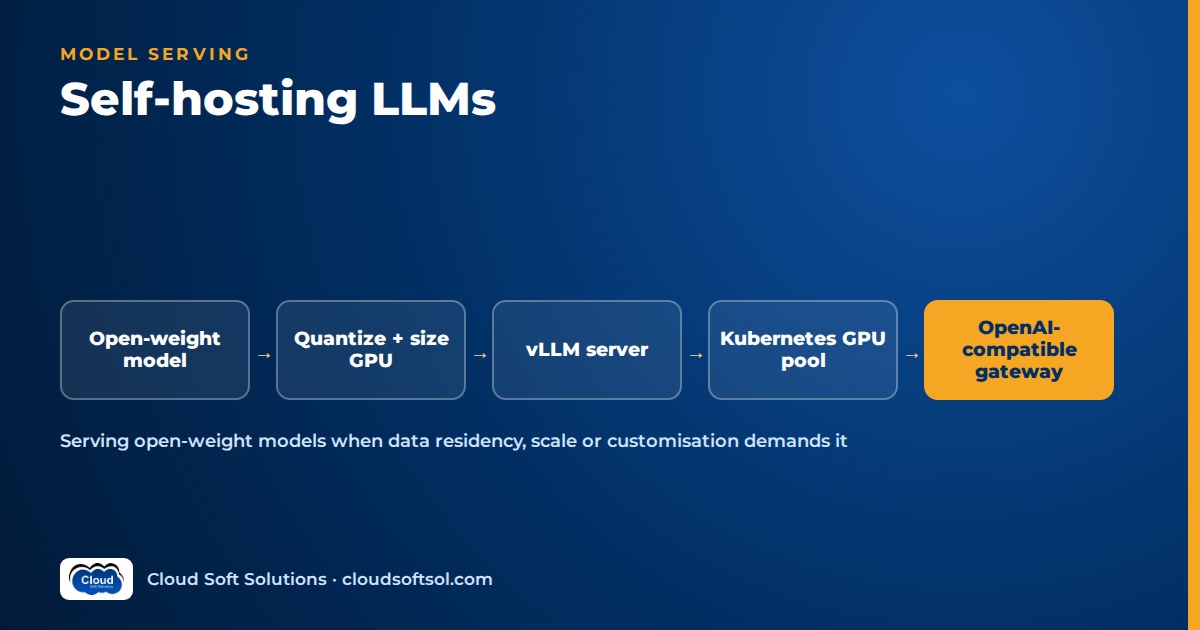
Self-hosting LLMs means running an open-weight model on GPUs you control, behind an inference server such as vLLM, so prompts and outputs never leave your boundary. It is the right call when data residency, an air-gapped network, steady high volume or deep customisation rule out a managed API. It is the wrong call when traffic is low, you need frontier-level reasoning, or nobody on the team wants to be paged about GPU nodes.
If you need the general picture of running LLM applications on a cluster (API, orchestrator, workers, secrets, GitOps), read Kubernetes for AI applications first. This article is the deep dive on the model-serving layer that guide only touches on.
When self-hosting makes sense, and when it does not
Managed model APIs (Amazon Bedrock, Azure OpenAI, Gemini on Vertex AI) are the sensible default: strong models, no GPU operations, pay-per-token pricing. Self-hosting earns its place only when a concrete requirement demands it.
Good reasons to self-host
- Data residency and sovereignty. The customer's regulator, contracts or internal policy say certain data cannot be processed by a third-party service, or must stay inside a specific data centre.
- Air-gapped or restricted networks. Defence, some banking core networks, manufacturing plants and government environments have no outbound internet. A managed API is simply unreachable.
- Cost at steady, high volume. If GPUs stay busy around the clock (bulk document processing, classification of every ticket or transaction), owning capacity can beat per-token pricing. Spiky or low traffic almost never does.
- Customisation and control. You want to fine-tune or adapt the model, pin an exact model version for years, control decoding, or serve many small LoRA adapters on one base model.
Reasons not to
- Low or unpredictable volume. An idle GPU costs the same as a busy one.
- You need frontier capability. The strongest proprietary models are generally ahead on complex reasoning, long-context synthesis and agentic tool use. Open-weight models have closed much of the gap, but you should measure on your own task, not assume.
- Operations burden. Drivers, CUDA versions, node images, model upgrades, capacity planning and on-call all become yours.
- A managed private option already satisfies compliance. Many residency concerns are met by a managed service in the right region with private networking. Check that before buying hardware.
| Requirement | Managed API | Self-hosted open-weight model |
|---|---|---|
| Data must not leave the customer's network | Only if a private, in-region offering is accepted | Strong fit |
| Fully air-gapped environment | Not possible | Required |
| Low or spiky traffic | Strong fit: pay per token | Poor fit: idle GPUs |
| Steady, high, predictable volume | Workable, cost grows linearly | Often cheaper once utilisation is high |
| Strongest available reasoning quality | Strong fit | Measure first; may fall short |
| Fine-tuning, adapters, pinned versions | Limited to what the provider supports | Full control |
| Small team, no GPU experience | Strong fit | High risk |
A common middle path is hybrid: self-host a small language model for high-volume, sensitive, narrow tasks (classification, extraction, redaction, embeddings) and route the rare hard request to a managed frontier model where policy allows.
Inference servers: vLLM, TGI, Triton and local tools
An LLM inference server loads weights onto GPUs, schedules requests, runs the decode loop and streams tokens back. Serving one request at a time through a plain model library wastes most of the GPU; production servers fix that.
vLLM
vLLM is an open-source inference engine and the usual starting point for a vLLM tutorial or first production deployment. Its key ideas:
- PagedAttention. The KV cache (the stored attention keys and values for every token in flight) is managed in fixed-size blocks, like virtual memory pages, instead of one contiguous buffer per request. This cuts fragmentation and lets far more concurrent sequences fit in GPU memory.
- Continuous batching. New requests join the running batch at each decode step instead of waiting for the whole batch to finish, which keeps the GPU busy under mixed request lengths.
- OpenAI-compatible API. It exposes chat completion and completion endpoints in the OpenAI format, so existing SDKs, LangChain and LangGraph code can point at it by changing a base URL.
- Practical features: tensor parallelism across several GPUs, prefix caching for repeated system prompts, support for common quantized formats, LoRA adapter serving and Prometheus metrics.
Hugging Face Text Generation Inference (TGI)
TGI is Hugging Face's serving toolkit, with continuous batching, streaming, quantization support and tight integration with the Hugging Face Hub. Before choosing it for new work, check its current maintenance status, because the serving landscape moves quickly.
NVIDIA Triton Inference Server and TensorRT-LLM
TensorRT-LLM compiles a model into an optimised engine for specific NVIDIA GPUs, and Triton serves it alongside other model types (vision, classic ML) with features such as model ensembles and dynamic batching. It can deliver very high throughput on NVIDIA hardware, at the cost of an engine build per model and GPU type and a steeper learning curve.
Ollama and llama.cpp for local and development use
llama.cpp runs quantized models (commonly in the GGUF format) on CPUs, Apple silicon and modest GPUs. Ollama wraps it with simple model management and a local API. Both suit laptops, demos, offline prototypes and edge devices, but they are not designed for high-concurrency multi-user serving.
GPU memory sizing: weights plus KV cache
The first question in any on-prem LLM deployment is how much GPU memory you need. Two parts dominate.
1. Model weights. Weights scale with parameter count times bytes per parameter:
# ILLUSTRATIVE - rough planning only
weights_bytes ~= parameters x bytes_per_parameter

bytes_per_parameter:
  16-bit (FP16 / BF16) = 2
  8-bit  (INT8 / FP8)  = 1
  4-bit                = 0.5

example: 7 billion params at 16-bit
  ~= 7e9 x 2 bytes ~= 14 GB of weights
2. KV cache. Every token in every active sequence stores keys and values for every layer. Conceptually:
# ILLUSTRATIVE - check your model's config
kv_bytes_per_token ~= 2 x layers x kv_heads
                      x head_dim x bytes_per_value

kv_total ~= kv_bytes_per_token
            x tokens_per_sequence
            x concurrent_sequences
The KV cache is what grows with context length and concurrency, and it is often what surprises teams. A model that fits comfortably for one short chat can run out of memory when fifty users send long documents. Models with grouped-query attention have fewer KV heads, so a smaller cache per token.
3. Overhead. Add room for activations, the CUDA context and framework buffers. vLLM pre-allocates a configurable fraction of GPU memory and fills whatever is left after weights with KV cache blocks, so the practical question becomes "how many concurrent tokens does the remaining memory hold?"
When the weights do not fit on one GPU, split the model across GPUs with tensor parallelism (within one node, over fast interconnect) or pipeline parallelism (across layers, possibly across nodes). Prefer a single node whenever the model fits.
Quantization: 8-bit and 4-bit trade-offs
Quantization stores weights (and sometimes activations or the KV cache) in fewer bits. It reduces memory, lets a larger model fit on smaller hardware and often raises throughput, because decoding is usually limited by memory bandwidth.
- 8-bit (INT8 or FP8): roughly halves weight memory compared with 16-bit. Quality loss is generally small for most tasks, and newer GPUs accelerate FP8 natively. A sensible first step.
- 4-bit (methods such as GPTQ, AWQ or GGUF variants): roughly a quarter of 16-bit weight memory. Savings are large, but quality can drop on reasoning, arithmetic, code and non-English text. Results vary by model and method.
- KV cache quantization: shrinks the cache so more concurrent sequences fit, with its own quality trade-off.
The rule is simple: never trust a quantized model on reputation. Run your own evaluation set (the same one you use for prompt and model changes, as described in LLM evaluation) against the full-precision and quantized versions, and include the languages and document types your users actually send, such as Hindi or Telugu text alongside English.
Throughput, latency and batching
Serving has two phases. Prefill processes the whole prompt at once and is compute-heavy; it sets the time to first token. Decode generates one token at a time per sequence and is memory-bandwidth-heavy; it sets the inter-token latency.
Batching is how you trade between the two goals:
- Larger batches raise total tokens per second per GPU, which lowers cost per token, but each user waits longer.
- Smaller batches give snappier responses but leave the GPU underused.
Decide which matters for each workload. An interactive assistant needs a low time to first token and smooth streaming. An overnight batch job that summarises claims only cares about total throughput. Run them as separate deployments or queues with different concurrency limits, and cap prompt and output length at the gateway so one long request cannot stall everyone else.
Deploying on Kubernetes
Kubernetes already solves scheduling, rollout and autoscaling. The model-serving specifics:
GPU node pools and the device plugin
- Create a dedicated GPU node pool (an EKS managed node group, a GKE GPU node pool or on-prem GPU servers) and taint it so only model pods with matching tolerations land there.
- Install the GPU device plugin, or the NVIDIA GPU Operator, which also manages drivers, the container toolkit and monitoring exporters. Pods then request
nvidia.com/gpuin their resource limits. - One GPU per container is the default unit. Sharing options (time-slicing, Multi-Instance GPU on supported hardware) exist for small models, with weaker isolation.
Readiness and model load time
A large model can take minutes to download and load. If Kubernetes sends traffic too early, or kills the pod for failing liveness checks during load, you get crash loops. Use a startupProbe with a generous window, a readiness probe on the server's health endpoint, and keep weights out of the container image: pull them once onto a persistent volume or a node-local cache from an internal model registry or object store.
# ILLUSTRATIVE SKETCH - not a production manifest
containers:
  - name: vllm
    image: INTERNAL_REGISTRY/vllm:PINNED_TAG
    args: ["--model", "/models/MODEL_DIR",
           "--served-model-name", "assistant-model"]
    resources:
      limits: { nvidia.com/gpu: 1 }
    startupProbe:
      httpGet: { path: /health, port: 8000 }
      periodSeconds: 10
      failureThreshold: 60
    readinessProbe:
      httpGet: { path: /health, port: 8000 }
    volumeMounts:
      - { name: model-cache, mountPath: /models }
tolerations:
  - { key: gpu, operator: Exists, effect: NoSchedule }
Autoscaling on queue and concurrency, not CPU
CPU utilisation tells you almost nothing about a GPU inference pod. Scale on signals the server exposes, such as the number of waiting requests, running requests or KV cache usage, through the Prometheus adapter or KEDA. Because a new replica may need minutes to become ready, scale out early, keep a minimum replica count for interactive workloads, and accept that scale-to-zero only suits batch jobs that can tolerate a cold start. GPU capacity is not always available on demand, so reserve what production needs.
To learn the cluster side properly, Cloudsoft's Kubernetes training in Hyderabad and the GKE Kubernetes course cover node pools, scheduling, probes and autoscaling. Deploying models like this inside a customer's environment, and connecting them to RAG and agents, is the daily work of a Forward Deployed Engineer; Cloudsoft's FDE PRO program covers open-weight models alongside managed APIs on the way from AI demo to enterprise outcome.
Reference architecture with an OpenAI-compatible gateway
Applications should never call model pods directly. Put an OpenAI-compatible gateway in front, either an LLM proxy or your existing API gateway with the right plugins. It handles authentication against the enterprise identity provider (for example Microsoft Entra ID), per-team quotas and rate limits, request size caps, routing by model name, logging and fallback. Because both vLLM and most managed providers speak the same API shape, the gateway can route a request to the self-hosted model or, where policy allows, to a managed model without the application changing.
    Apps / agents (OpenAI SDK, LangGraph)
                  |
       OpenAI-compatible gateway
   (auth, quotas, routing, logging,
        guardrails, fallback)
          |                    |
  +-- ns: models (GPU pool) -+  |
  | vLLM: chat-model  (x N)  |  +-> managed API
  | vLLM: small-model (x N)  |      (if policy
  | embeddings / reranker    |       allows)
  +--------------------------+
          |            |
   Model cache PVC   Prometheus / OTel
   (internal model   -> dashboards,
    registry)           alerts, traces
The gateway is also the natural place for input and output checks; see AI guardrails for what to enforce there.
Security: provenance, licensing and network isolation
- Model provenance. Download weights only from the publisher's official repository, record the exact revision and checksum, and mirror them into an internal registry. Prefer the safetensors format over pickle-based files, which can execute code on load. Scan containers and pin image tags.
- Licensing. "Open-weight" is not the same as "open source". Licences differ on commercial use, user thresholds, acceptable-use policies and attribution. Have legal review the licence for each model and keep the decision on record.
- Network isolation. Model pods need no internet access at runtime. Apply default-deny NetworkPolicies, allow ingress only from the gateway, and block egress entirely in air-gapped setups.
- Data handling. Prompts contain sensitive data. Decide what the gateway logs, mask personal data and apply the source systems' retention rules. Broader controls are in AI security for enterprises.
Observability for self-hosted models
You now own the metrics a provider used to hide. Track at three levels:
- Serving: time to first token, inter-token latency, end-to-end latency percentiles, tokens per second, waiting and running requests, KV cache usage, preemptions and error rates. vLLM exposes many of these as Prometheus metrics.
- Hardware: GPU utilisation, memory, temperature and errors via the NVIDIA DCGM exporter; node health and pod restarts.
- Application: traces through the gateway and orchestrator with OpenTelemetry, plus LLM-level tracing in Langfuse or LangSmith, and quality metrics from your evaluation runs.
Alert on queue growth and time to first token, not only on errors, because a saturated model server degrades slowly before it fails. The full approach is in AI observability.
A cost model method with placeholders
Do not compare GPU hourly prices with API token prices directly. Compare the cost per million tokens at your real utilisation. All inputs below are placeholders to replace with your own quotes and load tests.
# ILLUSTRATIVE METHOD - every value is a placeholder
G = GPU node cost per hour (cloud rate, or
    hardware + power + space amortised per hour)
N = number of GPU nodes kept running
O = ops overhead per hour (people, monitoring,
    storage, gateway), apportioned
T = measured tokens/hour per node at your
    latency target (from a load test)
U = average utilisation (0 to 1) across the day

self_hosted_cost_per_M_tokens
    = (G x N + O) / (T x N x U) x 1,000,000

compare with:
managed_cost_per_M_tokens = provider price
    (blend input and output tokens)
Utilisation dominates. The same cluster that looks cheap at high, steady use looks expensive when it idles at night and on weekends. Model the break-even volume and revisit it when prices or models change. Cloud cost optimization for AI covers reservations, right-sizing and routing to cheaper models.
Illustrative example: an on-prem assistant at a bank
Consider a bank whose risk team has ruled that customer complaint text and loan file notes cannot be sent to any external service. It wants an assistant that summarises and tags complaints and drafts responses for human review.
- Discovery. The Forward Deployed Engineer confirms the constraint, measures volume (steady through business hours, with a nightly backlog) and agrees what "good" means with the complaints team: correct category, faithful summary, no invented account details.
- Model choice. A mid-sized open-weight instruct model with a licence approved by legal, plus a small embedding model for retrieving policy documents. Both are evaluated on anonymised, labelled complaints in English and regional languages at 16-bit and 8-bit; the 8-bit version passes, so fewer GPUs are needed.
- Platform. A GPU node pool on the bank's on-prem Kubernetes cluster, weights mirrored to an internal registry, vLLM behind an OpenAI-compatible gateway integrated with the bank's identity provider. No egress from the model namespace.
- Workloads. Interactive drafting runs with a minimum replica count and tight latency targets; the nightly backlog runs as a separate batch deployment that scales up after hours on queue depth.
- Controls. Gateway logs mask account numbers, every draft requires human approval, and evaluation runs before any model or prompt change.
Because the application uses a standard OpenAI-style client, approving a managed in-region model later would change only gateway routing.
Frequently asked questions
Is self-hosting LLMs cheaper than using an API?
Only at steady, high utilisation. A self-hosted model costs the same whether it is busy or idle, so low or spiky traffic is usually cheaper on a managed API. Calculate cost per million tokens at your measured throughput and real utilisation, including operations effort, before deciding.
What is vLLM and why is it popular?
vLLM is an open-source LLM inference server. It uses PagedAttention to manage the KV cache efficiently and continuous batching to keep GPUs busy, and it exposes an OpenAI-compatible API, so existing application code can switch to it by changing the base URL.
How much GPU memory do I need to deploy an open source LLM?
Estimate weights as parameter count times bytes per parameter (two bytes at 16-bit, one at 8-bit, half at 4-bit), then add KV cache, which grows with context length and the number of concurrent requests, plus overhead. Confirm the estimate with a load test on the actual model.
Does quantization reduce quality?
Usually a little at 8-bit and more at 4-bit, with the effect depending on the model, the method and the task. Reasoning, code and non-English text tend to be more sensitive. Always compare quantized and full-precision versions on your own evaluation set.
Can I use Ollama in production?
Ollama and llama.cpp are excellent for local development, demos, edge devices and CPU-only machines. For many concurrent users on shared GPUs, a server built for high-concurrency serving such as vLLM, or Triton with TensorRT-LLM, is the better fit.
How do I autoscale an LLM inference server on Kubernetes?
Scale on serving signals such as waiting requests, running requests or KV cache usage through KEDA or a custom metrics adapter, not on CPU. Keep a minimum number of replicas for interactive traffic, because loading a model can take minutes, and make sure GPU nodes can actually be provisioned.
Are open-weight models free to use commercially?
Not automatically. Open-weight licences vary on commercial use, usage thresholds, acceptable-use rules and attribution. Have each model's licence reviewed before production and record which revision you deployed.
Should an on-prem LLM deployment be fully air-gapped?
If the environment requires it, yes, and it is achievable: mirror weights and container images into internal registries, block all egress from model pods and run monitoring inside the network. Even where internet access exists, model pods should not need it at runtime.
Self-hosting is one option in a larger architecture, and the skill that matters is knowing when to use it and how to run it safely in a customer's environment. If you want to practise that end to end, from discovery to a deployed and observed system, explore the AI Forward Deployed Engineer course: 12 weeks of live sessions, classroom in Ameerpet beside Ameerpet Metro or live online, with placement support until you're placed. Call +91 96660 19191 for a free demo.


